8.2.3 DD Issue Against GL
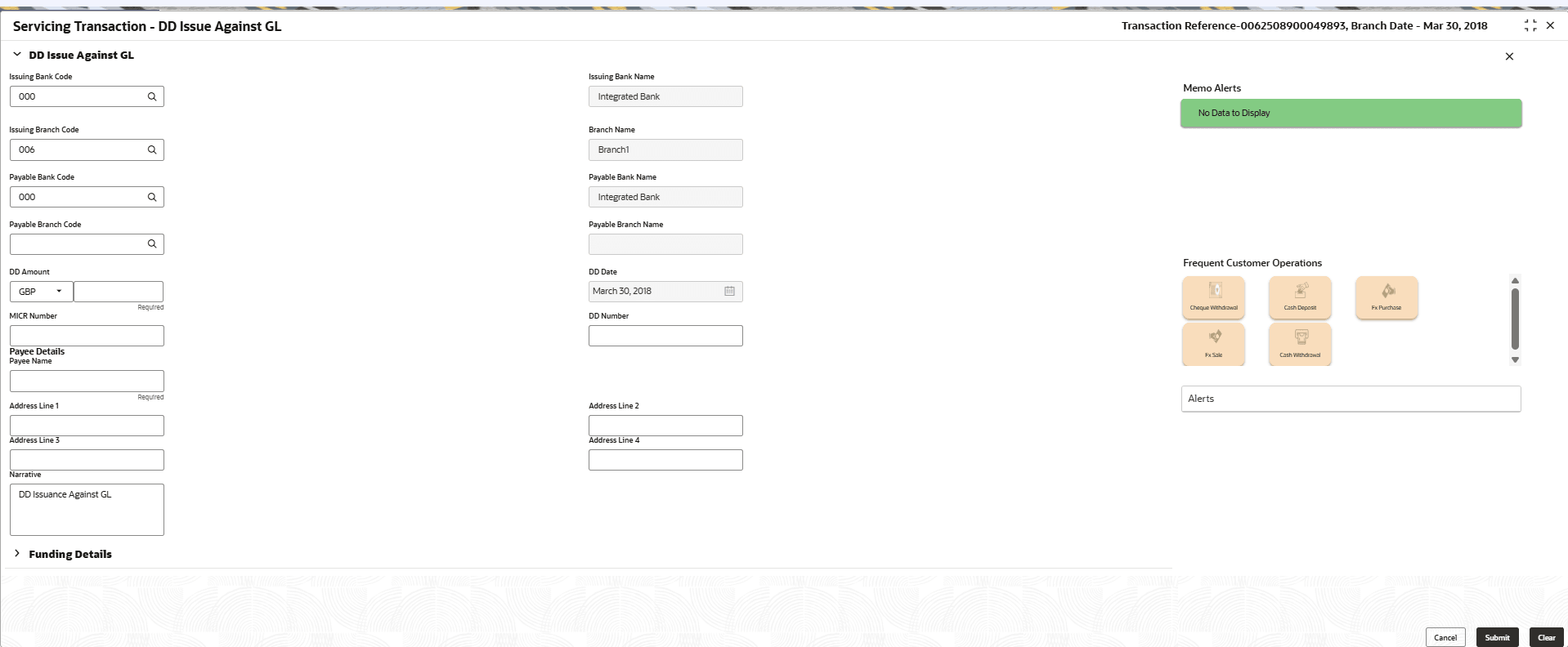
The Teller can use the DD Issue Against GL screen to issue a DD against a GL account.
- On the Homepage, from Teller mega menu, under
Remittances, click DD Issue -
GL or specify DD Issue - GL in the search
icon bar and select the screen.The DD Issue Against GL screen is displayed.
- On the DD Issue Against GL screen, specify the fields.
For more information on fields, refer to the field description
table.
Note:
The fields marked as Required are mandatory.Table 8-27 DD Issue Against GL - Field Description
Field Description Issuing Bank Code
Specify the code of the issuing bank.
Issuing Bank Name
Specify the name of the issuing bank.
Issuing Branch Code
Displays the logged-in branch code.
Branch Name
Displays the branch description of issuing branch.
Payable Bank Code
Select the payable bank code. The list of values contains the bank codes maintained using the External Bank Code Maintenance screen.Note:
- To remit funds within the same bank, select the logged-in bank code as payable bank code. To remit funds across banks, select the necessary bank code as payable bank code. The fields Payable Branch Code and Payable Branch Name will be enabled after you specify the Payable Bank Code.
- If the Instrument Currency is FCY and the Payable Bank code selected is External Bank, then the Instrument Type will be Demand Draft-FCY (DF).
Payable Bank Name
Displays the name of the selected bank code.
Payable Branch Code
Select the branch code of the payable bank. The list of values contains the corresponding branch codes maintained using the Bank Code Maintenance screen.
Payable Branch Name
Displays the branch name of the selected branch code.
DD Amount
Specify the DD currency and DD amount.
DD Date
Specify the date that needs to be mentioned in the DD.
MICR No
Displays the serial number.
DD Number
Specify the instrument number and validate.
Note: If not specified, the system generates the DD number based on the maintenance setup.
Payee Details
Specify the fields.
Payee Name
Specify the payee name on which the DD is drawn.
Payee Address
Click Address Details button to view the customer address details.Note:
For the field-level description of the customer address, see Address Details.Narrative
Displays the narrative as DD Issuance Against GL, and it can be modified.
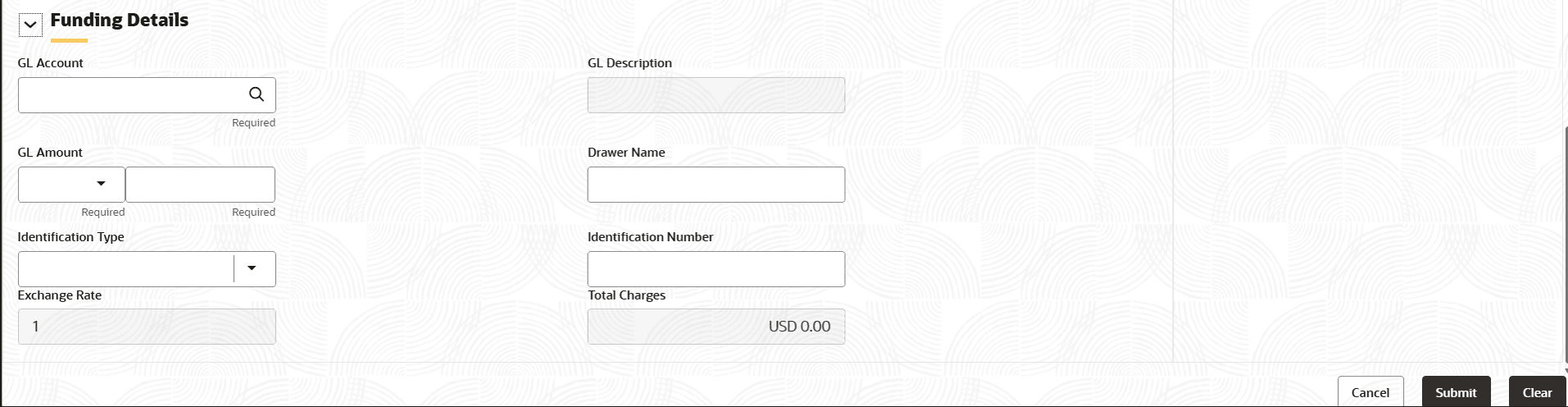
- Click on the Funding Details data segment.The Funding Details data segment is displayed.
- On the Funding Details data segment, specify the fields.
For more information on fields, refer to the field description
table.
Note:
The fields marked as Required are mandatory.Table 8-28 Funding Details - Field Description
Field Description GL Account Select the account number of the GL against which the BC is issued from the LOV. GL Description Displays a brief description of the general ledger. GL Amount Specify the GL amount. Drawer Name Specify the name of the drawer. Identification Type Select the identification type of the payee from the drop-down list. Identification Number Specify the identification number of the payee. Exchange Rate Displays the exchange rate. Total Charges Displays the total charges. - Specify the charge details. For information on the fields in the Charge Details segment, refer to Charge Details.
- Click Submit.
A teller sequence number is generated, and the Transaction Completed Successfully information message is displayed.
Note:
The transaction is moved to authorization in case of any warning raised when the transaction saves.When you submit, the transaction details are handed off to the Oracle Banking Payments system for instruments processing with external system status as Pending.
After the transaction is processed and responded from Oracle Banking Payments with appropriate status, the Teller selects the transaction from Journal Log and completes the transaction.
Parent topic: Demand Drafts