5 Cashflow Management
This topic describes the information on Cashflow Management transaction and systematic instructions to edit the Cashflow Management transaction.
- Edit Cashflow transactions (Single transaction at a time)
- Edit master of the Recurring cashflow transaction
- Delete Cashflow transaction
- Delete Recurring Cashflow transaction master.
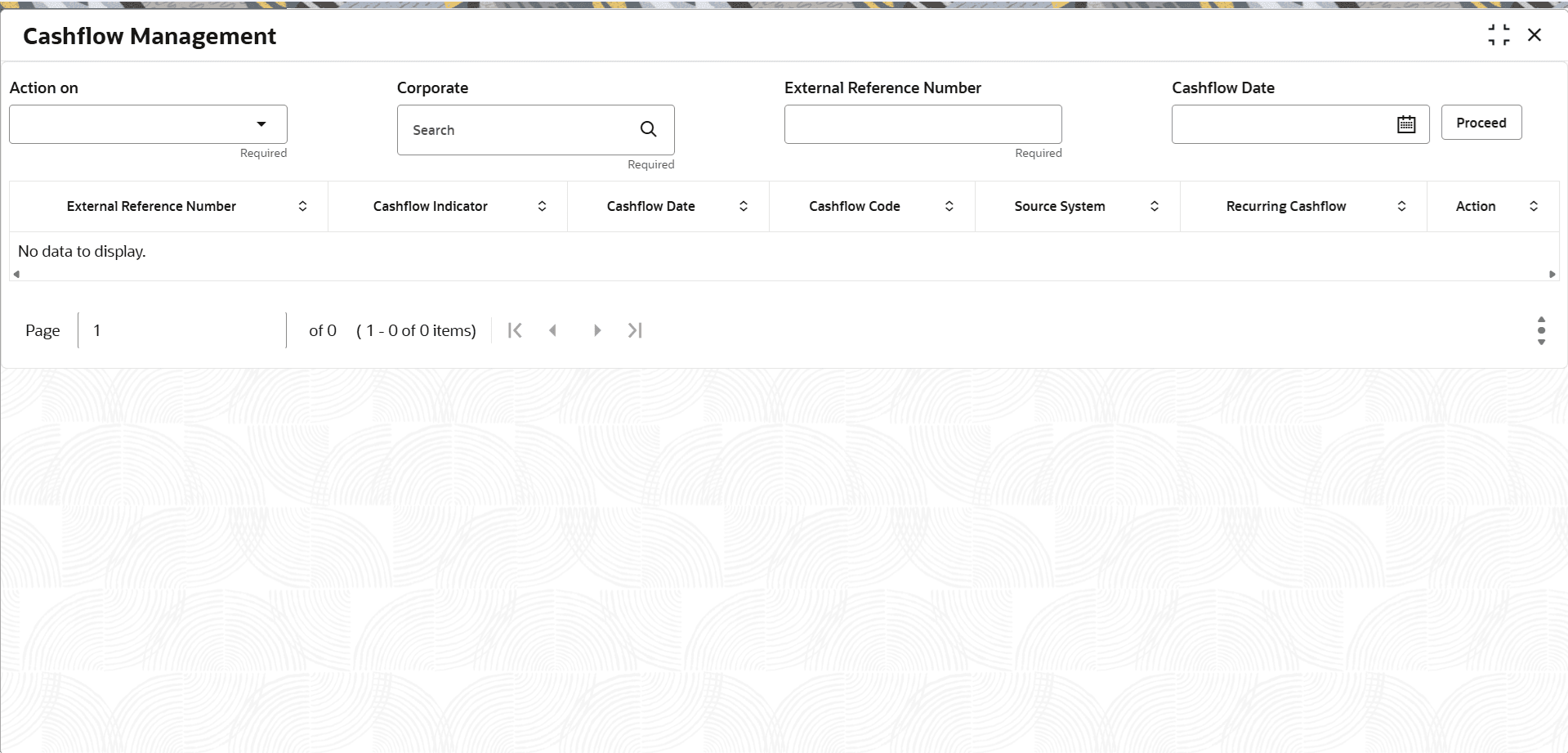
- Under Cashflow, click Cashflow Management.The Cashflow Management screen displays.
Figure 5-1 Cashflow Management
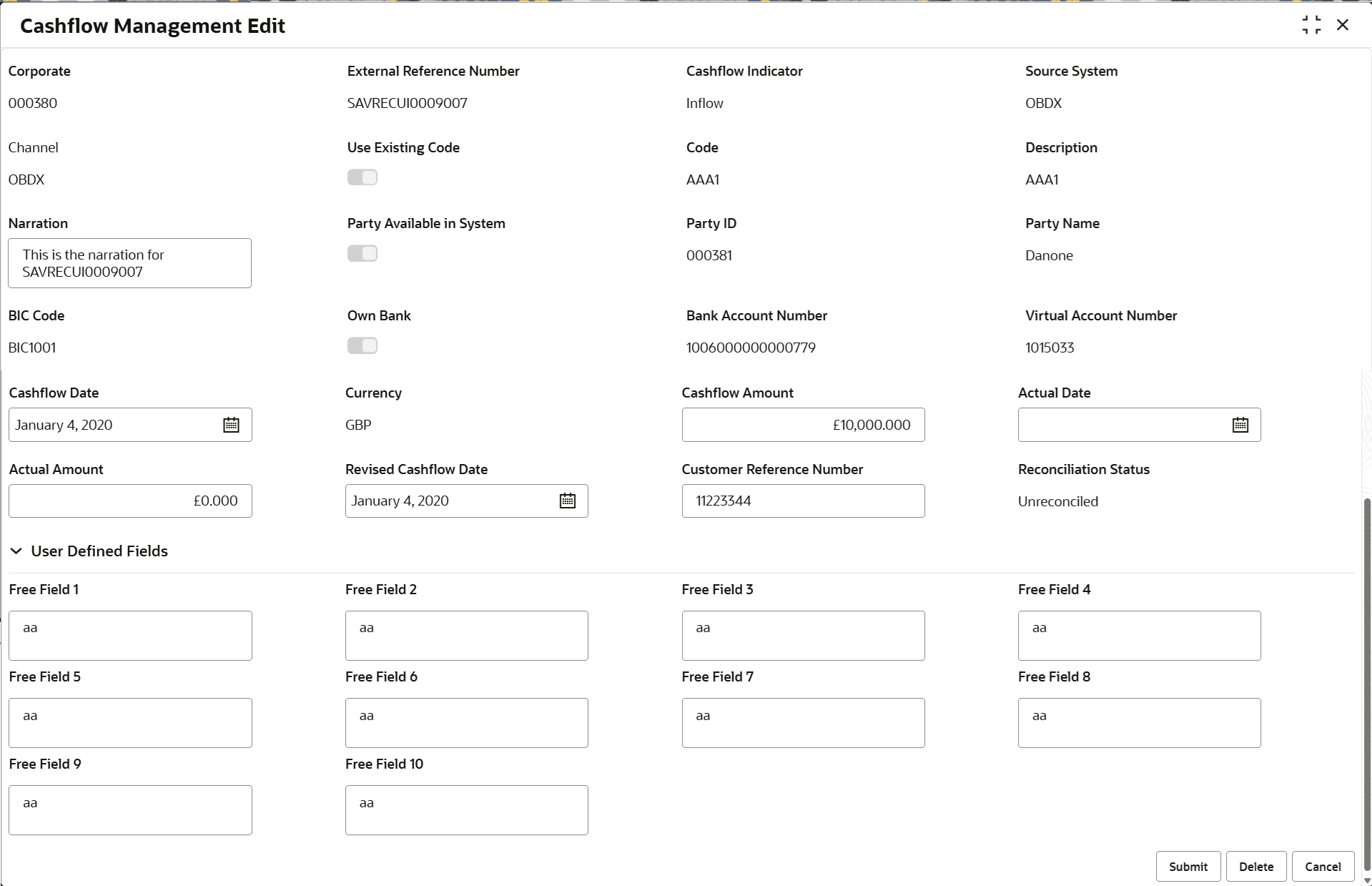
- In the Action column, click EditThe Cashflow Management Edit screen displays.
Figure 5-2 Cashflow Management Edit - Individual Cashflow
Table 5-2 Cashflow Management Edit - Individual Cashflow - Field Description
Field Description Corporate Displays the specific customer for cashflow management. External Reference Number Displays the reference number that have been generated in some external system as available in the selected cashflow transaction. Cashflow Indicator Displays the cashflow indicator as available in the transaction. Source System Displays the source of the expected cashflow as available in the selected cashflow transaction. Channel Displays the channel of the expected cashflow as available in the selected transaction. Use Existing Code Displays whether the existing cashflow codes that are created in the Cashflow Code Maintenance screen are used to create the transaction. Code Displays the code for the recurring cashflow. Description Displays the description of the code. Narration Displays the narration as captured in the cashflow transaction. The user can edit this field.
Party Available in System Displays whether the corporate already available in Oracle® Banking Cash Management. Party ID Displays the Party Id to or from whom the cashflow is expected. Party Name Displays the party name to or from whom the cashflow is expected. BIC Code Displays the BIC code. BIC code is a Bank Identifier Code that helps to identify external bank accounts in a data storing system.
Own Bank Displays the if the bank account where the cashflow is received / paid is from own bank or external bank. Bank Account Number Displays the customer bank accounts from common core or OBLM. Virtual Account Number Displays the virtual account number. Cashflow Date Displays the date of the cashflow. The user can edit this field.
If the transaction is part reconciled or reconciled then this date is non editable
Currency Displays the currency of the cashflow transaction. Cashflow Amount Displays the amount of expected cashflow. This field can be edited only up to the amount of cashflow that has not be reconciled / part paid i.e. modified amount cannot be less than outstanding amount
Actual Date Specify the date on which the actual amount is received. Actual Amount Specify the actual amount in case if any or some part of the expected cashflow is already received / paid / reconciled in an outside system or before entering in OBCM. Th amount cannot be less than expected cashflow amount / outstanding cashflow amount .
Customer Reference Number Specify the reference number other than external reference number. This reference number is typically provided by customer especially when input from channel.
Reconciliation Status Displays if the transaction is fully reconciled or part reconciled User Defined Fields This section displays the User Defined fields. Free Field 1 to 10 Displays the additional information. The user can edit this field.
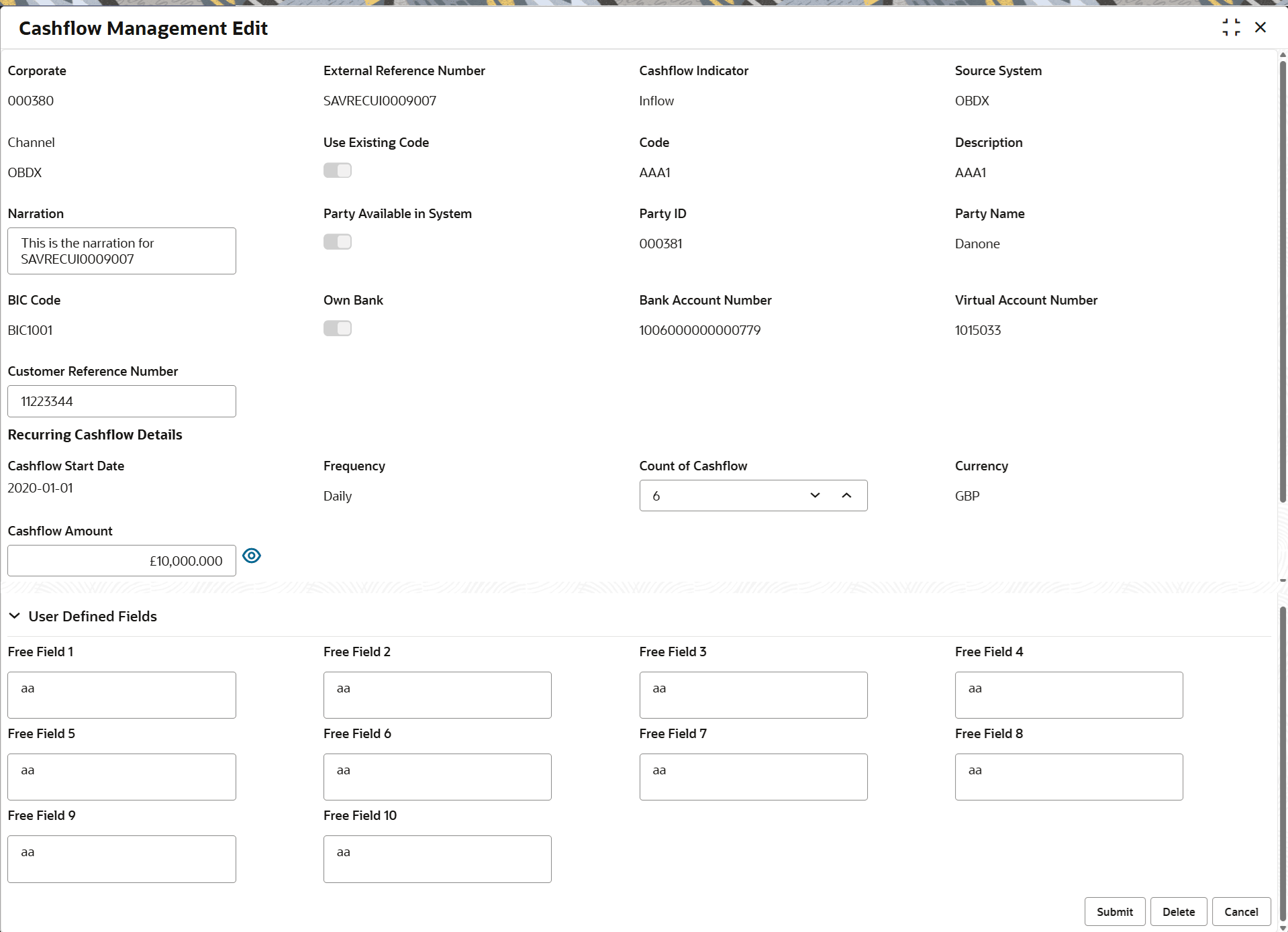
Figure 5-3 Cashflow Management Edit - Recurring Cashflow - Master Update
Description of the illustration cashflow-management-edit---recurring-cashflow---master-update.pngTable 5-3 Cashflow Management Edit - Recurring Cashflow - Master Update - Field Description
Field Description Corporate Refer Cashflow Management Edit - Individual Cashflow - Field Description. External Reference Number Refer Cashflow Management Edit - Individual Cashflow - Field Description. Cashflow Indicator Refer Cashflow Management Edit - Individual Cashflow - Field Description. Source System Refer Cashflow Management Edit - Individual Cashflow - Field Description. Channel Refer Cashflow Management Edit - Individual Cashflow - Field Description. Use Existing Code Refer Cashflow Management Edit - Individual Cashflow - Field Description. Code Refer Cashflow Management Edit - Individual Cashflow - Field Description. Description Refer Cashflow Management Edit - Individual Cashflow - Field Description. Narration Refer Cashflow Management Edit - Individual Cashflow - Field Description. Party Available in System Refer Cashflow Management Edit - Individual Cashflow - Field Description. Party ID Refer Cashflow Management Edit - Individual Cashflow - Field Description. Party Name Refer Cashflow Management Edit - Individual Cashflow - Field Description. BIC Code Refer Cashflow Management Edit - Individual Cashflow - Field Description. Own Bank Refer Cashflow Management Edit - Individual Cashflow - Field Description. Bank Account Number Refer Cashflow Management Edit - Individual Cashflow - Field Description. Virtual Account Number Refer Cashflow Management Edit - Individual Cashflow - Field Description. Customer Reference Number Refer Cashflow Management Edit - Individual Cashflow - Field Description. Recurring Cashflow Details This section displays the Recurring Cashflow Details related fields. Cashflow Start Date Displays the cashflow start date of the recurring type of cashflow. Frequency Displays the frequency of the recurring cashflow details. The frequency can be:- Daily
- Weekly
- Fortnightly
- Monthly
- Quarterly
Count of Cashflow Displays the information from latest authorized recurring master record. This field is editable.
Currency Displays the currency of the cashflow transaction. Cashflow Amount Displays amount of expected cashflow. This field can be edited only upto the amount of cashflow that has not be reconciled / part paid i.e. modified amount cannot be less than outstanding amount.
Click the
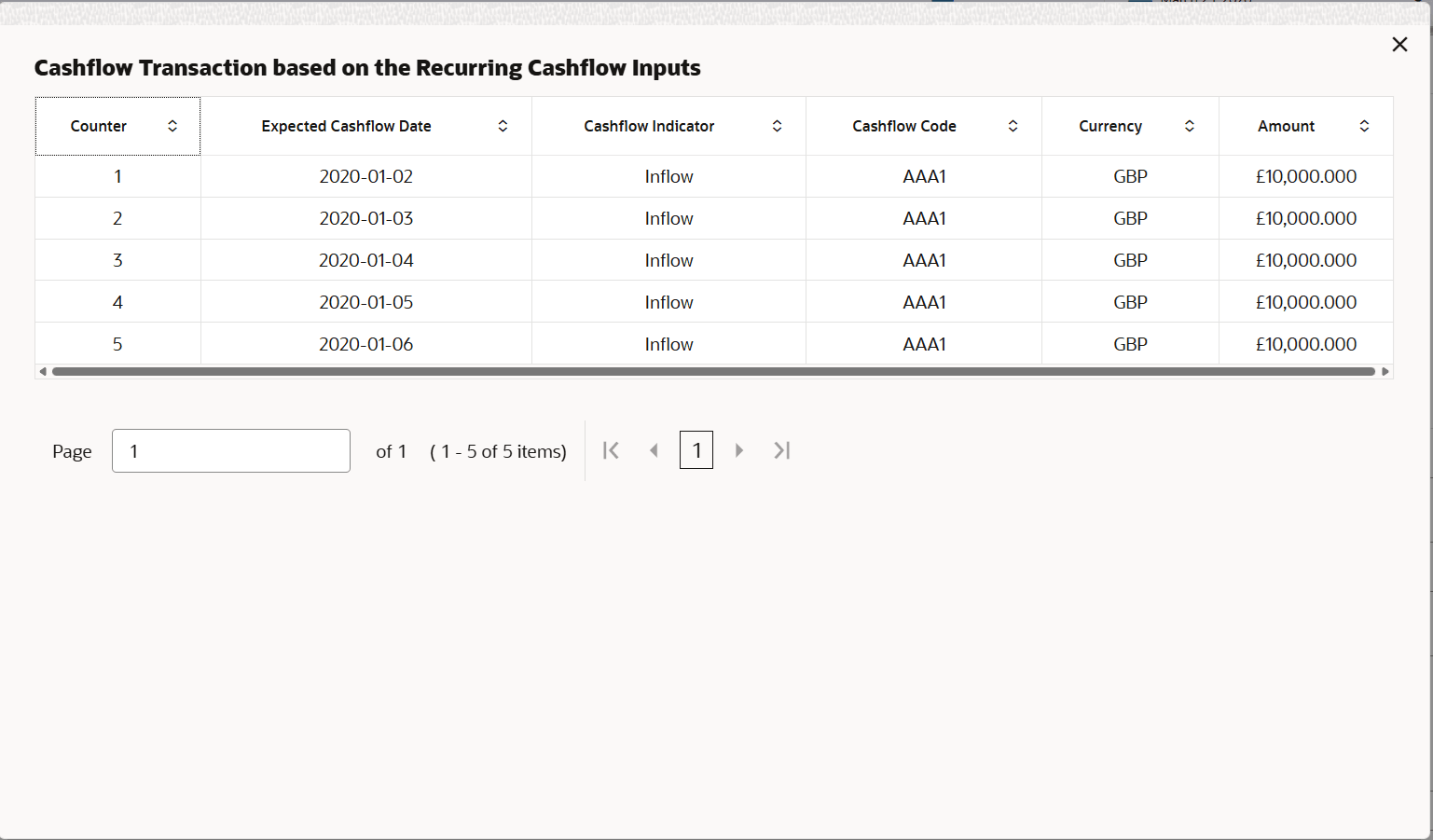
 icon to view the scheduled Recurring Cashflow transactions.
User Defined Fields This section displays the User Defined fields. Free Field 1 to 10 Displays the additional information. The user can edit this field.
- On the Cashflow Management Edit - Recurring Cashflow - Master Update screen, click the icon.The Cashflow Transaction based on the Recurring Cashflow Inputs screen displays.
Figure 5-4 Cashflow Transaction based on the Recurring Cashflow Inputs