5.2 Process to View Definition
This topic describes the information about View List of Definitions.
User can view the list of definitions created in the system and search for a
particular definition.
To view the list of definitions:
- Under Maintenance, click Auto Number
Generation, then click View
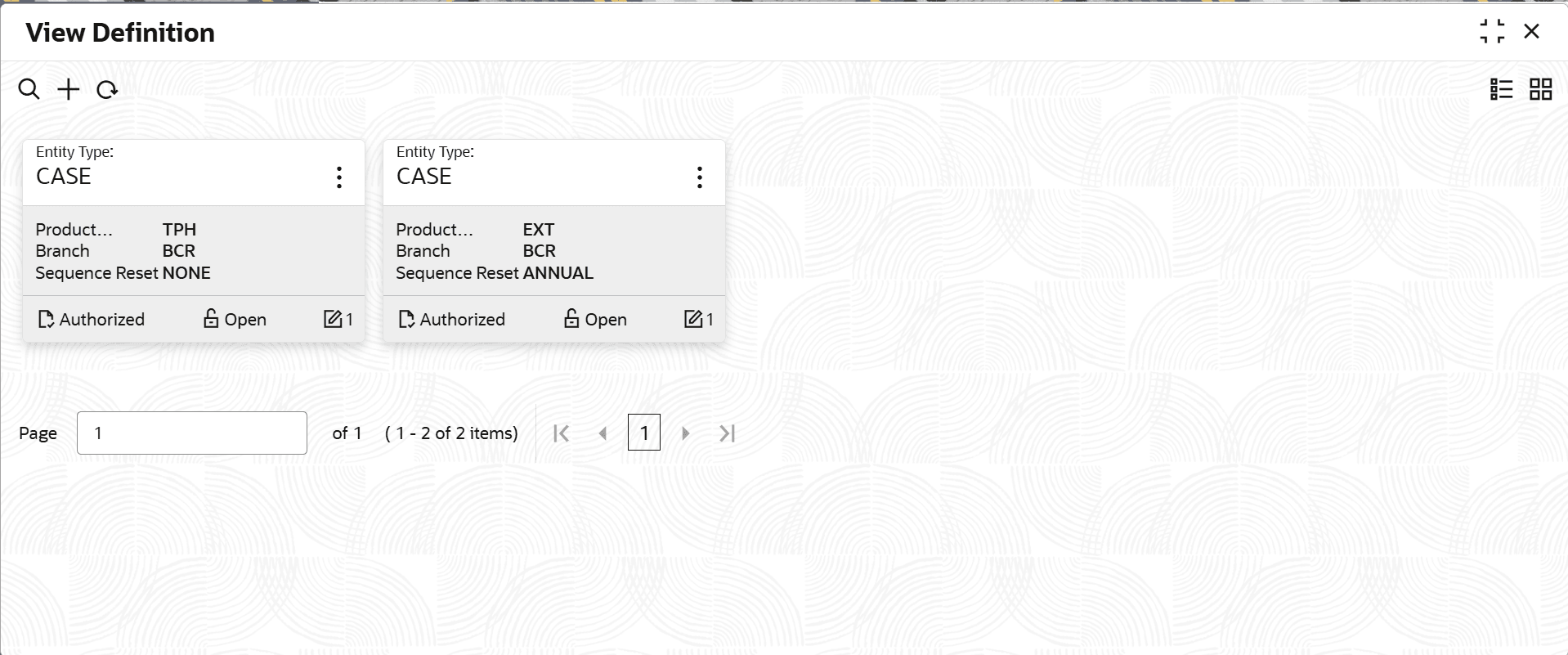
Definition.The View Definition screen is displayed. For more information on fields, refer to the field description table.
Table 5-2 Field Description: View Definition - Tile
Field Name Description Entity Type Displays the entity type. Product Processor Displays the product processor code. Branch Displays the name of the branch. Sequence Reset Displays the frequency of reset for auto number generation logic for an entity type. <Authorization Status> Displays the authorization status of the definition. The possible values are:- Unauthorized
- Authorized
<Record Status> Displays the status of the record. The possible values are:- Open
- Closed
- On the View Definition screen, click

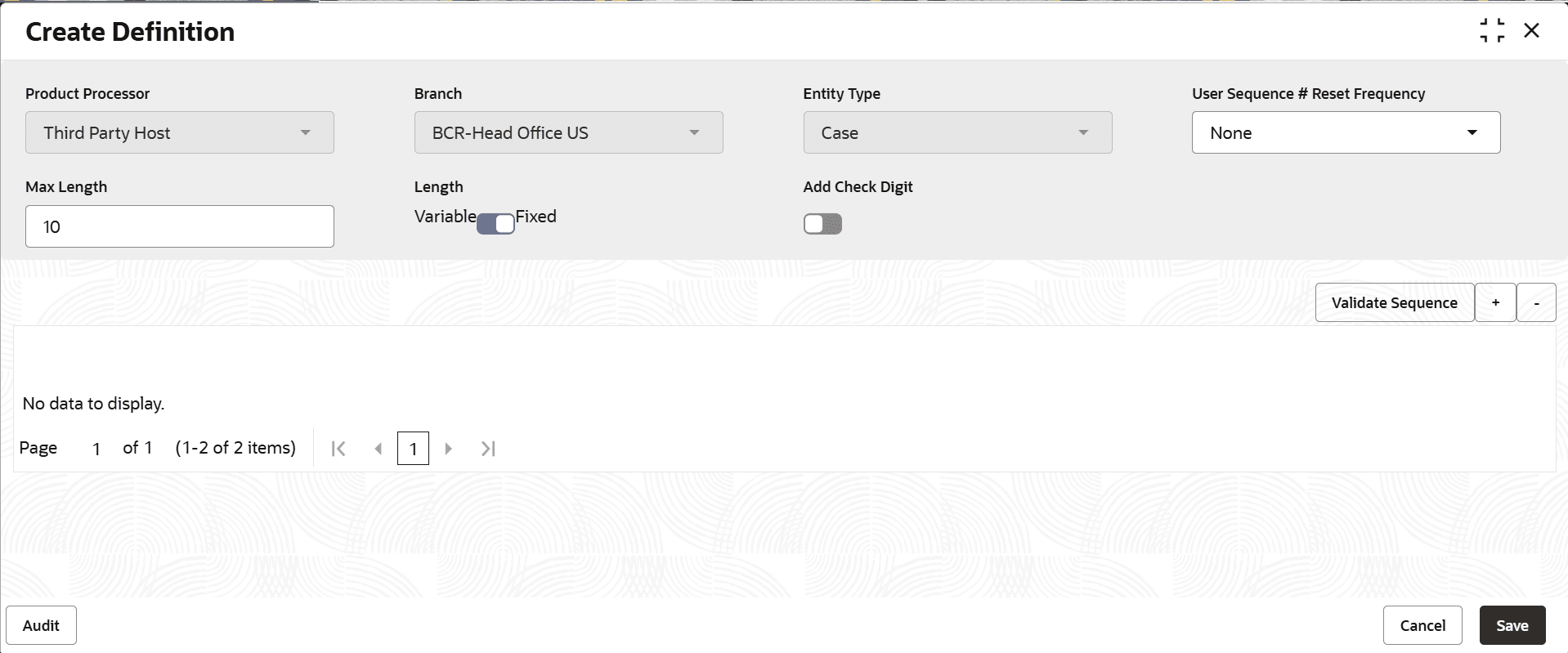
icon.The View Definition - Search screen is displayed. - Click Unlock to modify the created definition.The Create Definition - Modify screen is displayed.
For more information on fields, refer to the field description table.
Table 5-4 Field Description: Create Definition
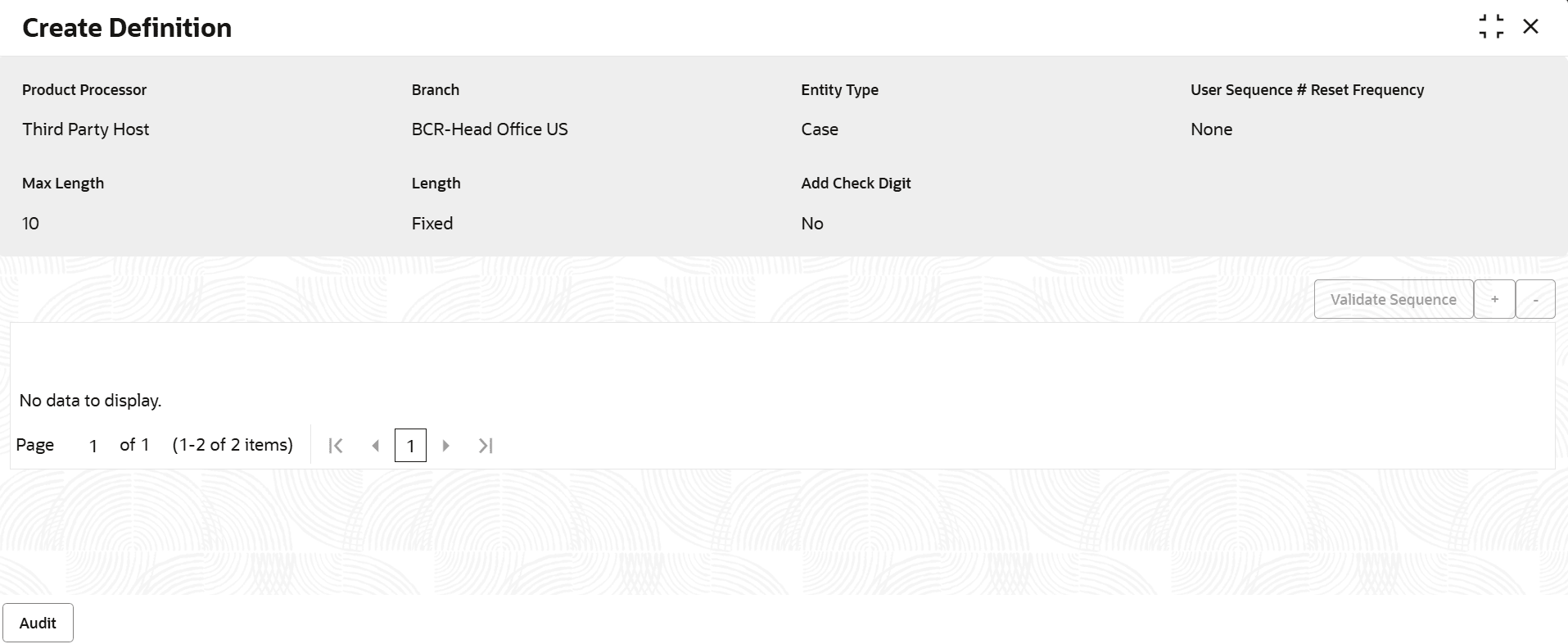
Field Name Description Product Processor Indicates the product processor. Branch Indicates the branch name. Entity Type Indicates the entity type for which the auto number should be generated using the definition. User Sequence # Reset Frequency Indicates the frequency at which the system should reset the auto number generation logic for an entity type. Max Length Indicates the maximum length of the number that is generated. Length Toggle to indicate whether system should generate number with variable or fixed length. Add Check Digit Toggle to indicate whether system should add a check digit at the end of the auto number generated for the selected entity type. <Unit Details> This section is used to specify what the number should constitute and the sequence of the same in the auto number to be generated. Sequence Indicates the sequence of the unit in the auto number generation logic. The value of the unit appears in the generated auto number as per the sequence number. Units Indicates the unit with which the system should generate the number. Value Indicates or displays the length of the unit. Enabled Toggle to indicate whether the unit is active. - Click View to view the created definition code.The Create Definition - View screen is displayed.
For more information on fields, refer to the field description table.
Table 5-5 Field Description: Create Definition
Field Name Description Product Processor Indicates the product processor. Branch Indicates the branch name. Entity Type Indicates the entity type for which the auto number should be generated using the definition. User Sequence # Reset Frequency Indicates the frequency at which the system should reset the auto number generation logic for an entity type. Max Length Indicates the maximum length of the number that is generated. Length Toggle to indicate whether system should generate number with variable or fixed length. Add Check Digit Toggle to indicate whether system should add a check digit at the end of the auto number generated for the selected entity type. <Unit Details> This section is used to specify what the number should constitute and the sequence of the same in the auto number to be generated. Sequence Indicates the sequence of the unit in the auto number generation logic. The value of the unit appears in the generated auto number as per the sequence number. Units Indicates the unit with which the system should generate the number. Value Indicates or displays the length of the unit. Enabled Toggle to indicate whether the unit is active.

Parent topic: Auto Number Generation