2.10.1.59 Consolidation Drawdown Details
This topic describes the systematic instructions to consolidation drawdown details screen. Use this data segment to capture the basic details of the transaction detailed below.
- In the Drawdown, click Consolidation
Drawdown tab and provide the required details.The Consolidation Drawdown screen displays.
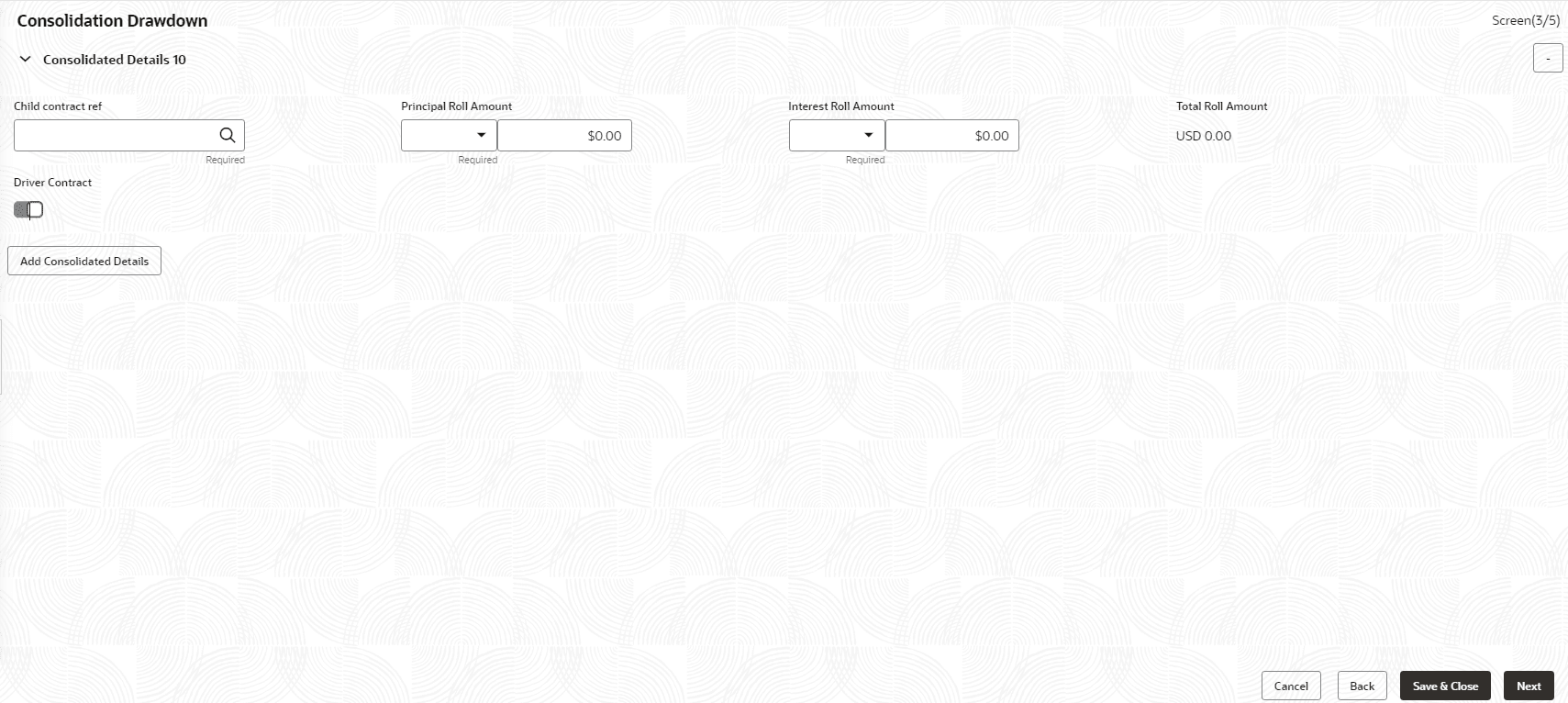
- Specify the fields on Consolidation Drawdown
screen.For more information on fields, refer to the field description table.
Table 2-76 Consolidation Main Details - Field Description
Field Description Child Contract Ref No User have to select the child drawdowns that have to be consolidated as part of rollover. The option list displays all drawdowns with the same combination of counterparty, product, currency, and maturity date that user select. Select a drawdown from this list. Click the Add Consolidation Details button to select the next drawdown from the list. Principal Roll Amount The system displays the outstanding principal that can be rolled over for each child drawdown. User can amend the outstanding principal, if required. This amount can be either greater than or lesser than the outstanding principal amount. The system treats this as a special amount rollover. Interest Roll Amount In addition to displaying the outstanding principal, the system displays the interest to be capitalized for each drawdown in the Interest Roll Amt field. User cannot amend this amount. Total Roll Amount Sum of Principal Roll amount and Interest Roll amount Driver Contract From the list of child drawdowns selected for consolidation, user have to designate one of them as the Driver Contract. The consolidated drawdown (generated upon rollover) inherits the preferences (information such as settlement details, schedules, MIS details and so on) of the driver contract user select here.
Parent topic: Cash Flow
