2.10.1 Cash Flow
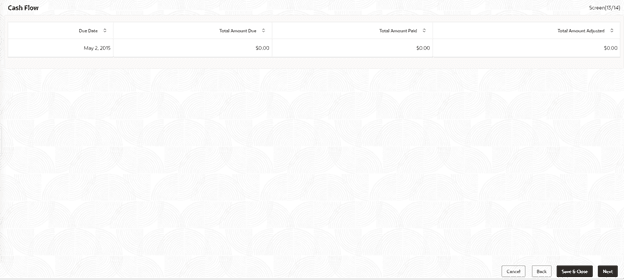
This topic describes about cash flow screen. Use Cash Flow screen to view the cash flow details based on the interest details and payment schedules captured for the loan.
This data segment helps to view the total amount that is due and the component wise dues for the loan application.
- In the Loan Origination, click Cash
Flow tab and view the below details
Table 2-10 Cash Flow - Field Description
Field Description Due Date Display the due dates on which the dues to be settled. Total Amount Due Display the total amount due calculated for the loan application. Note:
On click of each due date, system displays the component wise amount due, amount paid, and adjusted amount.This topic contains the following sub-topics:
- Settlement Details
This topic explains the systematic instructions to settlement details. Use Settlement Details screen to capture the Settlement Details such as name, number and so on. - Summary
This topic explains the systematic instructions to summary screen. All the details provided on different tabs is summarized and shown. - Facility and Collateral Details
This topic explains the systematic instructions to facility and collateral details. Use Link Facility and Collateral screen to capture the credit lines and collaterals that the prospective borrower wants to associate as part of the corporate loan that is availed. - Holiday Preferences
This topic explains the systematic instructions to holiday preferences. Use Holiday Preferences screen for handling holiday preferences if the maturity date or schedule date or revision date falls on a holiday. - Credit Approval
This topic explains the systematic instructions to credit approval. Use this data segment for any exemption raised as part of Facility/Collateral data segment due to insufficient credit lines. Then, the loan application is marked for credit approval. - Application Verification
This topic explains the systematic instructions to application verification. Use Application Verification screen to verify the loan details captured in previous data segments. - Loan Approval
This topic explains the systematic instructions to loan approval. Use Loan Approval screen to approve the loan application. - Customer Acceptance
This topic explains the systematic instructions to customer acceptance. Use Customer Acceptance screen to capture the acknowledgement details given by the customer post loan sanctioning. - Draft Proposal Approval Details
This topic explains the systematic instructions to draft proposal approval details. Use Draft Proposal screen to verify and input all the details captured for draft proposal captured in various data segment such as client name, loan amount, currency, tenor, company profile, collateral requirements, fee and charges details, and interest details. - Restructuring Amendment Details
This topic explains the systematic instructions to restructuring amendment details. Use Restructuring Amendment Details screen to capture the financial amendment details for restructuring. - Payment Details
This topic explains the systematic instructions to payment details. Use Payment Details screen to capture payment details for the loan. - Rate Quotation Details
This topic explains the systematic instructions to rate quotation details. Use Rate Quotation Details screen to capture the rate quotation details. - Operations Enrichment
This topic explains the systematic instructions to operations enrichment. Use this screen to enter operation enrichment data segment details. - Tranche Details
This topic explains the systematic instructions to tranche details. Use Tranche Details screen to enter the tranche related details. - Margin Details
This topic describes the systematic instructions to margin details screen. Use Margin Details screen to add the margin details. - Fee Details
This topic describes the systematic instructions to fee details screen. Use Fee Details screen to add the fee details. - Facility Details
This topic describes the systematic instructions to facility details screen. Use Facility Details screen to enter the facility details. - Additional Tranche Details
This topic describes the systematic instructions to additional tranche details screen. Use Additional Tranche Details screen to enter the additional tranche details. - Agreement Details
This topic describes the systematic instructions to agreement details screen. Use the Agreement Details screen to capture the agreement details. - Lender Commitments
This topic describes the systematic instructions to lender commitments screen. Use Lender Commitments screen to enter commitment on tranches and so on. - Fee Schedules
This topic describes the systematic instructions to fee schedules screen. Allows capturing the Fee Schedules such as fee, start date and so on. - Rate Fixing and Billing Preferences
This topic describes the systematic instructions to rate fixing and billing preferences screen. Use Rate Fixing and Billing Preferences screen to enter IRFX holiday, days, currency, notification days, notification holiday and so on. - Entity Details
This topic describes the systematic instructions to entity details screen. Use Entity Details to capture entity name, description and so on. - Settlement Details
This topic describes the systematic instructions to settlement details screen. Use Settlement Details screen to enter settlement details such as Mnemonic, currency and so on. - Summary
All the details provided on different tabs is summarized and shown. - Loan Details
This topic describes the systematic instructions to loan details screen. - Additional Loan Details
This topic describes the systematic instructions to additional loan details screen. Use Additional Loan Details screen to capture the Additional Loan details such as product code, expense Code and so on. - Interest Details
This topic describes the systematic instructions to interest details screen. Use Interest Details screen to capture the Interest details such as rate type, loan amount, and so on. - Payment Schedules
This topic describes the systematic instructions to payments schedules screen. Use to Payment Schedules screen to capture the Payment Schedules such as schedule type, amount and so on. - Settlement Details
This topic describes the systematic instructions to settlement details screen. Use Settlement Details screen to capture the Settlement Details such as name, number and so on. - Summary
- Parties
This topic describes the systematic instructions to parties screen. Use Parties screen to capture the Agency Drawdown Party details such as name, role and so on. - Loan Details
This topic describes the systematic instructions to loan details screen. - Additional Loan Details
This topic describes the systematic instructions to additional loan details screen. Use Additional Loan Details screen to capture the Additional Loan details such as product code, expense Code and so on. - Facility Details
This topic describes the systematic instructions to facility details screen. Use Facility Details screen to capture the Facility Details such as dates, code and so on - Lenders share
This topic describes the systematic instructions to lenders share screen. - Deal Facility Condition Precedent
This topic describes the systematic instructions to deal facility condition precedent screen. - Further Conditions Precedent
This topic describes the systematic instructions to further conditions precedent screen. Use Further Conditions Precedent to capture the Further Conditions Precedent such as Status and so on. - Drawdown Condition Precedent
This topic describes the systematic instructions to drawdown condition precedent screen. - Disbursement Schedules
This topic describes the systematic instructions to disbursement schedule screen. - Interest Margin Details
This topic describes the systematic instructions to interest margin details. Use Interest Margin Details to capture the Interest Margin Details such as component name and so on. - Payment Schedules
This topic describes the systematic instructions to payment schedules screen. - Settlement Details
This topic describes the systematic instructions to settlement details screen. Use Settlement Details screen to capture the Settlement Details such as name, number and so on. - Parties
This topic describes the systematic instructions to parties screen. Use Parties screen to capture the Participant Drawdown Party details such as name, role and so on. - Loan Details
This topic describes the systematic instructions to loan details screen. Use Loan Details screen to capture the Loan Details such as value, amount and so on. - Additional Loan Details
This topic describes the systematic instructions to additional loan details screen. Use Additional Loan Details to capture to the Additional Loan details such as product code, expense Code and so on. - Facility and Tranche Details
This topic describes the systematic instructions to facility and tranche details. - Lenders share
This topic describes the systematic instructions to lenders share screen. Use Lenders Share screen to capture the Lenders Share such as amount, rates and so on. - Deal Facility Condition Precedent
This topic describes the systematic instructions to deal facility condition precedent screen. Use Deal Facility Condition Precedent screen to capture the Deal Facility Condition Precedent such as CP Status and so on. - Further Conditions Precedent
This topic describes the systematic instructions to further conditions precedent screen. Use Further Conditions Precedent to capture the Further Conditions Precedent such as Status and so on - Drawdown Condition Precedent
This topic describes the systematic instructions to drawdown condition precedent screen. Use Drawdown Condition Precedent screen to capture the Drawdown Condition Precedent such as CP Status and so on. - Disbursement Schedules
This topic describes the systematic instructions to disbursement schedules screen. Use Disbursement Schedules screen to capture the Disbursement Schedules such as currency, amount and so on. - Payment Schedules
This topic describes the systematic instructions to payment schedules screen. Use Payment Schedules screen to capture the Payment Schedules such as schedule type, amount and so on. - Settlement Details
This topic describes the systematic instructions to settlements details screen. Use Settlement Details screen to capture the Settlement Details such as name, number and so on. - Consolidation Main Details
This topic describes the systematic instructions to consolidation main details screen. Use Consolidation Main screen to capture the basic details of the transaction detailed below. - Consolidation Drawdown Details
This topic describes the systematic instructions to consolidation drawdown details screen. Use this data segment to capture the basic details of the transaction detailed below.
Parent topic: Cash Flow