2.10.1.8 Customer Acceptance

This topic explains the systematic instructions to customer acceptance. Use Customer Acceptance screen to capture the acknowledgement details given by the customer post loan sanctioning.

Based on acknowledgement received through mail or letter, user can capture the acknowledgement details and update the Customer acceptance status.

  1. In the Loan Origination, click Customer Acceptance tab and provide the required details.
    The Customer Acceptance screen displays.
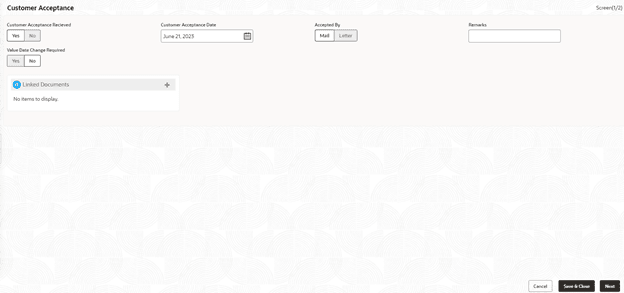
    Figure 2-20 Customer Acceptance


  2. Specify the fields on Customer Acceptance screen.

    For more information on fields, refer to the field description table.

    Table 2-19 Customer Acceptance - Field Description

    Field Description
    Customer Acceptance Date Select the date of acceptance from customer from the dropdown calendar.
    Acceptance By Select the mode of acceptance for customer from the drop-down list.
    Remarks Enter additional information about the customer acceptance.
    Value Date Change Required User can change the value date for Bilateral Loan Origination. After changing the value date, a confirmation dialog box appears. If user click Confirm user are taken to Application Enrichment stage, otherwise user can proceed with subsequent stages.

    If user click Confirm, the stage movement happens from Customer Agreement to Application Enrichment stage. If required, user can update the value date in this stage. After submitting this stage, user is taken back to Customer Agreement stage.