2.10.1.51 Further Conditions Precedent
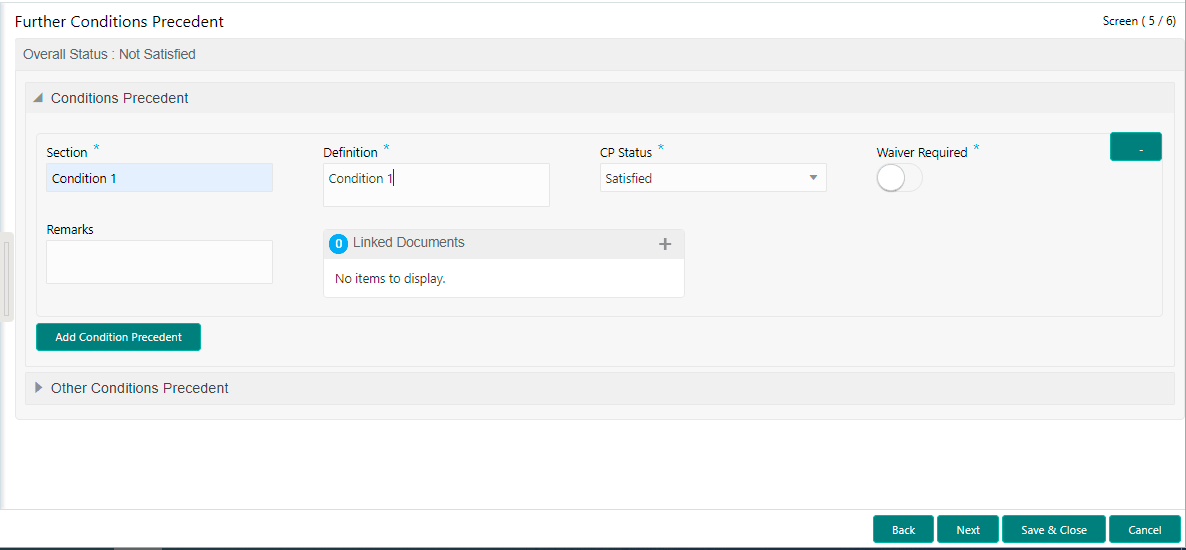
This topic describes the systematic instructions to further conditions precedent screen. Use Further Conditions Precedent to capture the Further Conditions Precedent such as Status and so on
- In the Participant Drawdown, click Further
Conditions Precedent tab and provide the required details.The Further Conditions Precedent screen displays.
For more information on fields, refer to the field description table.
Table 2-66 Conditions Precedent - Field Description
Field Description Section Enter the section. Definition Enter the definition. CP Status Select the status from the drop-down list Waiver Required Click to select for wavier required. Exceptional Approval Required Click to select for approval required. Remarks Enter the remarks. Linked Documents Click to add documents.
Parent topic: Cash Flow