2.10.1.21 Fee Schedules
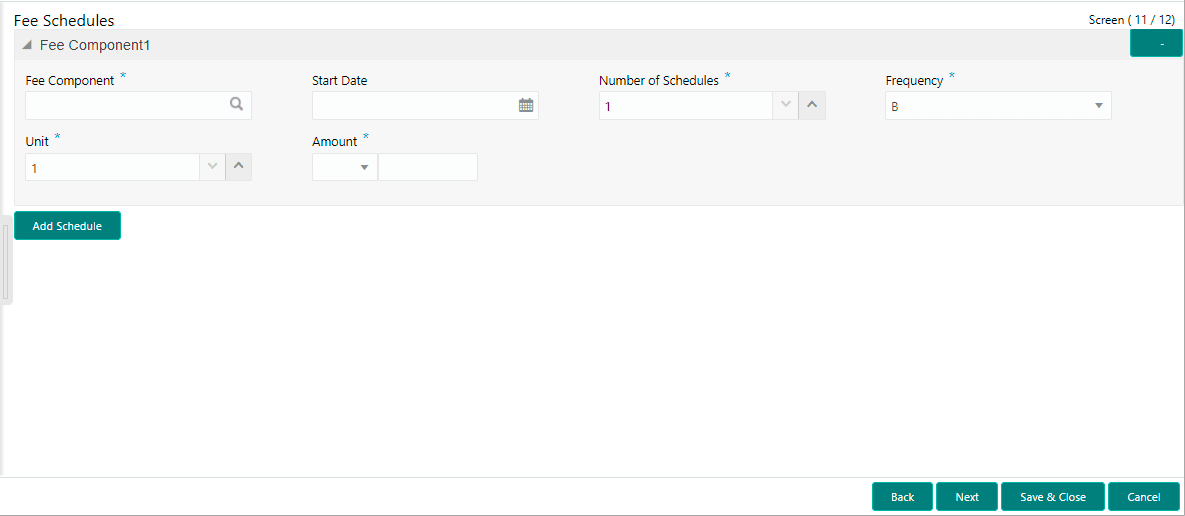
This topic describes the systematic instructions to fee schedules screen. Allows capturing the Fee Schedules such as fee, start date and so on.
- In the Operations Enrichment, click Fee
Schedules tab and provide the required detailsThe Fee Schedules screen displays.
For more information on fields, refer to the field description table.
Table 2-34 Fee Schedules - Field Description
Field Description Fee Component Click Search to view and select the fee. Start Date Select the start date from the drop-down calendar. Number of Schedules Enter the number of schedules. Frequency Select the frequency type from the drop-down list. Unit Enter the units. Amount Select the currency type from the drop-down list and enter the fee amount.
Parent topic: Cash Flow