2.10.1.41 Interest Margin Details
This topic describes the systematic instructions to interest margin details. Use Interest Margin Details to capture the Interest Margin Details such as component name and so on.
- In the Agency Drawdown, click Interest Margin
Details tab and provide the required details.The Interest Margin Details screen displays.
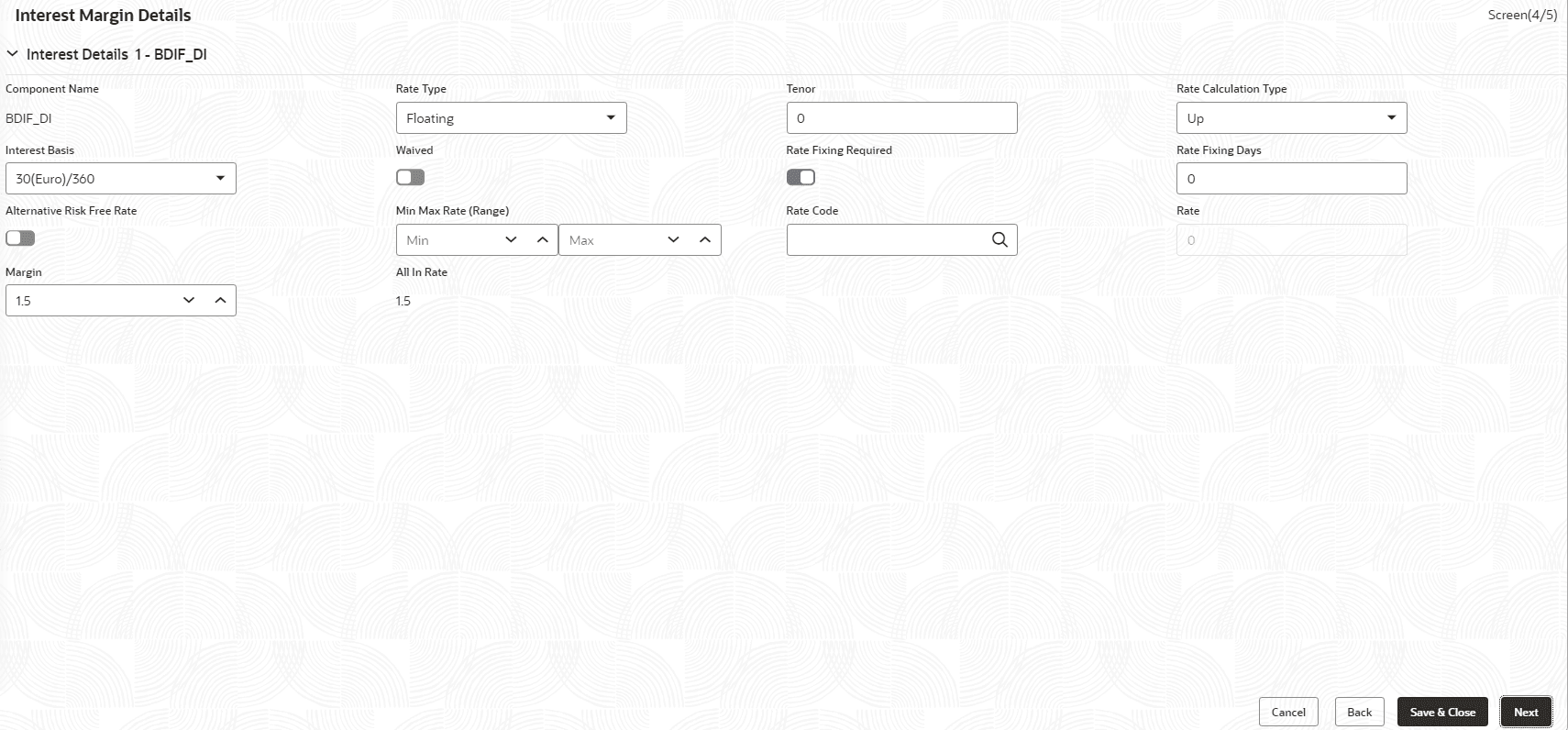
- Specify the fields on Interest Margin Details
screen.
For more information on fields, refer to the field description table.
Table 2-55 Interest Details- Field Description
Field Description Component Name Name gets auto-populated. Rate Type Select the type from the drop-down list. Tenor Tenor gets auto-populated. Rate Calculation Type Select the type from the drop-down list. Interest Basis Enter the interest basis. Rate Enter the rate. Margin Margin gets auto-populated. All in Rate Rate gets auto-populated. Rate Fixing Required Click to select for required. Rate Fixing Days Enter the days. Waived Click to select for wavier required. Table 2-56 Margin Details - Field Description
Field Description Component Name Name gets auto-populated. Component Description Description gets auto-populated. Margin Basis Margin basis gets auto-populated. Basis Amount Amount gets auto-populated. Rate Rate gets auto-populated.
Parent topic: Cash Flow
