2.5 Plant and Machinery Details

This topic explains the systematic instructions for plant and machinery details screen.

Use Plant and Machinery Details screen to capture the plant and machinery details provided by the client. These details can be used by relationship and credit manager to evaluate the collateral details of the customer. This segment can be used while providing equipment finance.

  1. In the Loan Origination, click Plant and Machinery Details tab and provide the required details.
    The Plant and Machinery Details screen displays.
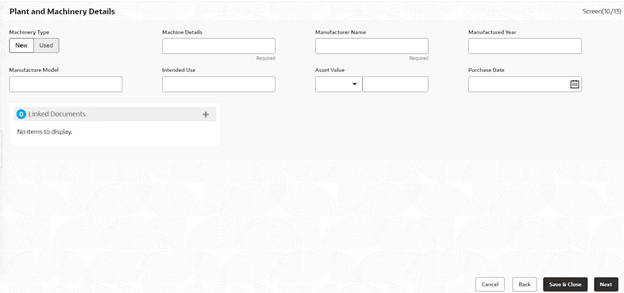
  2. In the Plant and Machinery Details screen, provide the required details.

    Note:

    The fields marked as Required are mandatory.

    For more information on fields, refer to the field description table.

    Table 2-5 Plant and Machinery Details - Field Description

    Field Description
    Machinery Type Enter the type of the machinery - New or Used.
    Machine Details Enter additional information about the Machine.
    Manufacturer Name Enter the Manufacturer name of the machinery.
    Manufactured Year Select the date of the manufacturing of the machinery.
    Manufacture Model Enter the model number of the machinery.
    Intended Use Enter the purpose of use of the machinery.
    Currency Select a currency from the drop-down list.
    Asset Value Enter the total value of the machinery.
    Purchase Date Select the date of purchase of machinery from the drop-down calendar.