2.4 Real Estate Loan
This topic explains the systematic instructions for real estate loan screen.
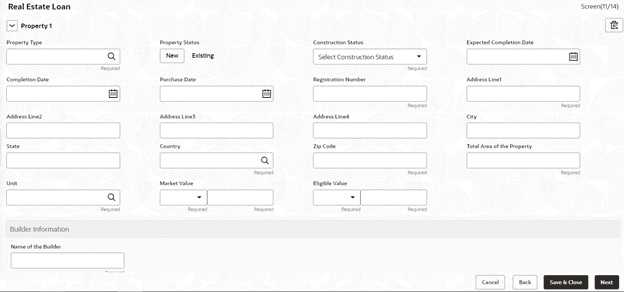
Use Real Estate Loan screen to capture the Real estate details or property details of the client. These details can be used by relationship and credit manager to understand the credit worthiness as well as the collateral details of the customer. This segment can be used while providing real estate loans.
- On the Homepage, from Corporate Lending, under Operations, click Bi-lateral and then click Loan Origination.
- In the Loan Origination, click Real Estate
Loan tab and provide the required details.The Real Estate Loan screen displays.
- In the Real Estate Loan screen, provide the required
details.
Note:
The fields marked as Required are mandatory.For more information on fields, refer to the field description table.
Table 2-4 Real Estate Loan - Field Description
Field Description Property Type Select the type of the property from the list of values. Property Status Specify the status of the property. The available options are: - New
- Existing
Construction Status Specify the status of construction. The available options are: - Completed Construction
- Under Construction
Expected Completion Date Enter the expected completion date of the property. Completion Date Enter the completion date of the property in case of Completed status. Purchase Date Enter the date of purchase of the property. Registration Number Enter the registration number or unique reference number of the property. Address 1-4 Enter the address of the property. City Enter the city of the property. State Enter the state in which the property is located. Country Enter the list of country from where user will have an option to select the correct county form the displayed list. Zip Code Enter the ZIP code of the location where property is located. Special Zone User can select the required option, if the property is situated in and around Special zone. Total Area of the Property Specify the total area of the property in figures. Unit Select the unit in which the area of the property is measured from the list of values. Market Value Enter the market value of the property along with the currency. Eligible Value Enter the eligible value of the property along with the currency. Name of the Builder Enter the name of the builder. Classification of the Builder Enter the classification of the builder - Category A/B. Ownership Status Select the status of ownership. The available options are: - Freehold
- Leasehold
Lessor Enter the name of the lessor. Lease Effective date Enter the date on which the property is leased out. Lease Expiry date Enter the date of expiry of the leased-out property.
Parent topic: Data segments