2.10.1.24 Settlement Details
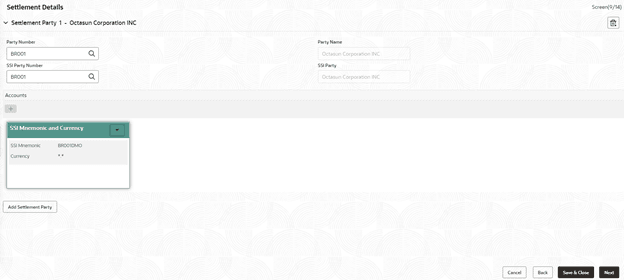
This topic describes the systematic instructions to settlement details screen. Use Settlement Details screen to enter settlement details such as Mnemonic, currency and so on.
Allows capturing the Settlement Details such as Mnemonic, currency and so on.
- In the Operations Enrichment, click
Settlement Details tab and provide the required
details.The Settlements Details screen displays.
For more information on fields, refer to the field description table.
Table 2-37 Settlement Details - Field Description
Field Description Party Name Click Search to view and select the required name. Party Number Number gets auto-populated. SSI Party Click Search to view and select the required SSI party. SSI Party Number Number gets auto-populated Accounts Accounts gets auto-populated.
Parent topic: Cash Flow