4.36 Specify Disclosure Schedule Details
- On the homepage, type OLDSCSCH and click next
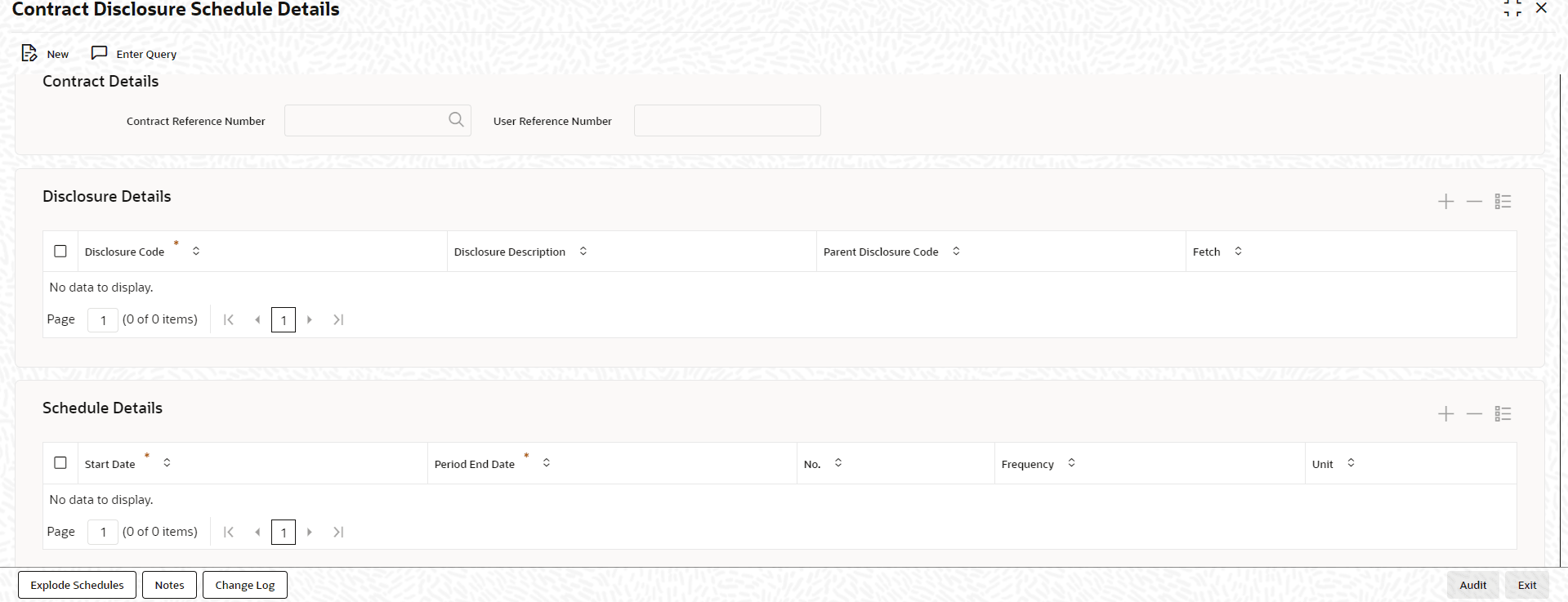
arrow.The Contract Disclosure Schedule Details screen is displayed.
Figure 4-44 Contract Disclosure Schedule Details
- You can enter below details in this screen. For information on fields, refer to
the field description table.
Table 4-51 Contract Disclosure Schedule Details
Field Description Contract Ref No Specify the contract reference number of the contract for which the reporting requirement details to be linked. Disclosure Code Specify the code for the reporting requirement. The reporting requirement is captured as disclosure code. The adjoining option list displays the disclosure codes and you can choose the required disclosure code. (Note: UCC disclosure code linked to a commitment contract need not be defaulted to linked loan contracts. You can manually attach a UCC disclosure code to individual loan contracts.)
Disclosure Description The description of the reporting requirement is displayed here. Parent Disclosure Code Select the parent disclosure code if the disclosure code is to be associated as a sub-event. The adjoining option list displays the disclosure codes that are already linked to the contract. For a UCC disclosure code, this field is disabled. (Notes:- If a disclosure code is linked to a parent disclosure code, then you cannot define schedule for this disclosure code and the schedule defined for the parent disclosure code is automatically propagated to the child disclosure code.
- Once a disclosure code is linked to a parent disclosure code, the same cannot be linked as a parent to another disclosure code, that is, a child cannot be selected as a parent. However, multiple disclosure codes can be linked to the same parent.
Notes Click Notes button to add any notes for the disclosure codes. Start Date Specify the start date from which the schedule commences. The start date can only be a date in the future and it cannot be a back dated date. For a UCC disclosure code, system automatically defaults the current date as the start date.
Period End Date Specify the end date on which the schedule ends. For a UCC disclosure code, system automatically defaults the expiry date maintained in the UCC Details screen. For more information on UCC details screen, refer to the Maintaining UCC Details in this User Manual.
No Specify the number of schedules that are required. For example, if 3 quarterly schedules are required starting from 15-Dec-06 (that is, 15-Dec-06, 15-Mar-07, 15-Jun-07), enter the Start Date as 15-Dec-06 and No. as 3 and Frequency as Quarterly.
For a UCC disclosure code, system sets this field as 1 and disables it.Frequency Select the frequency of the disclosure schedule from the drop-down list. The list displays the following values: - Daily
- Monthly
- Quarterly
- Half Yearly
- Yearly
- Weekly
- BULLET
Unit Specify the value of unit of the frequency selected. For example, if the schedule should be once in two months for a Frequency Monthly then the value for unit is 2.
For a UCC disclosure code, system sets this field as 1 and disables it.Note:
- While generating the schedule, the system does not check whether the due date falls on a holiday.
- The system does not perform any validation associated with the contract start date.
- However, validation is performed to ensure that schedule date is not beyond the Contract Maturity Date.
- It is mandatory to maintain Schedules for each disclosure code unless the disclosure code is linked to a parent.
- For a UCC disclosure code, you cannot add a schedule or delete the
automatically generated disclosure schedule.
- If you click on Add button in the
Schedule Details section, system will display the following
error message:
Multiple schedules are not allowed for UCC disclosure codes.
- If you click on Delete button in the
Schedule Details section, system will display the following
error message:
Cannot delete the schedule for UCC disclosure codes
- You can only modify Start Date and Period End Date fields for the contract.
- If you click on Add button in the
Schedule Details section, system will display the following
error message:
Parent topic: Disbursing a Loan