4.7 Basic Details
In this page, you can select a collateral type and capture basic details about the collateral.
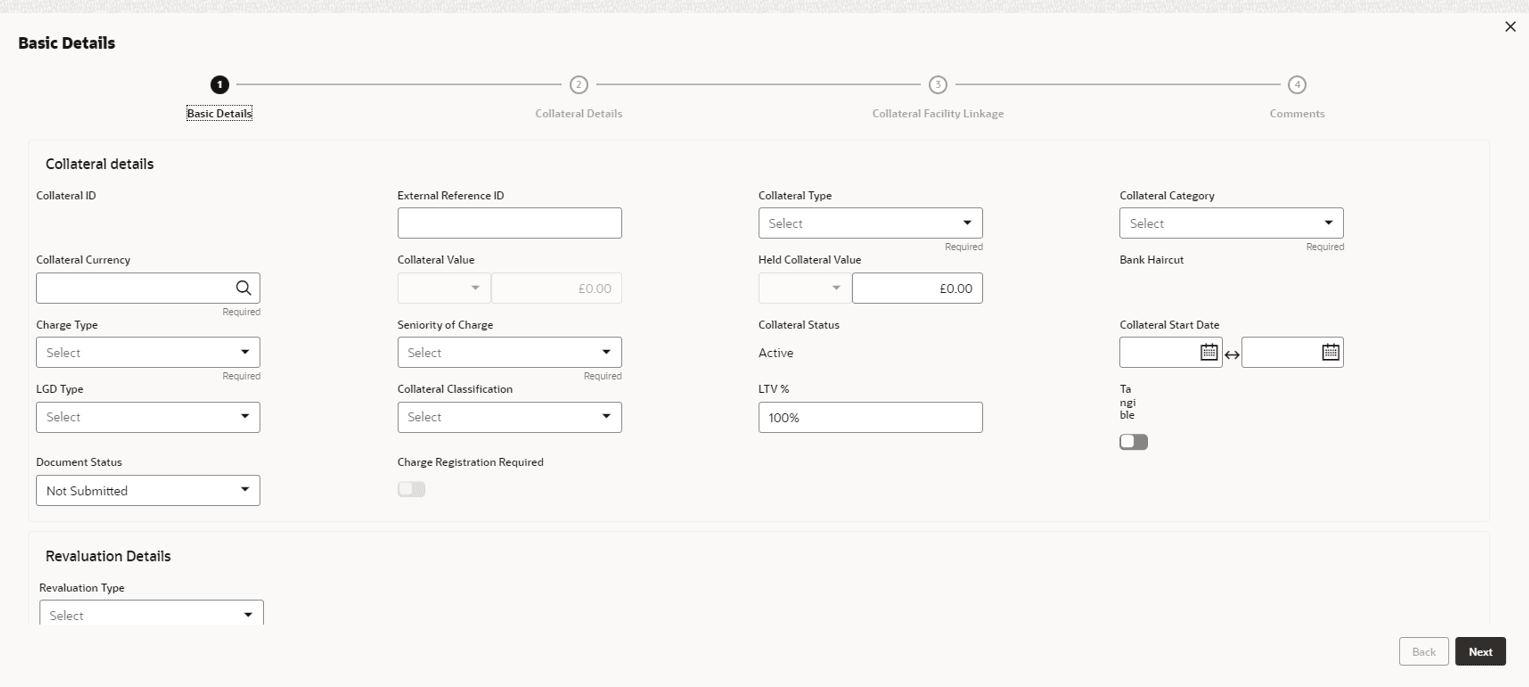
For field level information refer the table below.
Table 4-31 Basic Details
| Fields / Icons | Description |
|---|---|
| Collateral ID | Collateral ID is displayed in the Collateral ID details, by default. |
| External Reference ID | Enter External Reference ID. |
| Collateral Type | Select Collateral Type from the drop-down
list. The options available are:
|
| Collateral Category | Select Collateral Category from the
drop-down list. Collateral categories are listed based on the
selected Collateral Type.
Note:
The below options are displayed only for Collateral
Type selected as Vehicle.
|
| Collateral Currency | Click Search icon in Collateral Currency field and select the currency for collateral value. |
| Collateral Value | Specify Collateral Value in the collateral value field. |
| Held Collateral Value | Specify Held Collateral Value in corresponding fields. |
| Charge Type | Select Charge Type based on selected
Collateral Type. The options available are:
|
| Seniority of Charge | Select the bank’s Seniority of Charge on
the collateral. The options available are:
|
| Collateral Status | Collateral Status is displayed as Active by default. |
| Collateral Start Date | Click Select Date in Calendar icon and specify the Collateral Start Date and End Date. |
| LGD Type | Select LGD Type from the drop-down list.
The options available are:
|
| Collateral Classification | Select Collateral Classification from the
drop-down list. The options available are:
|
| LTV % | Enter LTV %. |
| Tangible | Enable Tangible, if required. |
| Document Status | Select Document Status from the drop-down
list. The options available are:
|
| Charge Registration Required | Enable Charge Registration Required, if required. |
| Revaluation Details | Select Revaluation Details from
Revaluation Type drop-down list. The option available
in Revaluation Type are:
|
| Collateral Description | Specify a brief description about the collateral in Collateral Description field. |
| Remarks | Enter Remarks, if any. |
- Click Next. The Collateral Details screen is displayed.
Parent topic: Proposal Enrichment