3.4.22 Ship
This topic provides systematic instructions about the Ship data segment in Evaluation Enrichment stage.
The Ship data segment appears in case Ship is selected
as the Collateral Type in Quick Initiation screen.
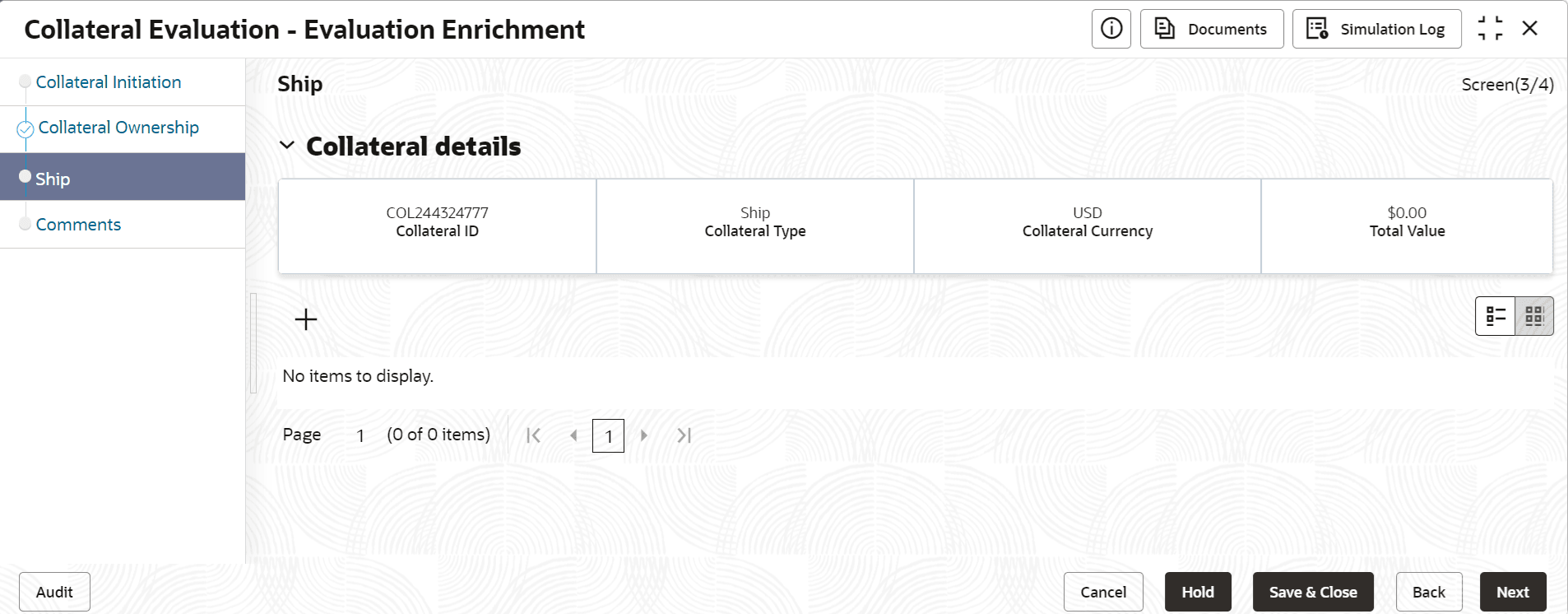
- Click the add icon.The Configure - Ship screen is displayed.
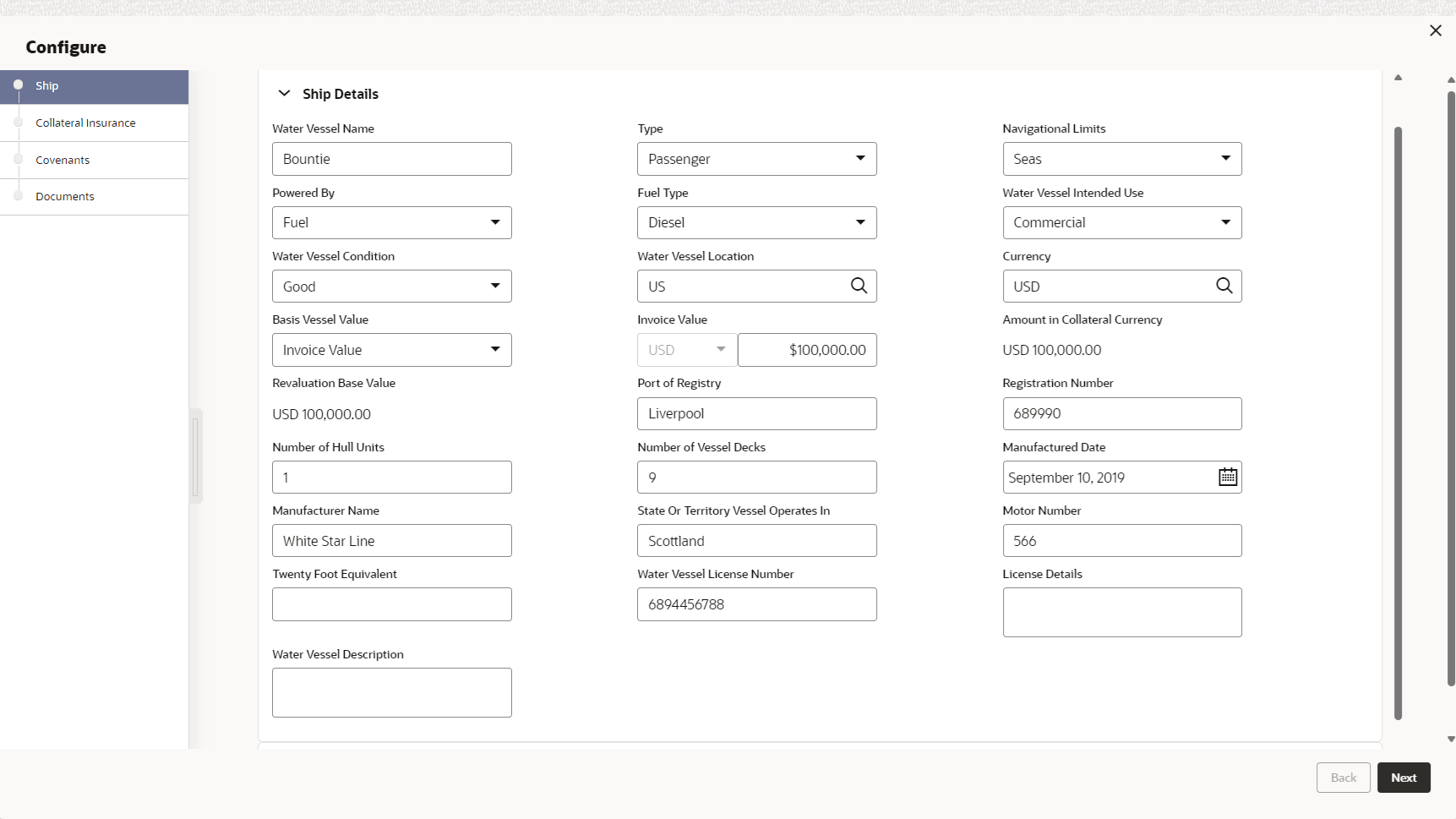
- Provide all the ship details in the Configure - Ship screen.For more information on fields, refer to the field description table below.
Table 3-67 Configure - Ship Details - Field Description
Field Description Water Vessel Name Specify the name of the water vessel. Type Select the Type of water vessel from the drop down list. The available options include but are not limited to: - General Cargo Vessels
- Container Ships
- Dry Bulk Carriers
- Multi Purpose Vessels
- Reefer Ships
- Ferries
- Freight
- Ro-Pax
- Pure Car Carriers
- Combined Carriers
- Ocean Liners
- Cruise Ships
- Fishing Vessel
- High Speed Craft
- Tankers
- Passenger
- Roll On Roll Off
Navigational Limits Select the Navigational Limits from the drop-down list. The available options are: - Inland Lakes
- Inland Rivers
- Oceans
- Seas
Powered By Specify the power source of the water vessel by selecting an option from the Powered By drop down list.The available options are: - Fuel
- Sail
Fuel Type If Fuel is selected as power source, select the Fuel Type from the drop-down list. The available options are: - Diesel
- Gasoline
Water Vessel Intended Use Select the Water Vessel Intended Use from the drop-down list. The available optiosn are: - Commercial
- Personal
- Recreational
Water Vessel Condition Select the Water Vessel Condition from the drop down list. The available options are: - Average
- Damaged
- Exceptional
- Good
Water Vessel Location Search and select the Water Vessel Location. Currency Specify the Currency in which the water vessel is valuated. Basis Vessel Value Select the Basis Vessel Value as Invoice or Market Value from the drop-down list. The available optiosn are: - Invoice Value
- Market Value
Invoice Value Specify the Invoice Value if Invoice Value is selected as Basis Vessel Value. Otherwise, specify the Market Value. Amount in Collateral Currency Water vessel value is converted to collateral currency and displayed in this field, if the vessel value currency is different from the collateral currency. Revaluation Base Value Invoice or market value is displayed as the base value for revaluation. Port of Registry Specify the Port of Registry of the water vessel. Registration Number Specify the water vessel Registration Number. Number of Hull Units Specify the Number of Hull Units available in the water vessel. Number of Vessel Decks Specify the number of decks available in the water vessel. Manufactured Date Specify the date on which the water vessel is manufactured. Manufacturer Name Specify the water vessel Manufacturer Name. State or Territory Vessel Operates In Specify the state or territory in which the water vessel is operating. Motor Number Specify the Motor Number of the water vessel. TEU Specify the twenty-foot equivalent unit (TEU) of the water vessel capacity. Water Vessel License Number Specify the Water Vessel License Number. License Details Capture all the license details in this field. Water Vessel Description Provide a description about the water vessel. Table 3-68 Configure - Ship Dimensions - Field Description
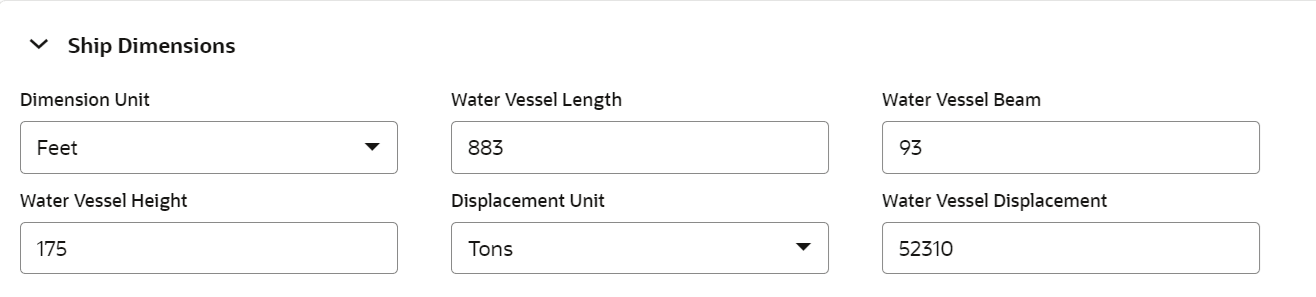
Field Description Dimension Unit Select the unit for capturing water vessel dimension from Dimension Unit drop down list. The options available are: - Feet
- Meters
Water Vessel Length Specify the Water Vessel Length in selected unit. Water Vessel Beam Specify the Water Vessel Beam (width) in selected unit. Water Vessel Height Specify the Water Vessel Height in selected unit. Displacement Unit Select the unit for water vessel weight from Displacement Unit drop down list. The options available are: - Tons
- Metric Tons
Water Vessel Displacement Specify the displacement of water vessel in selected unit. Table 3-69 Configure - Ship Tonnage - Field Description
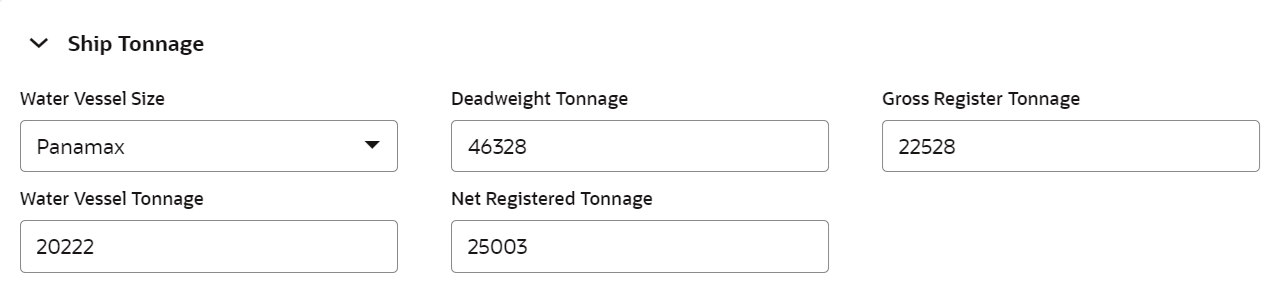
Field Description Water Vessel Size Select the Water Vessel Size from the drop down list. The available options are: - Aframax
- Capesize
- Chinamax
- Handymax
- Handysize
- Malaccamax
- Panamax
- Q-Max
- Seawaymax
- Suezmax
Deadweight Tonnage Specify the Deadweight Tonnage of the water vessel. Gross Register Tonnage Specify the Gross Register Tonnage of the water vessel. Water Vessel Tonnage Specify the Water Vessel Tonnage. Net Registered Tonnage Specify the Net Registered Tonnage of the water vessel. Note:
This topic contains Water Vessel related fields. For other information, refer Vehicle topic in the Enrichment chapter.