3.5 Liquidation Details

This topic provides systematic instructions about the Liquidation Details data segment in Collateral Liquidation Initiation stage. The Liquidation Details data segment allows user to capture all the attributes pertaining to the Collateral Liquidation

Click Next in the Initiation - Linked Transaction screen.

The Liquidation Details screen displays.
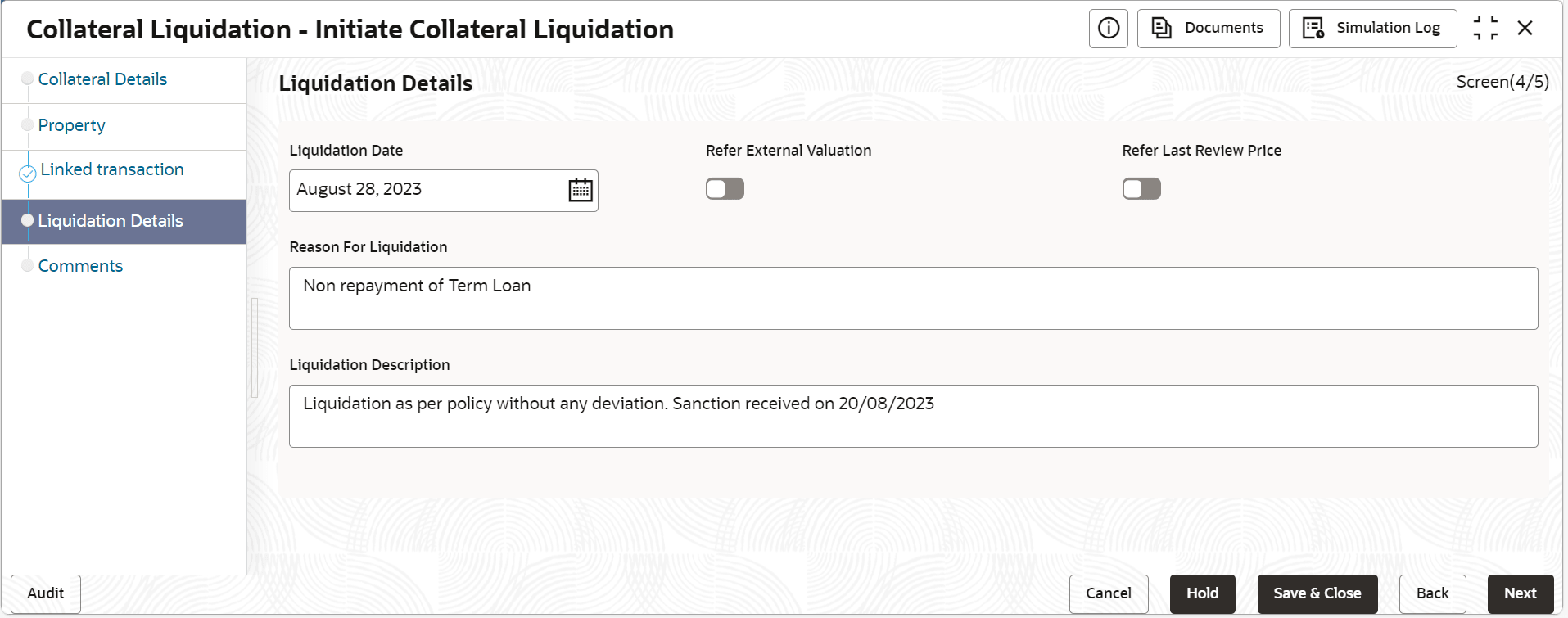
Figure 3-9 Initiate_Liquidation Details


  1. Specify the liquidation details.
    For information on Initiation - Liquidation Details fields , refer the field description below table.

    Table 3-5 Initiation - Liquidation Details

    Fields/ Icons Description
    Liquidation Date Select a date on which the liquidation request is captured.
    Refer External Valuation Enable this flag, if Extenal valuation is to be done for the Collateral.
    Refer Last Review Price Enable this flag, if the Last Valuation has to be referred instead of a fresh valuation.
    Reason for Liquidation Specify the reason for liquidating the collateral.
    Liquidation Description Provide a brief description for the liquidation.
  2. After capturing the liquidation details, click Next.
    The Initiation - Comments screen is displayed.