5.1 Basic Info
This topic provides systematic instructions about the procedure to enrich basic information captured in the Initiation stage.
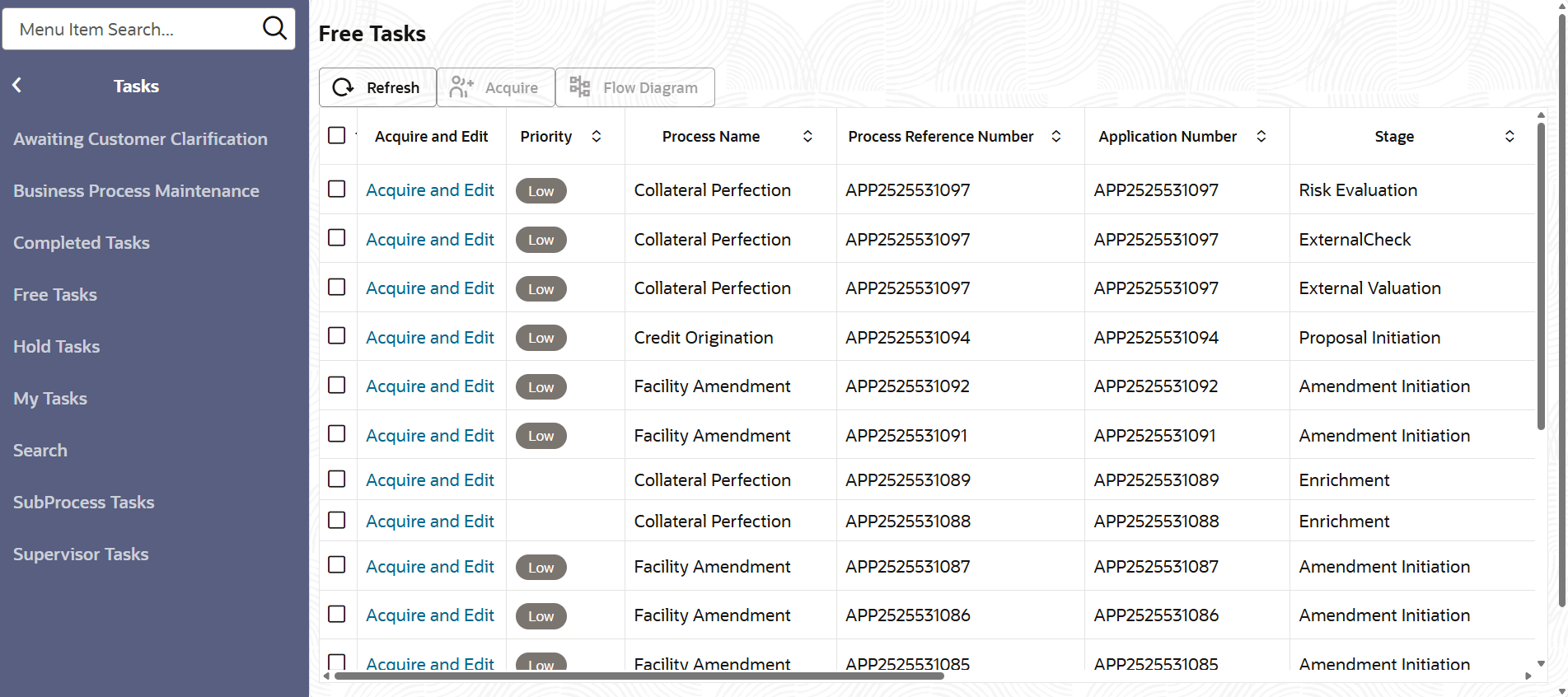
- From Home screen, click Tasks.
Under Tasks, click Free
Tasks.The Free Task screen is displayed.
- Click Acquire & Edit, the required Data Enrichment
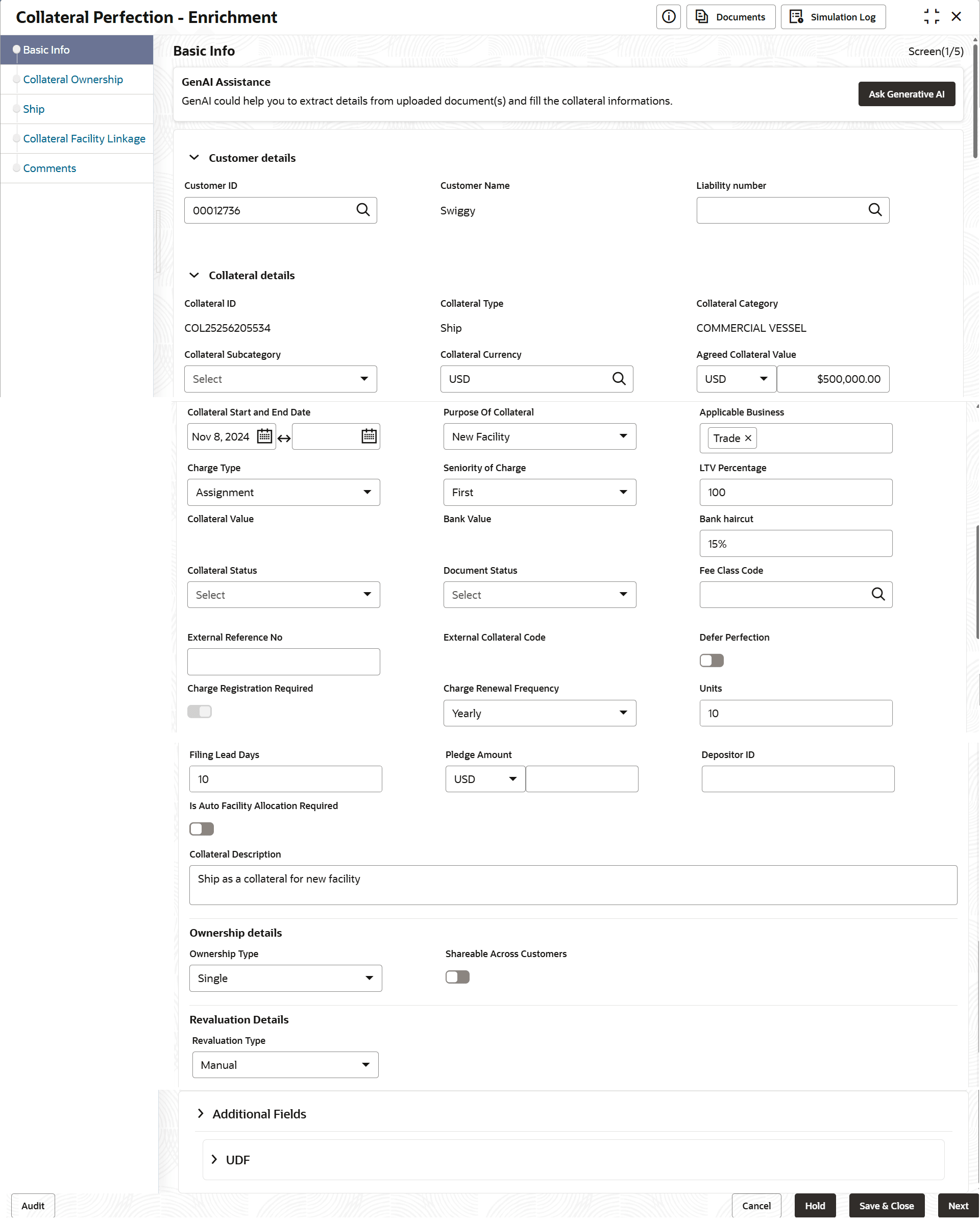
task.The Data Enrichment - Basic Info screen is dispalyed.
- Provide all the details in the Data Enrichment - Basic Info
screen.
For more information on the fields, refer to the field description table below:
Table 5-1 Basic Info - Collateral Details - Field Description
Field Description Customer ID
Customer Id selected in the Quick Initiation screen is displayed. You can change the Customer Id, if required. Customer Name Customer Name is displayed based on the selected Customer Id. Liability Number Search and select Liability Number. Collateral Id Collateral Id is a unique identifier generated for the collateral. This is system generated and you cannot modify.
Collateral Type Collateral Type selected in the Quick Initiation screen is displayed here. You cannot modify this.
Collateral Category Select the Collateral Category. Collateral Categories applicable for the selected Collateral Type are displayed in the drop down list.
Collateral Description Collateral Description provided in the Initiation stage is displayed here. You can modify this if required.
Collateral Currency Collateral Currency specified in the Initiation stage is displayed here. You can modify this if required.
Owner Estimated Value Owner Estimated Value of the collateral specified in the Initiation stage is displayed here. You can modify this if required.
Available From Available From date selected in the Initiation stage is displayed here. You can modify this if required.
Available Till Available Till date selected in the Initiation stage is displayed here. You can modify this if required.
Purpose of Collateral Purpose of Collateral selected in the Initiation stage is displayed here. You can modify this if required.
Applicable Business Select the business for which the collateral is applicable. Options include but not limited to LT Lending, Trade, and Working Capital.
Charge Type Select the Charge Type from the drop down list. The available options are:- Hypothecation
- Pledge
- Lien
Seniority of Charge Select the Seniority of Charge from the drop down list. The available options are:- First
- Second
- Third
- PRIMARY
LTV Percentage Specify the collateral's loan to value percentage. Collateral Status Select the status of the collateral. The available options are:- Active
- Release
Document Status Select the status of the collateral document. The available options are:- Active
- Release
Table 5-2 Basic Info - Ownership Details - Field Description
Field Description Ownership Type Select the Ownership Type from the drop down list. The available options are:- Single
- Joint
Shareable Across Customers Enable this flag if the collateral is shareable with multiple customers.
Table 5-3 Basic Info - Configuration - Field Description
Field Description Refer to Field Investigation This flag is enabled if this configuration is enabled in the Business Process Maintenance for the selected Collateral Type. Field Investigation stage is applicable in the Collateral Perfection process, only if this flag is enabled.
Refer to External Check This flag is enabled if this configuration is enabled in the Business Process Maintenance for the selected Collateral Type. External Check stage is applicable in the Collateral Perfection process, only if this flag is enabled.
Refer to External Valuation This flag is enabled if this configuration is enabled in the Business Process Maintenance for the selected Collateral Type. External Valuation stage is applicable in the Collateral Perfection process, only if this flag is enabled.
Refer to Legal Opinion This flag is enabled if this configuration is enabled in the Business Process Maintenance for the selected Collateral Type. Legal Opinion stage is applicable in the Collateral Perfection process, only if this flag is enabled.
Refer to Internal Legal Opinion This flag is enabled if this configuration is enabled in the Business Process Maintenance for the selected Collateral Type. Internal Legal Opinion stage is applicable in the Collateral Perfection process, only if this flag is enabled.
Refer to Internal Valuation This flag is enabled if this configuration is enabled in the Business Process Maintenance for the selected Collateral Type. Internal Valuation stage is applicable in the Collateral Perfection process, only if this flag is enabled.
Refer to Risk Evaluation This flag is enabled if this configuration is enabled in the Business Process Maintenance for the selected Collateral Type. Risk Evaluation stage is applicable in the Collateral Perfection process, only if this flag is enabled.
- Click Next.