2.6 Document Upload and Checklist
This topic provides details about Document Upload and Checklist.
Documents to be uploaded and the checklist of verified for each stage of
the process can be maintained. Click on the Documents button to view /upload the
documents that has to be uploaded for the stage or to view/ upload the documents
which are uploaded for the task.
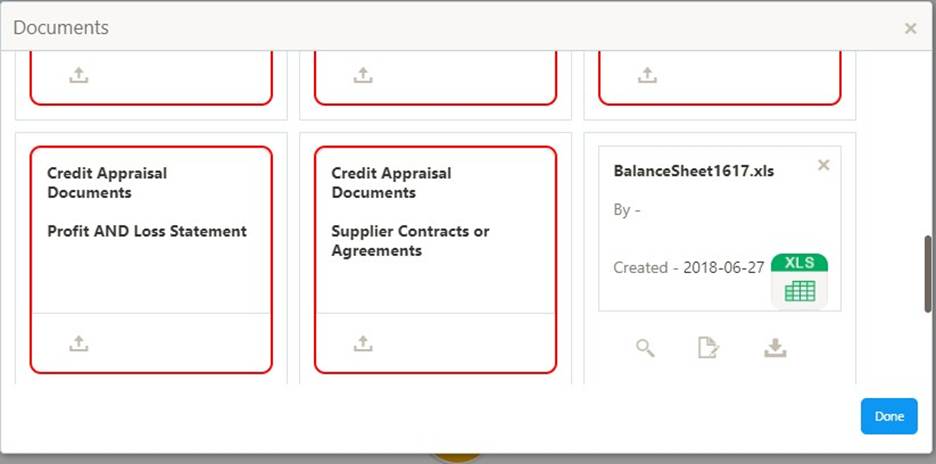
Table 2-17 Action Fileds
| Field | Description |
|---|---|
| Upload | On click of Upload, the Document upload screen will be opened and the user can specify the document title, description, remarks, expiry date and select the document to be uploaded. This button will be visible only for the documents which are not yet uploaded. |
| View | On click of View button the document will be either downloaded or opened based on the browser capability. This button will be visible only for the documents which are already uploaded. |
| Edit | On Click of Edit the Document upload screen will be opened and the user can specify the document title, description, remarks, expiry date and select the document to be re-uploaded. This button will be visible only for the documents which are already uploaded. |
| Download | On Click of Download the document will be downloaded. This button will be visible only for the documents which are already uploaded. |
| Delete | This button will be visible only for the documents which are already uploaded. Click on the X button to delete the uploaded document. |
User can click on the upload button to upload the documents
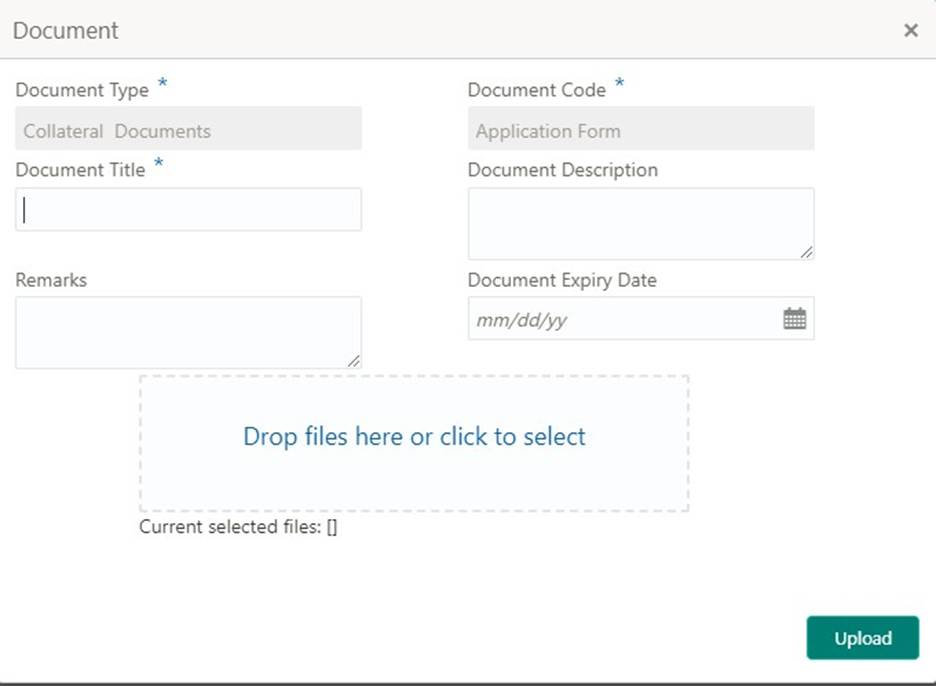
Table 2-18 Exception Initiation - Details
| Field Name | Description | Attribute Type | Object Type | Size | Mandatory/Optional | Field Validation |
|---|---|---|---|---|---|---|
| Document Type | System displays the document type | Display | Free Text | - | NA | - |
| Document Code | System displays the document Code | Display | Free Text | - | NA | - |
| Document Title | Specify the Document Title | Input | Free Text | 30 | Mandatory | - |
| Document Description | Specify the short description of the document | Input | Free Text | 150 | - | - |
| Remarks | Specify the remarks if any | Input | Free Text | 150 | - | - |
| Document Expiry | Specify the Document Expiry Date | Input | Date | - | - | - |
| Document | Drag and Drop or click to select the | Input | Document | - | - | - |
| Upload | file to be uploaded | - | Upload | - | - | - |
Checklist:
On click of the submit button the checklist for the stage of the process
will be displayed. User can confirm each of the check list by clicking on the
checkbox and can capture the remarks by clicking on the remarks button.
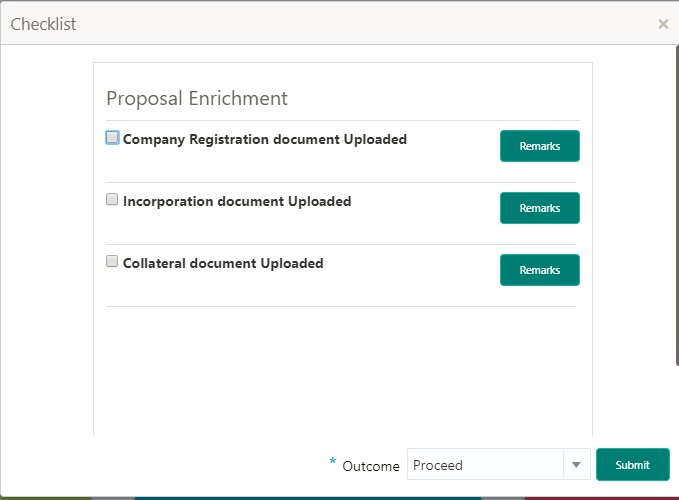
Table 2-19 Exception Initiation - Details
| Field Name | Description | Attribute Type | Object Type | Size | Mandatory/Optional | Field Validation |
|---|---|---|---|---|---|---|
| Checklist Description | System displays the checklists maintained for the stage | Display | Free Text | - | Mandatory | Verify the entire checklist before clicking the submit button. |
| Remarks | Specify the remarks | Input | Button / Text | - | NA | - |
Parent topic: Credit Exception