2.2 Substitution Request
This topic provides information on substitution request. It enables users to initiate and manage the process of replacing existing collateral with new assets.
The Collateral Substitution task is generated and listed in the free
tasks queue.
- From Homescreen, click Tasks
under Tasks, click Free
Tasks.The Free Tasks screen is displays.
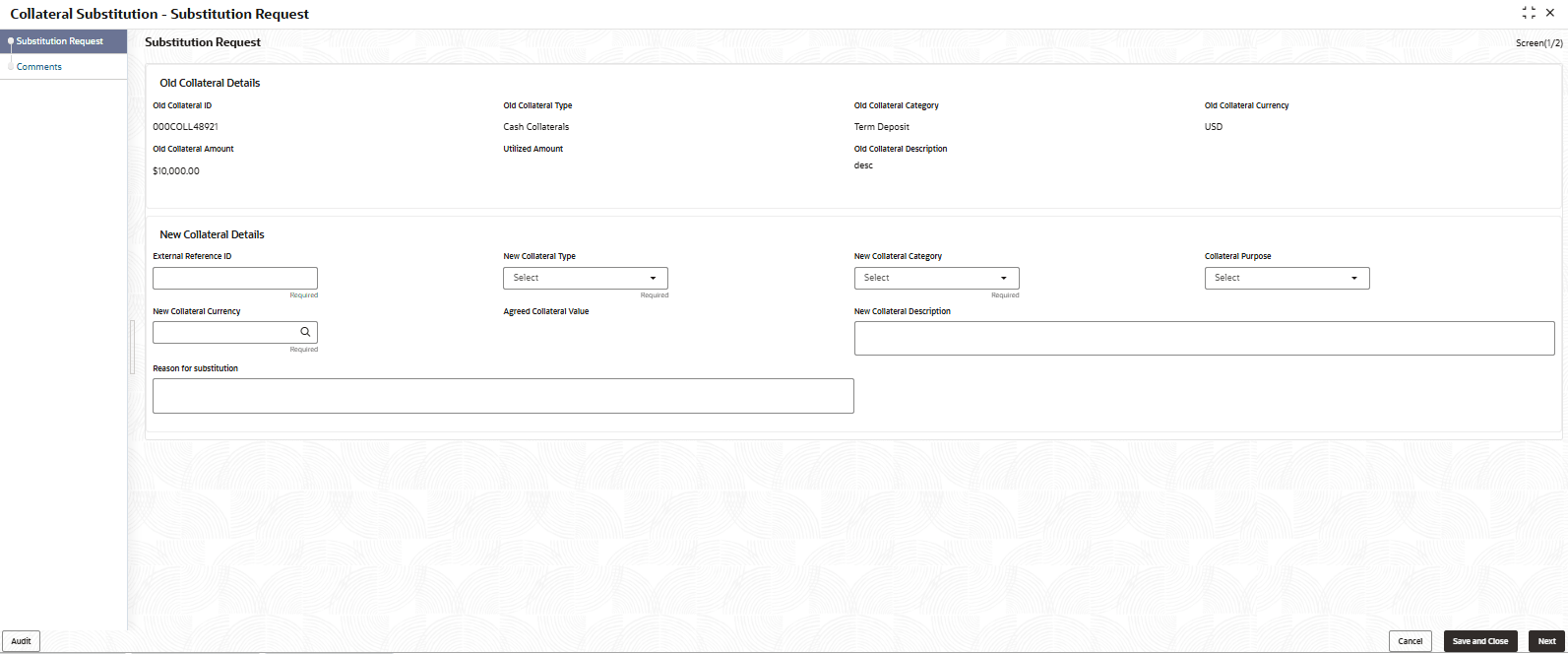
- Click Acquire & Edit.The Substitution Request screen is displays.For more information on fields, refer to the field description table.
Note:
The fields marked as Required are mandatory.Table 2-3 Substitution Request - Field and Description
Field Description Old Collateral Details Displays the old collateral details sections. Old Collateral ID Displays the old collateral ID. Old Collateral Type Displays the old collateral type. Old Collateral Category Displays the old collateral category. Old Collateral Currency Displays the old collateral currency. Utilized Amount Displays the utilized amount. Old Collateral Description Displays the old collateral description. New Collateral Details Displays the new collateral details sections. External Reference ID Specify the external reference ID. New Collateral Type Select the new collateral type from the drop-down list. The available options are: - Account Receivables
- Account Contracts
- Aircraft
- Bill Of Exchange
- Bond
- Cash Collaterals
- Commercial Paper
- Commodity
- Corporate Deposits
- Crop
- Fund
- Guarantee
- Insurance
- Inventory
- Machine
- Miscellaneous
- Other Bank Deposits
- PDC
- Perishable
- Precious Metals
- Promissory Note
- Property
- Ship
- Vehicle
New Collateral Category Select the new collateral category from the drop-down list. Collateral Purpose Select the collateral purpose from the drop-down list. The available options are: - New Facility
- Enhancement of Limit
- Replacement of Collateral
- Augmentation of Collateral
New Collateral Currency Click  icon to select the new collateral currency.
Agreed Collateral Value Specify the agreed collateral value in selected currency. New Collateral Description Specify a brief description about the new collateral. Reason for Substitution Specify the reason for substitution.

Parent topic: Collateral Substitution Request