16.1 Book Forex Deal
This topic describes the systematic instructions to buy or sell foreign currency at a selected exchange rate for immediate or future transactions.
- Navigate to the Forex Deal screen.
- Click Book Deal to initiate and book a forex deal for
the selected currency pair and amount.The Book Forex Deal screen is displayed.
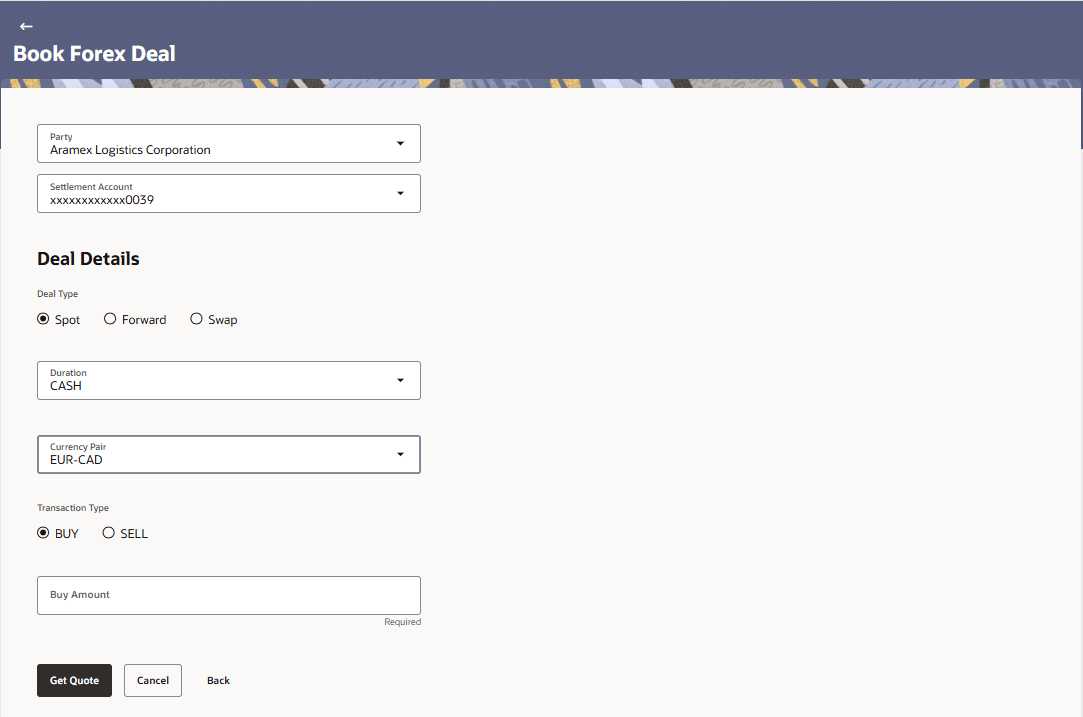
- Specify the fields on Book Forex Deal screen.For more information on fields, refer to the field and description table.
Table 16-1 Book Forex Deal - Field Description
Field Name Description Fields can be configured using the regional configurator. Party Select the corporate entity for which the forex deal is being booked. Settlement Account Select the account that will be used to settle the forex transaction. Deal Type Select the Deal Type: - Spot – Immediate settlement
- Forward – Future dated settlement
- Swap – Combination of buy and sell deals
Note: Out of the box Spot is qualified with OBTR.
Duration Select the deal duration based on settlement requirements and deal type. Durations are configured as per requirement using regional configurator. Swap Select the swap type from the drop-down list. The available options are:- Spot-Forward
- Forward-Forward
This field will be displayed only after the Deal Type is selected as Swap.
Currency Pair Select the currency pair for the forex deal. Currency pair is fetched from Common core. Transaction Type Select the transaction type: The available options are:
- Buy
- Sell
This field is displayed only after a Currency Pair is selected.
Amount Specify the amount to be purchased or sold for the selected currency pair. Get Quote Click Get Quote to fetch the applicable exchange rate. Cancel Click Cancel to abort the forex deal booking process. Back Click Back to navigate to the previous screen. - Click Get Quote to fetch the applicable exchange
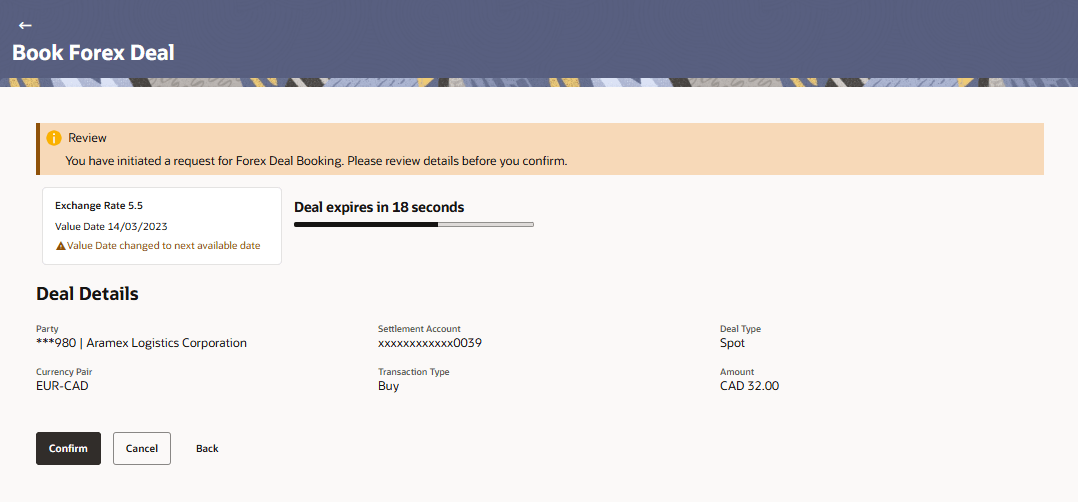
rate.The exchange rate is retrieved from the host system (OBTR) and displayed on the screen. If the value date is changed, the updated date is also reflected on the screen.
A timer is displayed within which the user must confirm the deal. If the deal is not confirmed within this time, the Confirm button is disabled, and the user must fetch the exchange rate again.
- Perform one of the following actions.
- Click Confirm to validate the entered details and proceed with booking the forex deal.
- Click Cancel to abort the forex deal booking process.
- Click Back to navigate to the previous screen.
Parent topic: Forex Deal