13.2 Direct Debits Details
This topic describes the systematic instruction to Direct Debits Details screen.
All the details of the recurring payment are categorized for easy viewing based on Execution Details & Payment History details. The user can also stop the repeat transfers through Stop Direct Debits feature.
To view the direct debits details:
- Select the account from the drop-down list to view its recurring payments. The system displays a summary of all the recurring payments for the selected account.
- Click Direct Debits to displays details on standing
orders.The Recurring Payments - Direct Debits screen is displayed.
- Click on the Reference
Number for the specific payment record to view
the instructions set for the transfer.
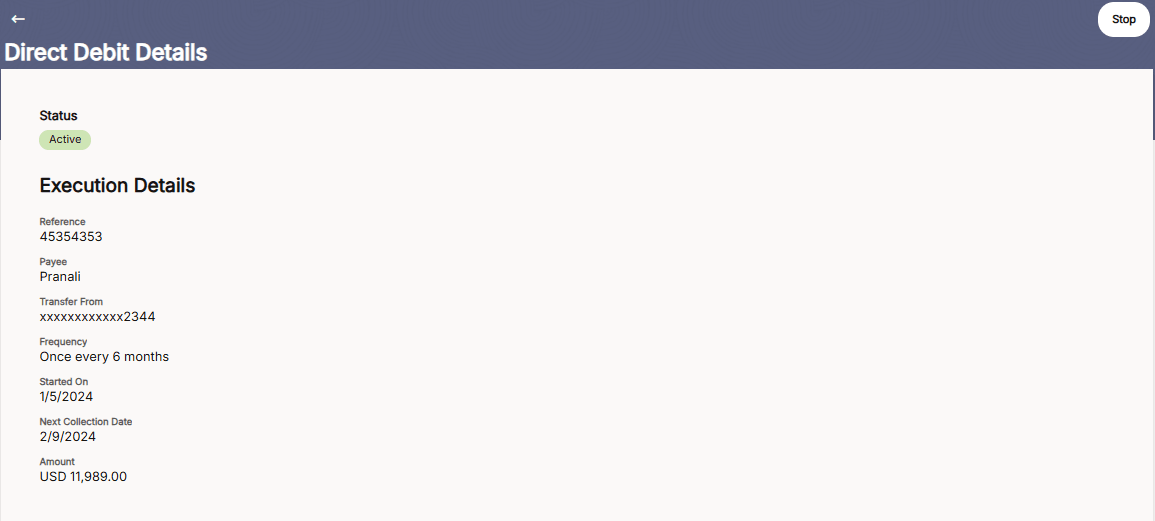
The Direct Debit Details screen appears with the details.
Table 13-3 Direct Debit Details - Field Description
Field Name Description A message identifying the reference number of the transaction is displayed. Status The status of the repeat transfer. The status can be:
- Active
- Failed
Execution Details Information specified in below fields are related to execution details. Reference Displays the reference number. Payee Display payee name. Transfer From Display CASA account number from which the transfer is set. Frequency Displays the frequency in which the recurring payment is executed. Started On Displays the start date of the repeat transfer execution i.e., the date on which the repeat transfer first starts being executed. Next CollectionsDate Displays the next collection date on which repeat transfer instructions are executed. Amount Display amount with currency.
- Click on the Reference
Number for the specific payment record to view
the instructions set for the transfer.
- Click Direct Debits to displays details on standing
orders.
- On Direct Debits Details screen, click
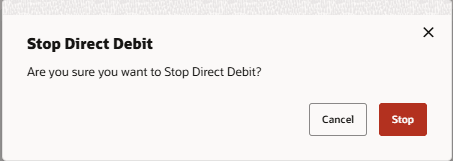
Stop button to stop the details.The Stop Direct Debit confirmation popup appears.
- Click Stop to stop the repeat
transfers maintained for the
account.
OR
Click Cancel to cancel the transaction.
The message confirming that the repeat transfer has been stopped/ cancelled appears.
- Click Stop to stop the repeat
transfers maintained for the
account.
Parent topic: Direct Debits