8.3.1 Allocation Rule overlay window
This window appears when you click the Rule Id link in the Prioritize Rule step when creating an allocation rule.
Figure 8-28 Allocation Rule overlay window
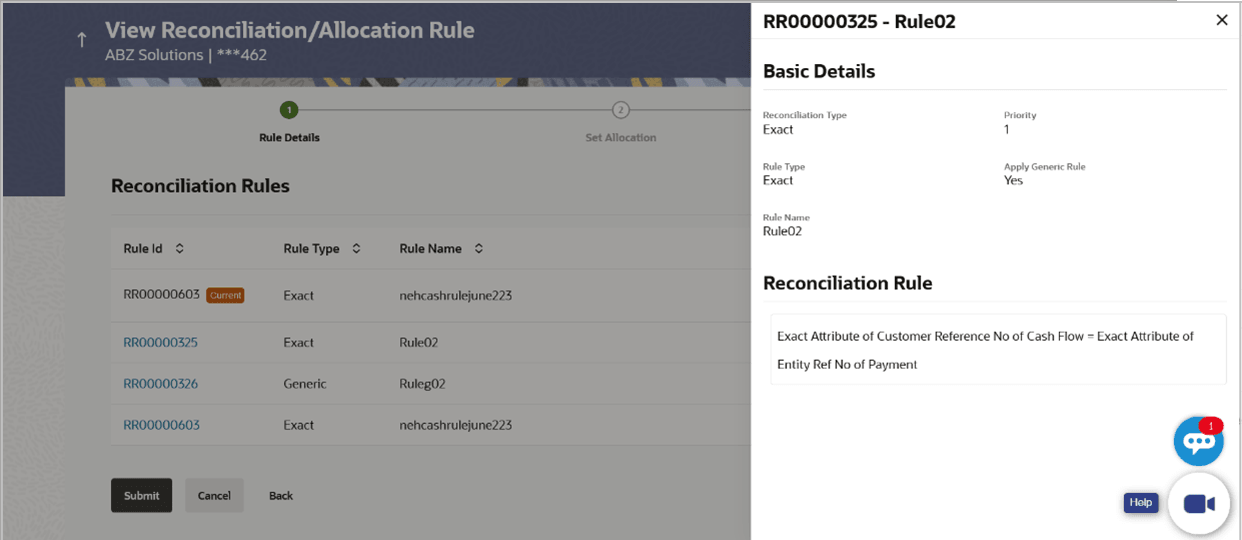
Table 8-12 Allocation Rule overlay window - Field Description
| Field Name | Description |
|---|---|
| Rule ID and Rule Name | Displays the rule ID and name at the top of the overlay window. |
| Basic Details | This section displays the Basic Details. |
| Reconciliation Type | This field appears blank for allocation rule. |
| Priority | Displays the priority assigned to the allocation rule. |
| Rule Type | Displays Exact by default. |
| Apply Generic Rule | Displays No by default. |
| Rule Name | Displays the name of the rule. |
| Reconciliation Rule | This section displays the entire rule that has been configured. |
| Allocation Details – Account Based | This section is displayed if account-based allocation has been selected for the rule. |
| Serial Number | Displays the serial number of the allocation. |
| Allocation Account | Displays the masked account number of the allocation. |
| Percentage | Displays the percentage allotted to the allocation account. |
| Allocation Details – Attribute Based | This section is displayed if attribute-based allocation has been selected for the rule. |
| Serial Number | Displays the serial number of the allocation. |
| Allocation Entity and Attributes | Displays the entity and the selected attribute of the allocation. |
| Percentage | Displays the percentage allotted for the allocation. |
Parent topic: Create Allocation Rule
Parent topic: View/Edit Allocation Rule