3.1 Overview
This topic describes the overview of the dynamic discounting.
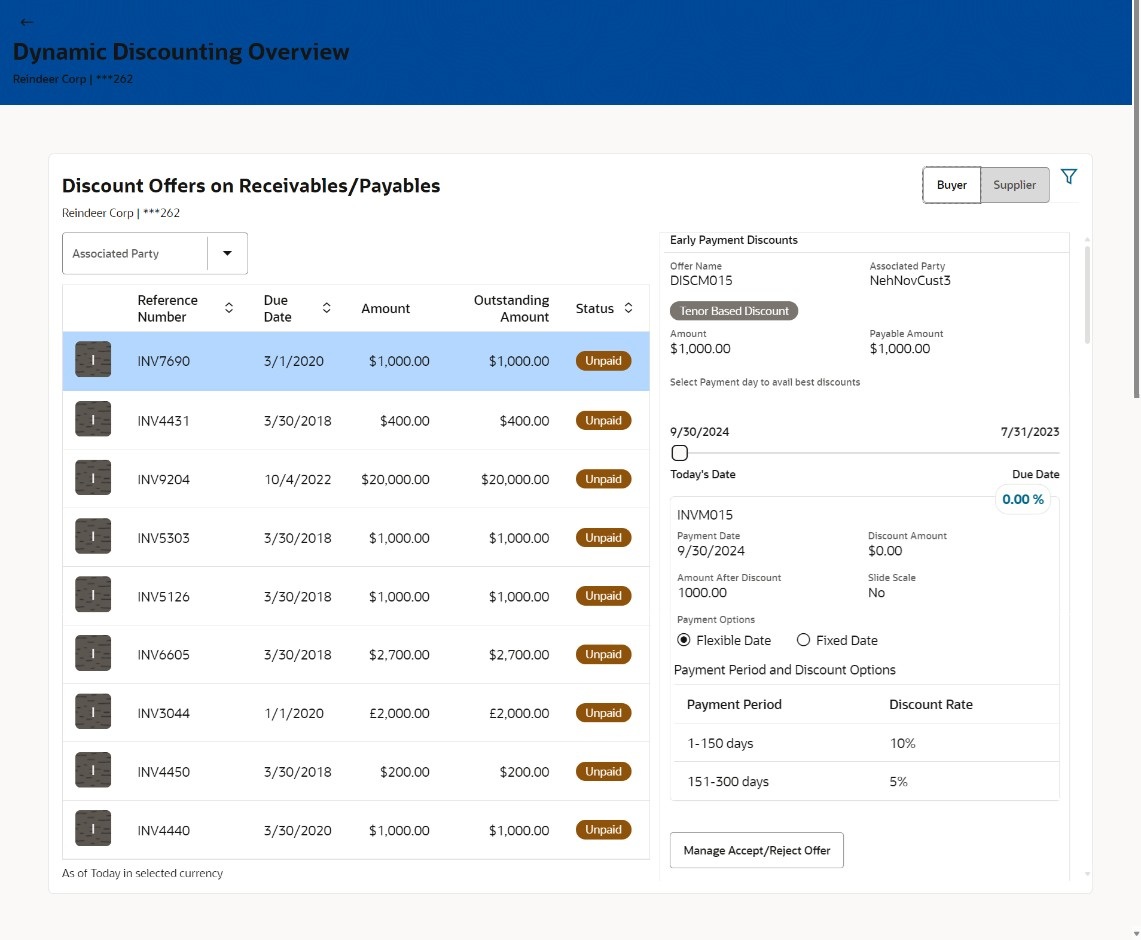
Discount Offers on Receivables/Payables – This widget displays the list of Receivables/Payables for which discount offers are available. The details can be viewed separately for the party’s roles as Buyer and Supplier. You can select the associated party from the dropdown to view the applicable receivables/payables and discount offers. The reference number, due date, amount, outstanding amount, and the status are displayed for each receivables/payables record. On clicking each record, details of discount offer displays in the right with an option to accept/reject the discount offer. On clicking the Accept/Reject Discount Offer link in the widget, Accept/Reject Discount Offer option in the Manage Receivables/Payables screen appears. For more information, refer the Accept/Reject Discount Offer. You can also view the applicable discount offers of other accessible parties, by clicking the filter icon and selecting the required party name.
Click this  icon to filter the discount offers based on party name. On selection, the
widget displays the discount offers of the selected party.
icon to filter the discount offers based on party name. On selection, the
widget displays the discount offers of the selected party.
Parent topic: Dynamic Discounting