3.2 Create Discount Offer
This topic provides systematic instructions to create a discount offer.
- From the Dashboard, click the Toggle
Menu, then click Receivables/Payables,
Dynamic Discounting, and Create Discount
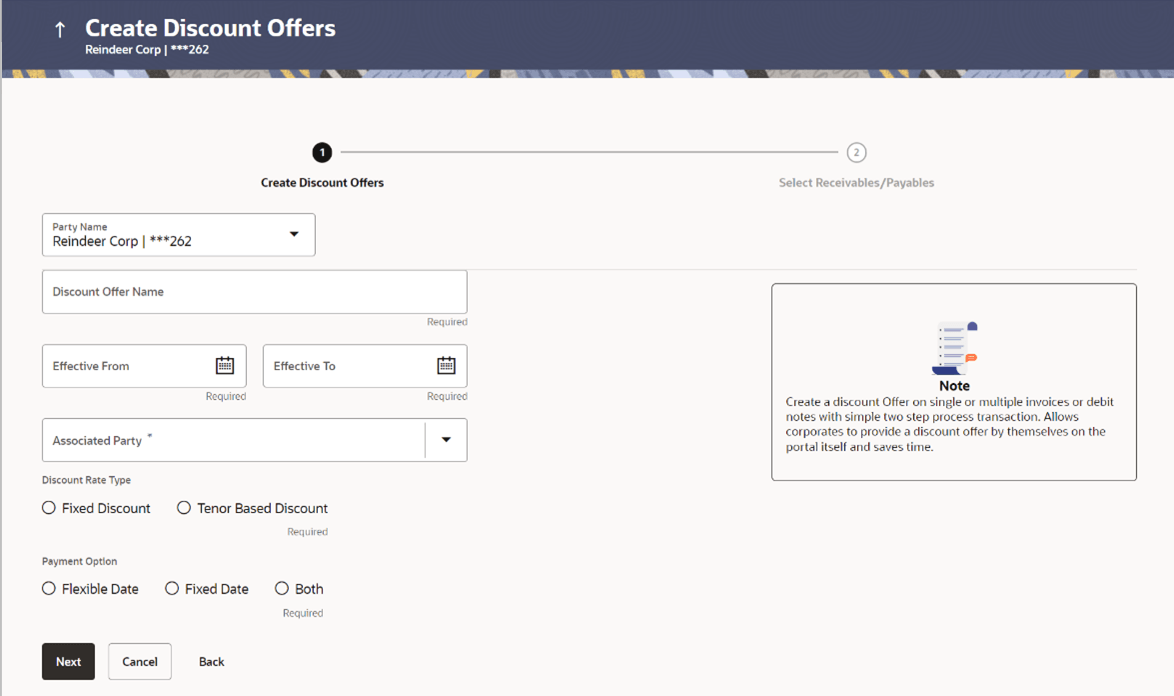
Offer.The Create Discount Offers screen appears.
Table 3-1 Field Description
Field Name Description Create Discount Offers This section displays Create Discount Offers details. Party Name Select the party name from the dropdown list in which the discount offer must be created. By default, the primary party/gcif of the logged-in user is selected. Note: Only accessible parties are displayed to the user.
Discount Offer Name Specify the name to be associated with the discount offer being created. Effective Date Click the calendar icons and set the start and end dates for the validity of the discount offer. Associated Party Select the associated party to link the discount offers from all on-boarded associated parties. The list of on-boarded associated party is categorized by: - Anchor Buyer
- Anchor Supplier
- Counter Party Buyer
- Counter Party Supplier
On selecting an associated party, the role of the party as Buyer or Supplier, appears below this field.
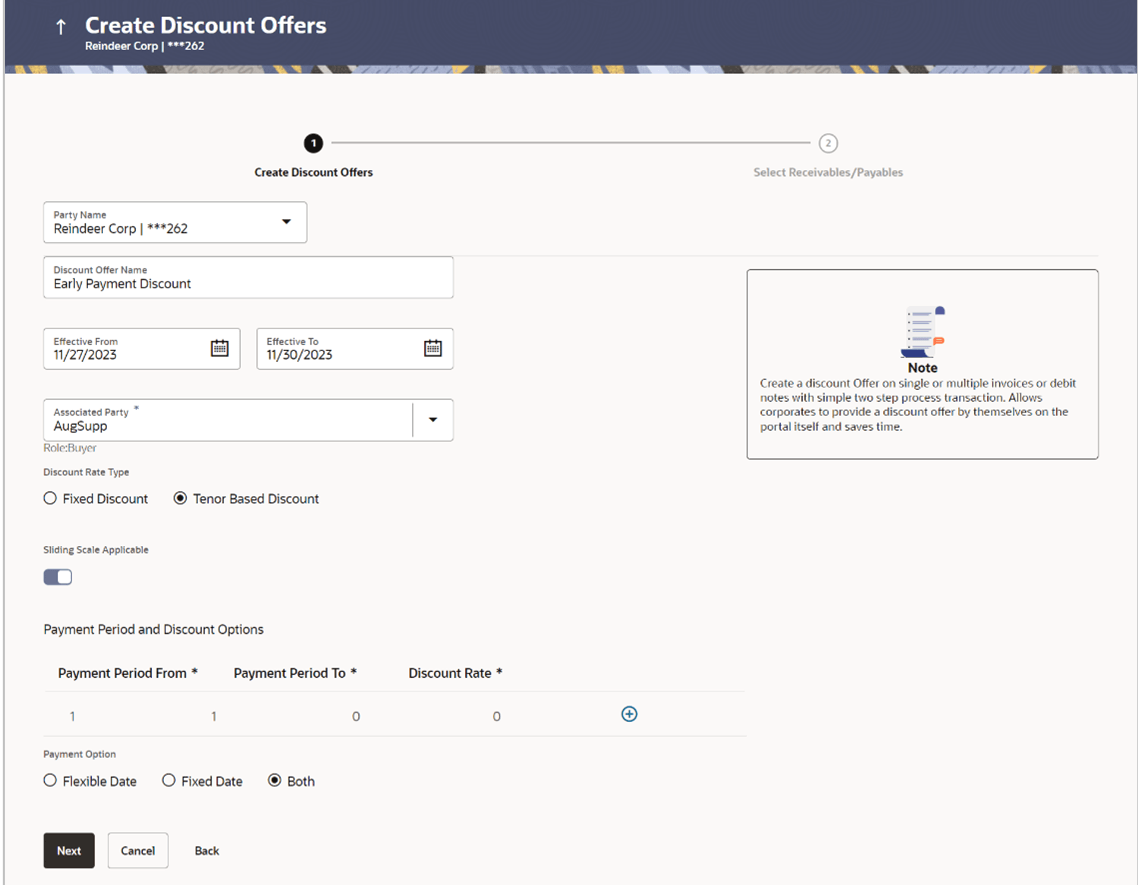
Discount Rate Type Select whether the discount rate will be fixed or tenor based. For the Fixed option, a fixed discount rate will be applied to the receivable/payable outstanding amount. For the Tenor Based option, variable discount rates are applicable based on the number of days within which the receivable/payable is paid off. The following scenarios are applicable if you select the Fixed option from the Discount Rate Type field. For more information, refer If the Discount Rate Type is Fixed section.
The following scenarios are applicable if you select the Tenor Based option from the Discount Rate Type field. For more information, refer If the Discount Rate Type is Tenor Based section.
Sliding Scale Applicable Enable this switch if the discount rate to be applied should reduce as the payment day advances. When Sliding Scale Applicable is switched ON:
- In case of Fixed discount rate, if the payment is made on the same day as invoice creation, then the entire discount is applied to the invoice amount. As each day advances, the discount rate slides down by the average discount per day from the invoice creation date till the invoice due date.
- In case of Tenor Based discount type, two columns are added to the Tenor Based table, namely, Highest Possible Discount Rate and Lowest Possible Discount Rate. On the starting day of the tenor, the highest possible discount rate is offered on the invoice amount. The discount rate then gradually slides down by the average discount per day from the start day of the tenor to the final day of the tenor. On the final day of the tenor, the lowest possible discount rate is offered.
Discount Rate Specify the discount rate to be applied for the offer. This field appears if you select the Fixed option from the Discount Rate Type field.
Payment Period From Specify the starting day of the tenor. Payment Period To Specify the final day of the tenor. Discount Rate Specify the discount percentage applicable for the tenor. This field is applicable only if Sliding Scale option is switched OFF. 
Click the add icon to add another tenor and applicable discount rate. 
Click the delete icon to delete a specific tenor. Highest Possible Discount Rate Specify the upper threshold of discount rate that should be offered on the first day of the tenor. Lowest Possible Discount Rate Specify the lower threshold of discount rate that should be offered on the final day of the tenor. Payment Option Select the required payment option. If you select Flexible, then the applicable discount is offered on the day of the payment as per the offer maintenance.
If you select Fixed, then a specific day must be selected during the acceptance of discount offer in Manage Receivables/Payables. Discount is offered only when the payment is made on that specific day.
If you select Both, then an option to select between ‘Flexible’ and ‘Fixed’ payment options is provided during the acceptance of discount offer in Manage Receivables/Payables.
If the Discount Rate Type is Fixed.
-
Scenario 1: For Discount Rate Type - Fixed, Sliding Scale Applicable – OFF
The Discount Rate field appears. The discount entered in this field, is applied whenever the payment is made on any day from the invoice creation day to the invoice due day.
-
Scenario 2: For Discount Rate Type – Fixed, Sliding Scale Applicable – ON
The Discount Rate field appears. The discount entered in this field is offered on the day of invoice creation. Then, as each day advances, the discount rate reduces by the average discount value per day from invoice creation day to invoice due day. No discount is offered past the due day. For example, if the invoice creation day is Day 1 and invoice due day is Day 10, and the discount rate offered is 10%, then on Day 1, 10% discount is offered on the invoice amount. Then as each day advances, the discount is reduced by 1%, so on Day 2, the discount offered is 9%. On Day 5, the discount offered is 5%. And on Day 10, the discount offered is 1%.
-
Scenario 1: For Discount Rate Type – Tenor Based, Sliding Scale Applicable – OFF
A tabular section appears, with Payment Period From, Payment Period To, and Discount Rate columns for entering the tenor and discount details. For each tenor entered, a fixed discount rate is offered. For example:Payment Period From Payment Period To Discount 1 10 10 11 20 5
If invoice payment is made any day from the 1st to 10th day of invoice creation, a fixed discount of 10% is offered on the invoice amount. From the 11th to the 20th day of invoice creation, a discount of 5% is offered on the invoice amount.
Scenario 2: For Discount Rate Type – Tenor Based, Sliding Scale Applicable – ON
A tabular section appears, with Payment Period From, Payment Period To, Highest Possible Discount Rate, and Lowest Possible Discount Rate columns. The discount rate for each tenor, starts with the highest possible value on the Payment Period From day. It then slides down by the average discount rate per day from the Payment Period From day to the Payment Period To day, for each tenor. For example:| Payment Period From | Payment Period To | Highest Possible Discount Rate | Lowest Possible Discount Rate |
|---|---|---|---|
| 1 | 5 | 20 | 15 |
| 6 | 10 | 14 | 10 |
If invoice payment is made on the 1st day, then a discount of 20% is offered on the invoice amount. As each day advances, the discount is reduced by 1%. So on the 2nd day, the discount offered is 19%. On the 5th day, discount offered is 15%, and so on.
- In the Create Discount Offers stage, enter the details as mentioned
above.
- Click Next to go to the Select
Receivables/Payables stage. Or, do one of the following:
- Click Back to go to the previous screen.
- Click Cancel to cancel the creation of the discount offer.
Table 3-2 Field Description
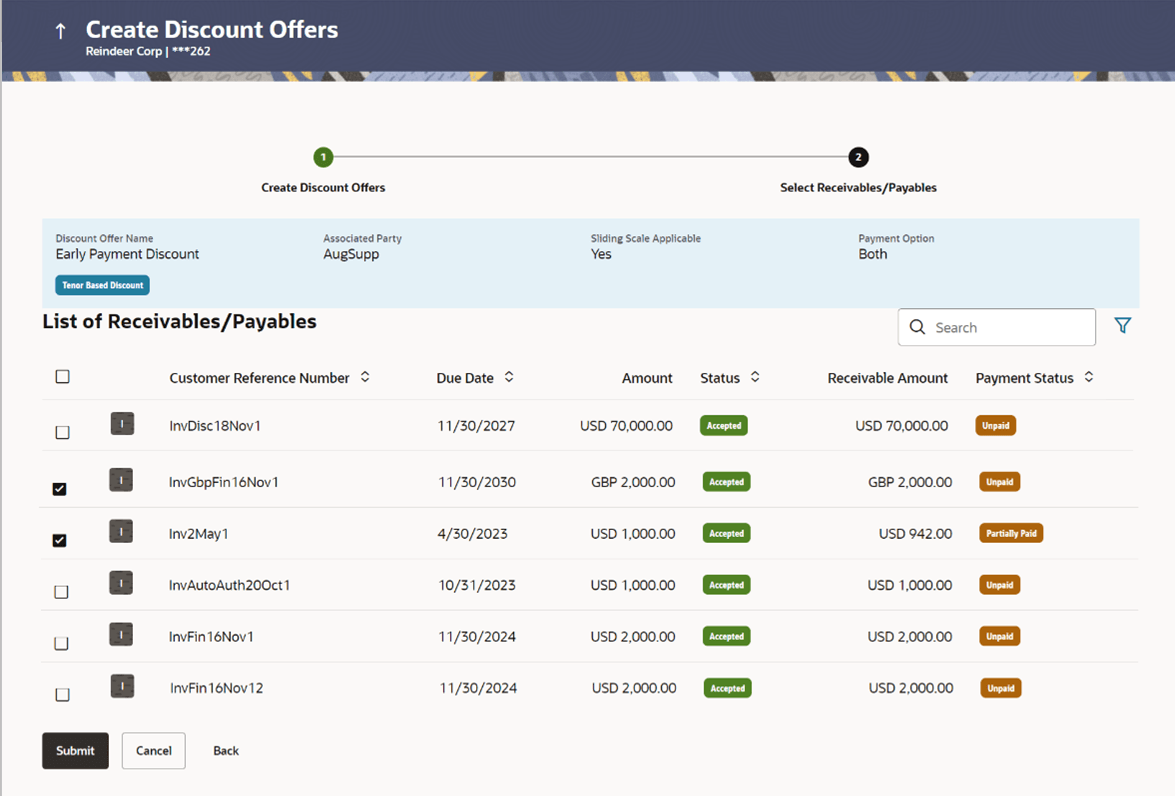
Field Name Description Select Receivables/Payables This section displays Receivables and Payables details. Discount Offer Name Displays the name of the discount offer being created. The colour-coded rate type, whether fixed or tenor-based, is displayed beside the discount offer name.
Associated Party Displays the name of the selected associated party. Sliding Scale Applicable Displays ‘Yes’ if sliding scale of discount rate is applicable, and ‘No’, otherwise. Payment Option Displays the payment option selected, whether fixed, or flexible, or both. List of Receivables/Payables This section displays List of Receivables/Payables. Search Specify the partial or complete search string to search for the invoices to apply the discount offer to. 
Click the filter icon and enter the required search criteria to search for required invoices to apply the offer to. A Search overlay window appears. For more details about the search criteria in this overlay window refer the Search (overlay window) section under View/Edit Receivables/Payables, in this user manual. Check Box Select a specific check box beside an invoice or the main check box to select all invoices listed. Indicator Displays ‘I’ for invoice. Customer Reference Number Displays the unique reference number assigned to the invoice. Due Date Displays the date on which the invoice is due to be fully paid. Amount Displays the invoice amount. Status Displays the status of the invoice. Receivable/Payable Amount Displays the amount that is yet to be received/paid. Payment Status Displays the status of the payment, whether unpaid or partially paid. - Once you select the required invoice(s) to apply the offer to, click
Submit. The Review screen appears. Or, do one of the following:
- Click Back to go to the previous screen.
- Click Cancel to cancel the creation of discount offer.
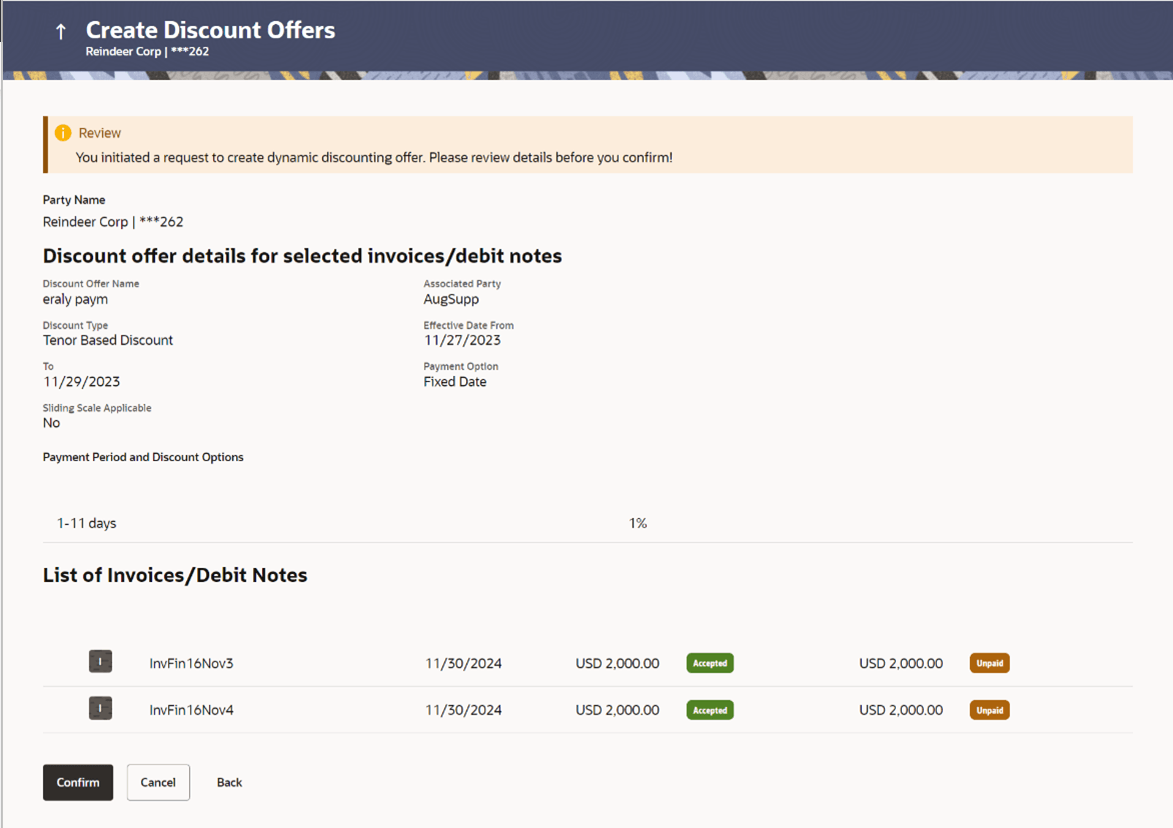
- Once you review the details of the discount offer being created, click
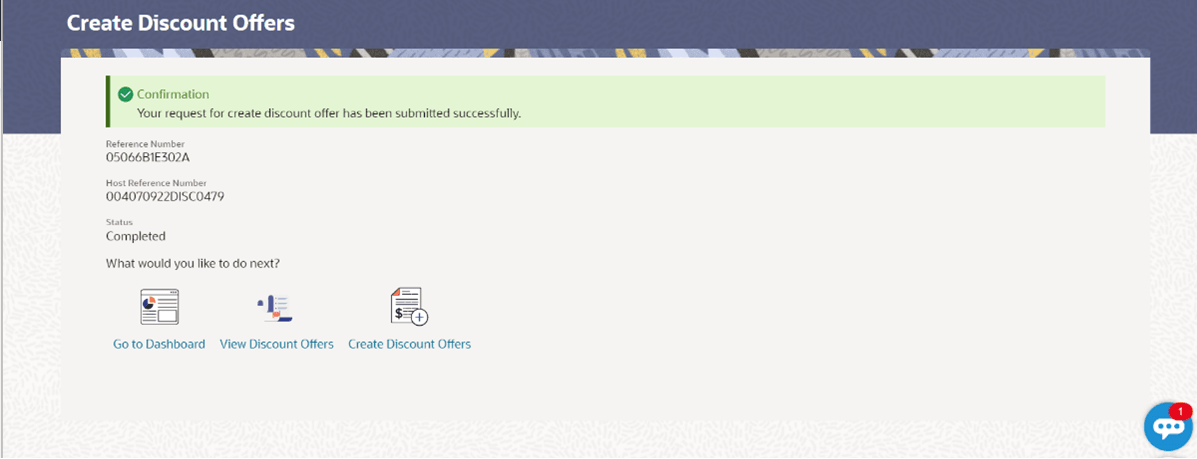
Confirm. The Confirmation screen appears. Or, do one
of the following:
- Click Back to go to the previous screen.
- Click Cancel to cancel the creation of discount offer.
Parent topic: Dynamic Discounting