8.5.2.1 Single Cash Flow Multiple Payments
This topic provides systematic instructions to reconcile a single cashflow with multiple payments.
- From the Dashboard, click the Toggle
Menu, then click Receivables/Payables,
Manual Reconciliation, and then Cash Flow
against Payment.The Cash Flow against Payment screen appears.
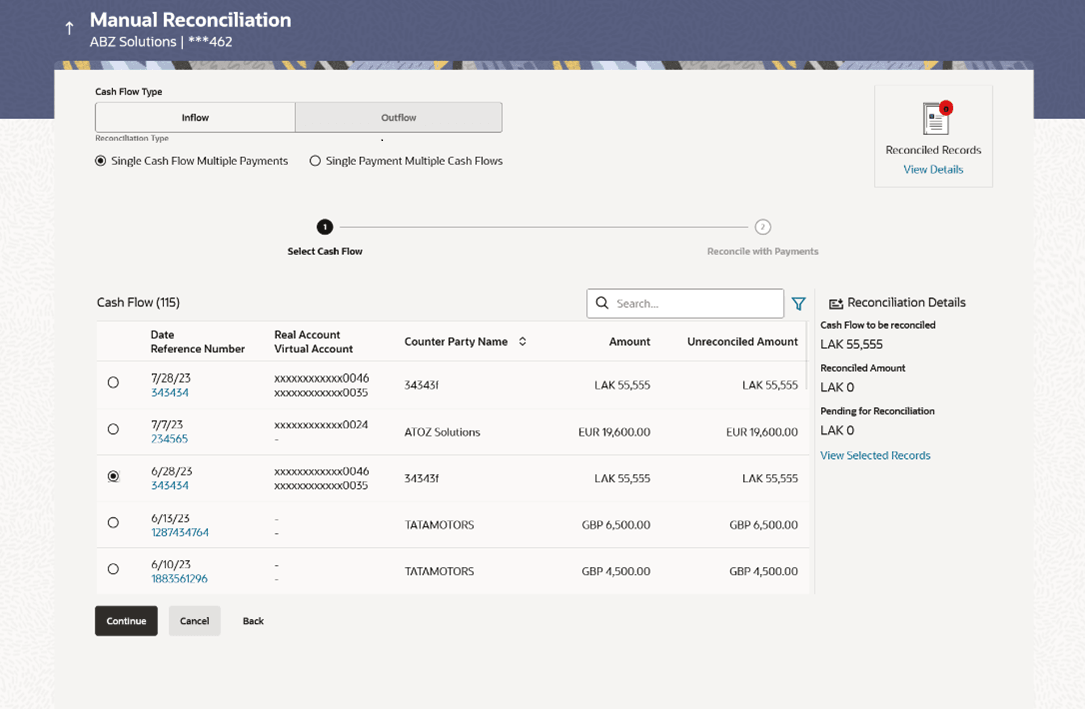
Figure 8-71 Manual Reconciliation - Select Cash Flow
- Select the Single Cash Flow Multiple Payments option from the
Reconciliation Type field. A list of unreconciled / partially-reconciled cash flow records is displayed. You can select one cash flow record from the list.
Table 8-33 Select Cash Flow - Field Description
Field Name Description Cash Flow (number) Displays the total number of cash flow records available in the list. Search Indicates an option to search for specific cash flow records. 
Click this icon to filter the cash flow records based on certain criteria. The Cash Flow Search overlay window appears. For more information on the fields in this window, refer the Cash Flow Search section in this document. Date Reference Number Displays the date of the cash flow and its reference number as a hyperlink. You can click this link to view the cash flow details in an overlay window. For more information on the fields displayed, refer the Cash Flow Details overlay window section below. Real Account Virtual Account Displays the real and virtual account numbers (in masked format), from which the cash flow was initiated. Counter Party Name Displays the name of the associated or counter party. Amount Displays the total cash flow amount. Unreconciled Amount Displays the unreconciled cash flow amount. Reconciliation Details section 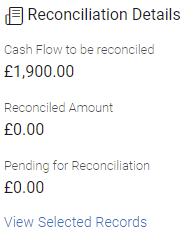
This section, present on the right hand side of the Manual Reconciliation screen, is automatically updated when you select the cash flow record and payments for reconciliation. Cash Flow to be reconciled Displays the cash flow amount to be reconciled, once you select a cash flow record in the 1st step of manual reconciliation. Reconciled Amount Displays the total payments amount. This field is updated once you select the payments in the 2nd step of manual reconciliation. Pending for Reconciliation Displays the difference between the amounts in the fields above. View Selected Records Click this link to view the details of the selected cash flow records and payments. An overlay window appears with the details of the selected records.
Cash Flow Details overlay window
This window appears when you click the Date Reference Number hyperlink.Figure 8-72 Cash Flow Details overlay window
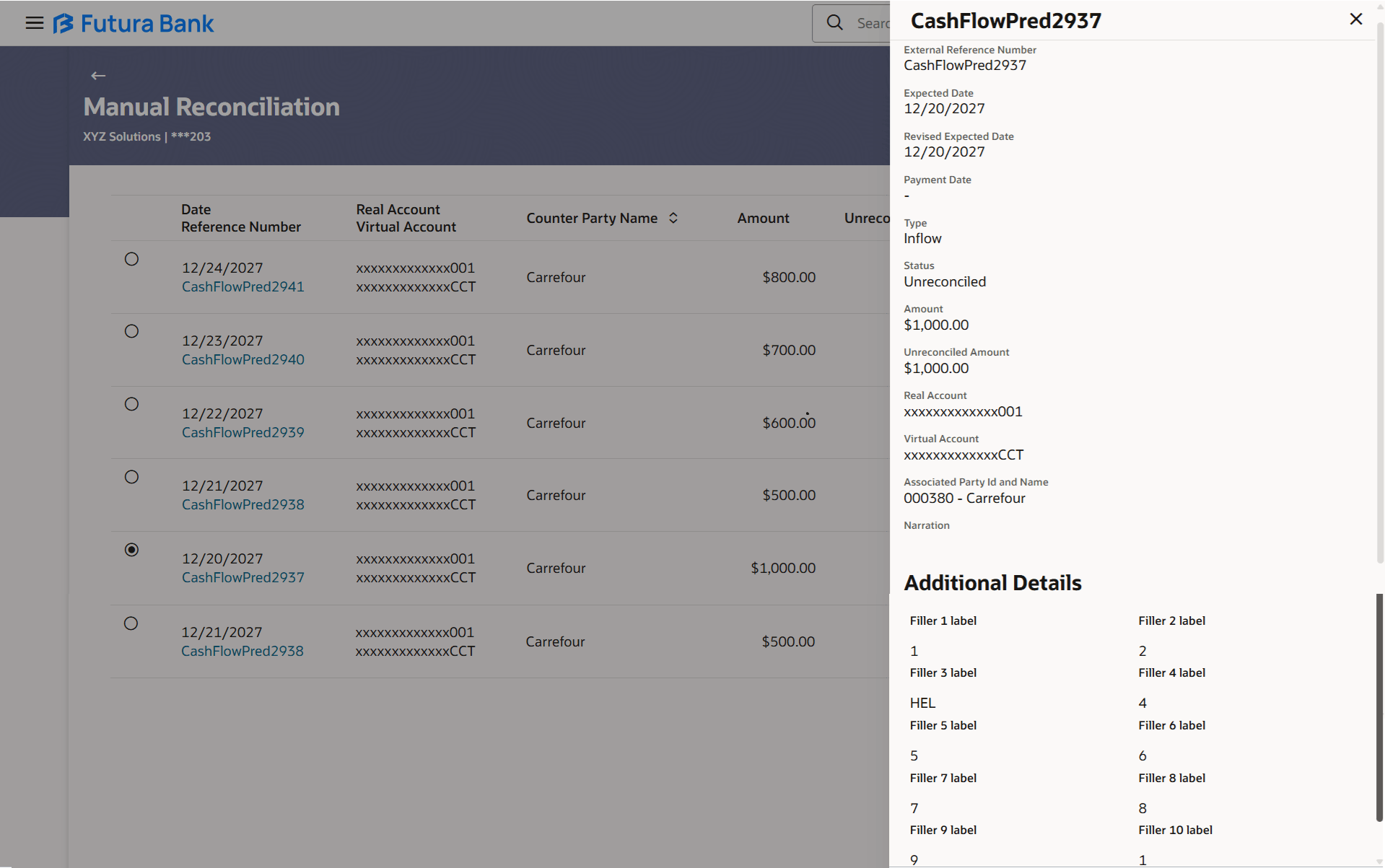
Table 8-34 Cash Flow Details overlay window - Field Description
| Field Name | Description |
|---|---|
| Cash Flow Reference Number | Displays the cash flow reference number assigned by the host, as the heading of the overlay window. |
| External Reference Number | Displays the external cash flow reference number. |
| Expected Date | Displays the expected date of the cash flow transaction. |
| Revised Expected Date | Displays the revised expected date of the cash flow transaction. |
| Payment Date | Displays the date of the payment. |
| Type | Displays the type of cash flow, whether inflow or outflow. |
| Status | Displays the status of the cash flow. |
| Amount | Displays the cash flow amount. |
| Unreconciled Amount | Displays the amount that is not yet reconciled. |
| Real Account | Displays the real account number involved in the cash flow transaction. |
| Virtual Account | Displays the virtual account number involved in the cash flow transaction. |
| Associated Party Id and Name | Displays the name and ID of the counter party involved in the cash flow transaction. |
| Narration | Displays any narration text/comments. |
| Additional Details | This section displays the Filler Label Fields. The financial institution can configure these fields on Day 0, based on their requirement. |
- Click Continue to proceed to the Reconcile with
Payments step. Or, do one of the following:
- Click Cancel to cancel the transaction.
- Click Back to go to the dashboard.
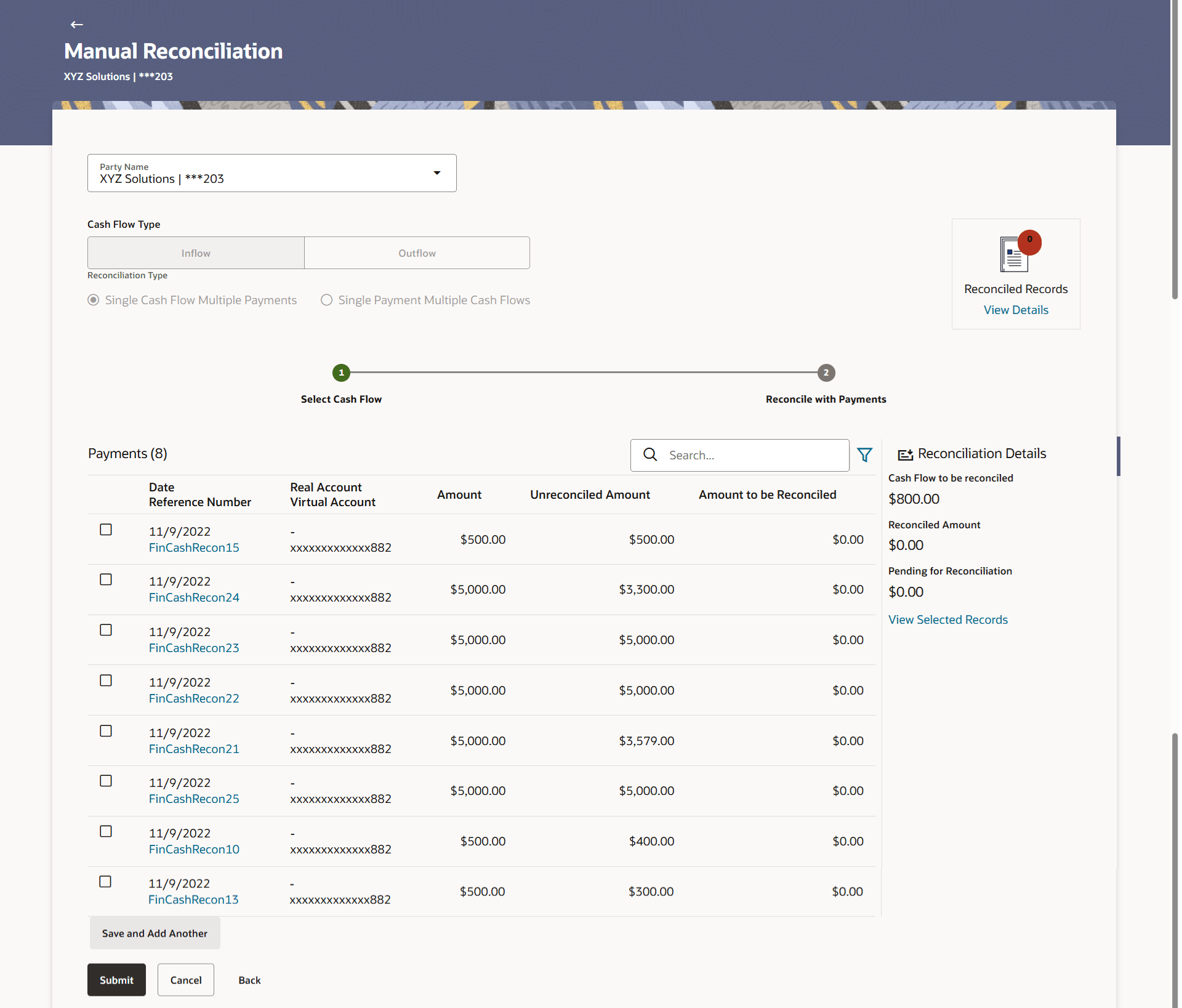
Table 8-35 Reconcile with Payments - Field Descriptio
Field Name Description Reconcile with Payments This step appears when you select a cash flow record and click Continue. You can select multiple payments for reconciliation. Payments (number) Displays the total number of payment records available in the list. Search Indicates an option to search for specific payments. Click this icon to filter the payments based on certain criteria. The Payment Search overlay window appears. For more information on the fields in this window, refer the Payment Search section in this document. Date Reference Number Displays the date of the payment and its reference number as a hyperlink. You can click this link to view the payment details in an overlay window. For more information on the fields displayed, refer the Payment Details overlay window section below. Real Account Virtual Account Displays the real and virtual account numbers (in masked format), from which the payment was initiated. Amount Displays the total payment amount. Unreconciled Amount Displays the payment amount that has not yet been reconciled. Amount to be Reconciled Indicates the payment amount to be reconciled. You can click to edit and modify the amount if required, and then click to save it. Reconciliation Details section 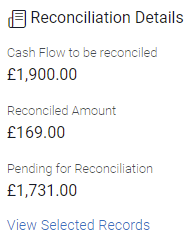
This section, present on the right hand side of the Manual Reconciliation screen, is automatically updated when you select the cash flow record and payments for reconciliation. Cash Flow to be reconciled Displays the cash flow amount to be reconciled, once you select a cash flow record in the 1st step of manual reconciliation. Reconciled Amount Displays the total payments amount. This field is updated once you select the payments in the 2nd step of manual reconciliation. Pending for Reconciliation Displays the difference between the amounts in the fields above. View Selected Records Click this link to view the details of the selected cash flow records and payments. An overlay window appears with the details of the selected records. Selected Record This overlay window appears when you click the View Selected Records link. It displays the details of the selected cash flow and payments to be reconciled. Reconciled Records This section (present on the top right side of the Manual Reconciliation screen) displays the number of records that you have saved for reconciliation by clicking Save and Add Another. You can click the View Details link to view the details of these saved cash flow-payments records, which appear in an overlay window. To remove a saved record, click  beside it.
Payment Details overlay window
This window appears when you click the payment reference number hyperlink.
Figure 8-74 Payment Details overlay window
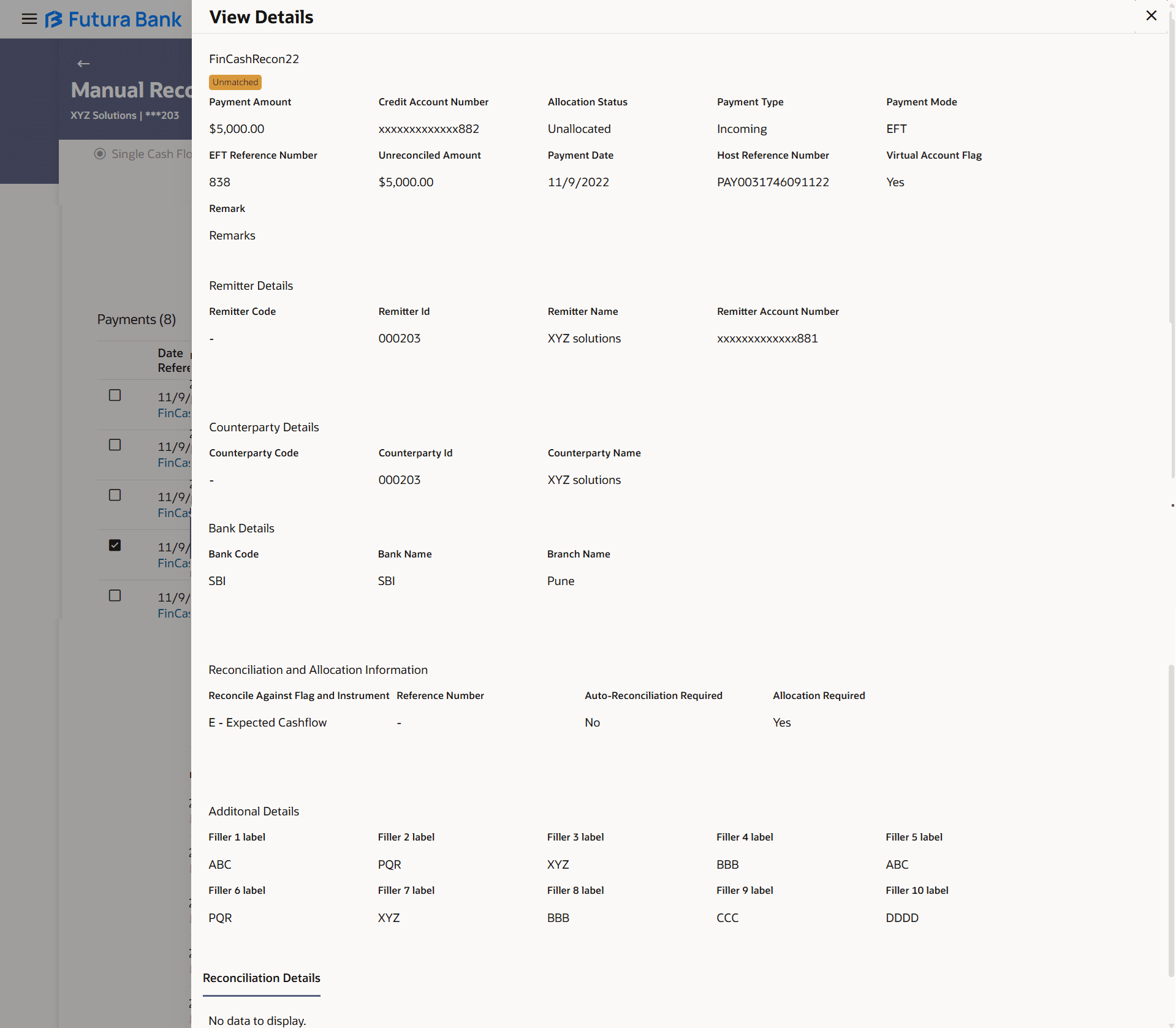
Table 8-36 Reconcile with Payments - Field Description
| Field Name | Description |
|---|---|
| Payment Reference Number | Displays the payment reference number assigned by the host. |
| Payment Amount | Displays the payment amount. |
| Credit Account Number | Displays the credit account number of the payment record. |
| Allocation Status | Displays the allocation status of the payment record. |
| Payment Type | Displays the type of payment, whether incoming or outgoing. |
| Payment Mode | Displays the mode in which the payment has been made. |
| EFT Reference Number | Displays the unique reference number assigned to the electronic transfer. |
| Unreconciled Amount | Displays any amount that is not yet reconciled. |
| Payment Date | Displays the date of the payment. |
| Host Reference Number | Displays the reference number of the payment, assigned by the host system. |
| Virtual Account Flag | Displays ‘Yes’ if a virtual account has been used for the payment, and ‘No’, otherwise. |
| Instrument Date | Displays the date of the instrument, if one has been used for the payment. |
| Remark | Displays remarks, if any. |
| Remitter Details | This section is displayed if the payment is of ‘incoming’ type with respect to the logged-in party. |
| Remitter Code | Displays the code assigned to the remitter by the remitter’s financial institution. |
| Remitter Id | Displays the remitter’s unique ID. |
| Remitter Name | Displays the remitter’s name. |
| Remitter Account Number | Displays the masked account number used by the
remitter to make the payment.
Note: The IBAN can be displayed instead of real and virtual account numbers, if the configuration at the bank-level is set to display IBAN. |
| Beneficiary Details | This section is displayed if the payment is of ‘outgoing’ type with respect to the logged-in party. |
| Beneficiary Code | Displays the code assigned to the beneficiary by the beneficiary’s financial institution. |
| Beneficiary Id | Displays the beneficiary’s unique ID. |
| Beneficiary Name | Displays the beneficiary’s name. |
| Beneficiary Account Number | Displays the masked account number used by the
beneficiary to which the payment has been made.
Note: The IBAN can be displayed instead of real and virtual account numbers, if the configuration at the bank-level is set to display IBAN. |
| Counterparty Details | This section is displays the Counterparty details. |
| Counterparty Code | Displays the code of the counterparty. |
| Counterparty Id | Displays the counterparty’s unique ID. |
| Counterparty Name | Displays the counterparty’s name. |
| Bank Details | This section is displays the bank details. |
| Bank Code | Displays the code of the other bank involved in the payment. |
| Bank Name | Displays the name of the other bank involved in the payment |
| Branch Name | Displays the name of the branch of the other bank. |
| Reconciliation and Allocation Information | This section is displays the Reconciliation and Allocation Information details. |
| Reconcile Against Flag and Instrument | Displays the flag and instrument against which the payment has-been/will-be reconciled. The instrument can be a receivable (such as invoice/debit note), finance, or cashflow. |
| Reference Number | Displays the reference number of the instrument against which the payment has-been/will-be reconciled. This can be the invoice/debit note reference number, the finance reference number, or the cashflow reference number. |
| Auto-Reconciliation Required | Displays ‘Yes’ if the instrument is eligible for auto-reconciliation, and ‘No’, otherwise. |
| Allocation Required | Displays ‘Yes’ if the instrument is eligible for allocation, and ‘No’, otherwise. |
| Finance Related Information | This section appears if these details have been provided in the bulk payment file that has been uploaded. |
| Program Code | Displays the program code associated with the finance. |
| Appropriation while Settlement | Displays the order of repayment with respect to principal, interest, and overdue interest. |
| Specific Appropriation | Displays the amounts allotted to repayment of principal, interest and overdue interest. |
| Additional Details | This section displays the Filler Label Fields. The financial institution can configure these fields on Day 0, based on their requirement. |
- In the Amount To Be Reconciled field, click
 to edit the amount and then click
  to save the changes, if required.
 - Click Save and Add Another to save the details and select another cash
flow record to reconcile against payments.
- To view a list of records that you have already saved, click the View
Details link in the Reconciled Records section, on the top
right side of the Manual Reconciliation screen. An overlay window appears
with the saved cash flow-payments records. To delete a record, click .
- To view a list of records that you have already saved, click the View
Details link in the Reconciled Records section, on the top
right side of the Manual Reconciliation screen. An overlay window appears
with the saved cash flow-payments records. To delete a record, click
Parent topic: Cash Flow against Payment