11 View Import Collection - Islamic
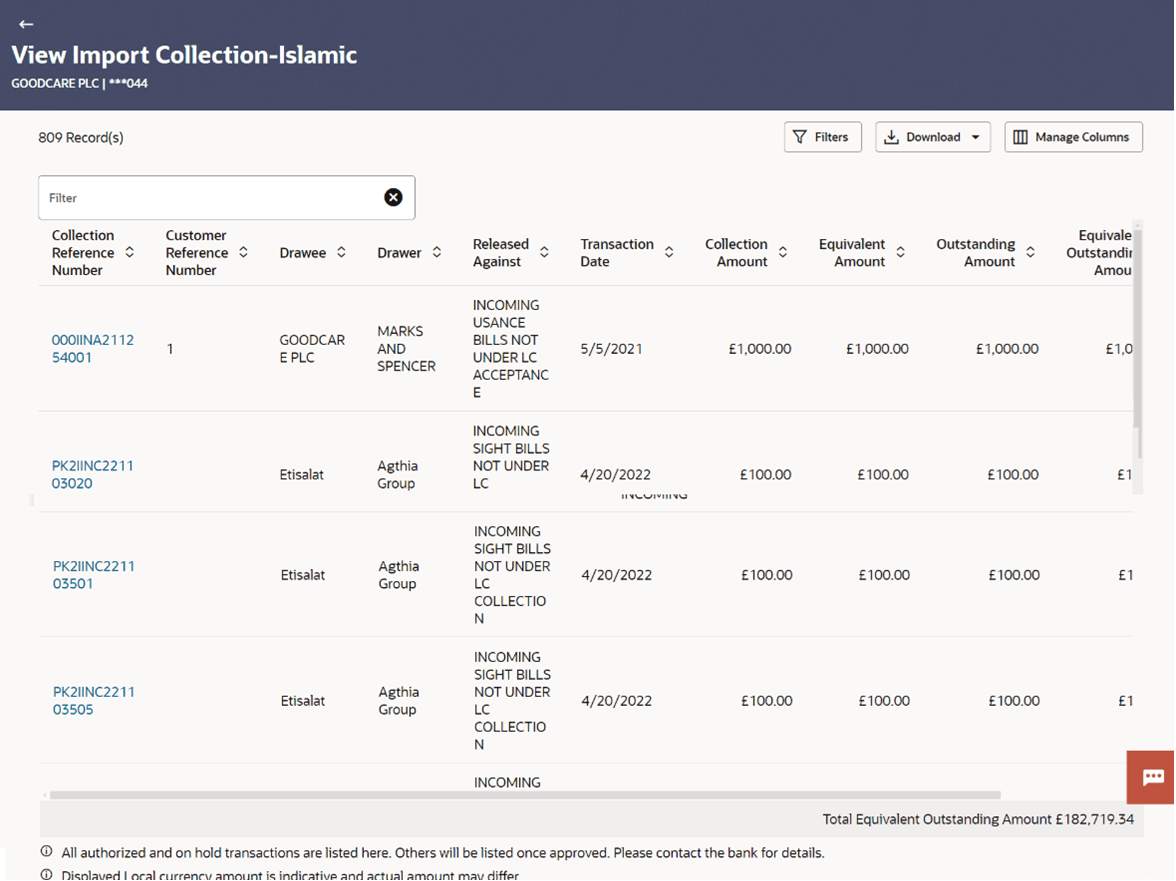
This topic provides the systematic instructions to view the details of existing Import Collection - Islamic in the application.
Using this option, you can view the details of existing Islamic Import Collection in the application. You can search the required Import Collection using different search criteria and download the Import Collection list in different file formats.
Note:
Whenever the API services are called by the OBDX, then OBTF pass only those incoming and outgoing SWIFT messages details that are flagged as External by the bank in the “Trade Finance Message Type Maintenance” screen.Pre-requisites
- User must have a valid corporate party Id and login credentials in place
- At least a single Import LC should exist for the party ID and party must having view rights for it
- From the Dashboard, click Menu, then click Trade Finance -
Islamic, and then click Collection. Under Collection, click Import
Collection and then click View Import Collection - Islamic.The View Import Collection - Islamic screen appears.
Figure 11-1 View Import Collection - Islamic
This topic contains following sub-topics:
- View Import Collection - Islamic - Search
This topic provides the systematic instructions to search an view the details of existing Import Collection. - View Import Collection - Islamic - View Collection Details
This topic provides the systematic instructions to view the View Import Collection - Islamic - View Collection Details in the application. - View Import Collection - Islamic - Attached Documents
This topic provides the systematic instructions to view and download the LC Attachments in the application. - View Import Collection - Islamic - Charges and Taxes
This topic provides the systematic instructions to view the Charges and Taxes details in the application. - View Import Collection - Islamic - SWIFT Messages
This topic provides the systematic instructions to view the SWIFT Messages details in the application. - View Import Collection - Islamic - Advice
This topic provides the systematic instructions to view the Advice details in the application. - View Import Collection - Islamic - Finances
This topic provides the systematic instructions to view the finances details in the application.