16.1 Modify Collection Islamic - Search
This topic provides the systematic instructions to search an view the existing Export Collection.
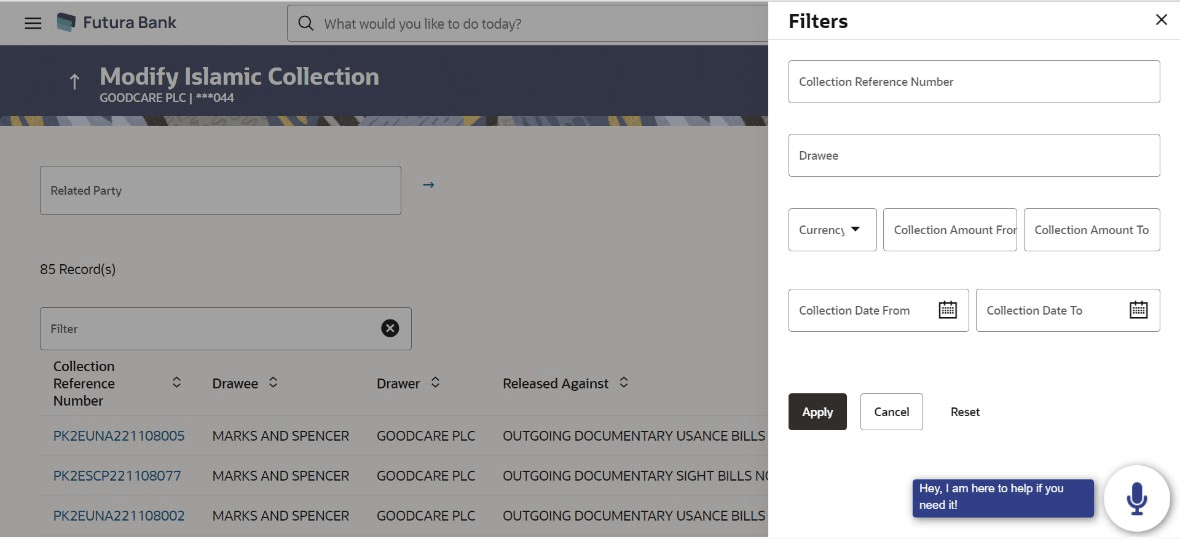
User can search the list existing export Collection using Collection Reference Number, Drawer, Collection Amount From- Collection Amount To and Collection Date From - Collection Date To.
To search the existing islamic export Collection:
- Perform any one of the following actions:
- From the Related Party list, select the appropriate option to initiate a search for the warranty related to the specific party.
- Specify the Collection Reference Number/Drawee/ Drawer/Released Against/ Collection Amount/ Equivalent Amount in the Filter field.
- Click
 to specify the filter criteria. The Filter overlay screen appears. Based on
the defined criteria you can view transactions.
to specify the filter criteria. The Filter overlay screen appears. Based on
the defined criteria you can view transactions.
Figure 16-2 Modify Islamic Collection - Filters
For more information refer to the field description table below:
Table 16-1 Modify Collection Islamic - Filter - Field Description
Field Name Description Collection Reference Number Specify the Islamic Export Collection reference number. Drawee Specify the name of the drawee. The Drawee is the receiver of Islamic Collection.
Currency Select the currency under the Collection. Collection Amount From- Collection Amount To Specify the Islamic Collection amount range used for searching the Collection. Collection Date From - Collection Date To Specify the start date and end date of the Islamic Collection date range used for searching the Import Collection. - Click Apply.The searched results are displayed based on the parameters provided.
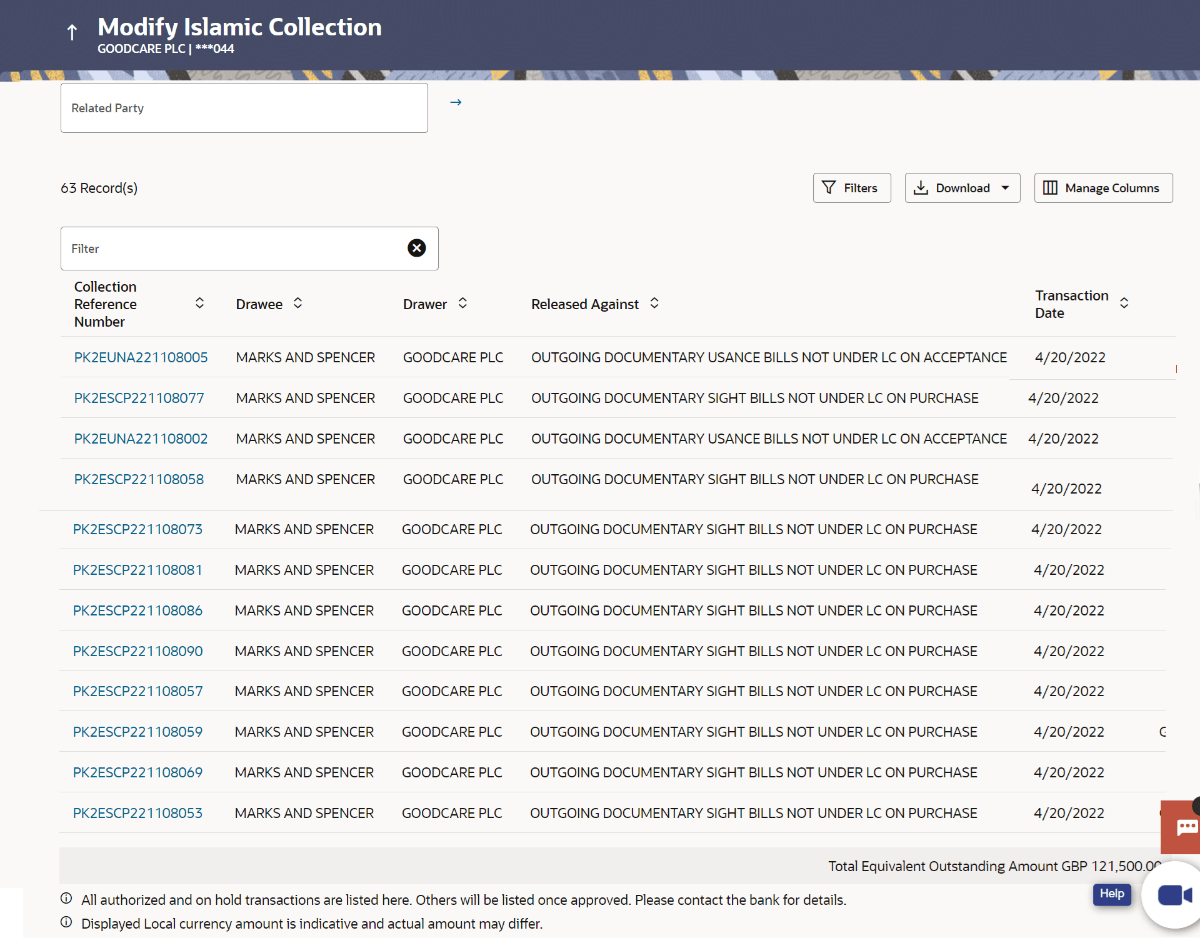
Figure 16-3 Modify Islamic Collection - Search Result
For more information refer to the field description table below:
Table 16-2 Modify Collection Islamic - Filter Result - Field Description
Field Name Description Related Party Specify the Related Party name to filter the Islamic Collection by Party Name. Filter Specify the Islamic Collection Reference Number/Drawee/ Drawer/Released Against/ Collection Amount/ Equivalent Amount to view the Export Collection. Filter Results This section displays the filter results. Collection Reference Number Displays the Islamic Export Collection reference number. Displays the link to view the Export collection details.
Drawee Displays the name of the drawee of the Islamic Export Collection. Drawer Displays the name of the drawer of the Islamic Export Collection. Released Against Displays the product name of the Islamic Export Collection. Transaction Date Displays the transaction date of the Export Collection. Collection Amount Displays the Islamic Export Collection amount. Equivalent Amount Displays the equivalent Islamic Export Collection amount. Financed Displays whether the collection amount is financed or not. Total Equivalent Outstanding Amount Displays the total outstanding equivalent amount in local currency. - Perform one of the following actions:
- Click on the desired Collection Reference Number link to view the Collection details. The Modify Collection screen appears with the details of the selected Export Collection. By default, Discount tab appears.
- Click the
 icon to download the records in CSV & PDF format.
- Click the
 icon to setup a column preference by rearranging or removing
columns.
icon to setup a column preference by rearranging or removing
columns.
Note:
If there is a Relationship pricing maintained for the customer, the same would be reflected in the charges instead of the standard pricing.
Parent topic: Modify Collection - Islamic