15 OBDX Regionalization Configuration
This topic provides information on OBDX Regionalization Configuration.
- DIGX_RG_REGION – Defines the regions supported in OBDX.
- DIGX_RG_FEATURE_FUNCTION – Defines the feature function which acts as a grouping category for a set of fields.
- DIGX_RG_COMPONENT – Defines the individual fields/components as rows in the table. Components belonging to a feature function have the same GROUP_ID.
- DIGX_RG_FEATUREFUNCTION_COMPONENT_MAPPING – Defines the region-specific configuration for a component.
- DIGX_RG_DATATYPES – Master table for the datatypes supported in Regionalization.
- DIGX_FW_RESOURCE_BUNDLE – Defines the labels for components. Specific to Regionalization, BUNDLE_NAME value is “Regionalization” and RESOURCE_NAME is the Component ID of the component for which label is to be defined.
Origination Address Regionalization
Specific to regionalization of Address fields in Origination module below queries can be used to view the DB config.
- select * from DIGX_RG_FEATURE_FUNCTION where ID = 'OR_PERSONAL_INFO';
- select * from DIGX_RG_COMPONENT where GROUP_ID = 'OR_PERSONAL_INFO';
- select * from DIGX_RG_FEATUREFUNCTION_COMPONENT_MAPPING where FEATUREFUNCTION_ID = 'OR_PERSONAL_INFO’;
Here, 'OR_PERSONAL_INFO' is the feature function id under which all the address components in the DIGX_RG_COMPONENT table are maintained.
- India (IN)
- United Kingdom (UK)
- United States of America (US)
The region wise configuration for the origination address fields is given in the table below:
Table 15-1 Region Wise Configuration
| Address Field Label | Region | Enabled | Required | Editable | ValidationsDatatype – min, max lengthMandatory/Optional |
|---|---|---|---|---|---|
|
House/Unit Number House/Unit Number House Name/Number
|
IN US UK |
Y Y Y |
N N N |
Y Y Y |
ALPHANUMERIC_WITH_ALL_SPECIAL - 0, 20 Optional |
|
Building Name Building Name Building Name/Number
|
IN US UK |
Y Y Y |
Y Y Y |
Y Y Y |
ALPHANUMERIC_WITH_ALL_SPECIAL - 1, 30 Mandatory |
|
Street Street Street |
IN US UK |
Y Y Y |
Y Y Y |
Y Y Y |
ALPHANUMERIC_WITH_ALL_SPECIAL - 2, 30 Mandatory |
|
Locality Locality Locality |
IN US UK |
N N N |
Y Y Y |
Y Y Y |
ALPHANUMERIC_WITH_ALL_SPECIAL - 1, 20 Hidden |
|
Country Country Country |
IN US UK |
Y N N |
Y Y Y |
Y Y Y |
Drop-down Not captured on screen - Defaulted to United States Not captured on screen - Defaulted to Great Britain |
|
City City City/Town |
IN US UK |
Y Y Y |
Y Y Y |
Y Y Y |
ALPHABETS_WITH_SPACE - 1, 30 Mandatory |
|
State State Country within the UK |
IN US UK |
Y Y Y |
Y Y Y |
Y Y Y |
Drop down, Mandatory for all regions |
|
Zip Code Zip Code Postcode |
IN US UK |
Y Y Y |
Y Y Y |
Y Y Y |
FREETEXT 1, 16 NUMERIC 5, 5 FREETEXT 6, 8 Mandatory for all regions |
The region-specific configuration for address components can be found in the DIGX_RG_FEATUREFUNCTION_COMPONENT_MAPPING table.
Origination address components
Figure 15-1 Origination address components
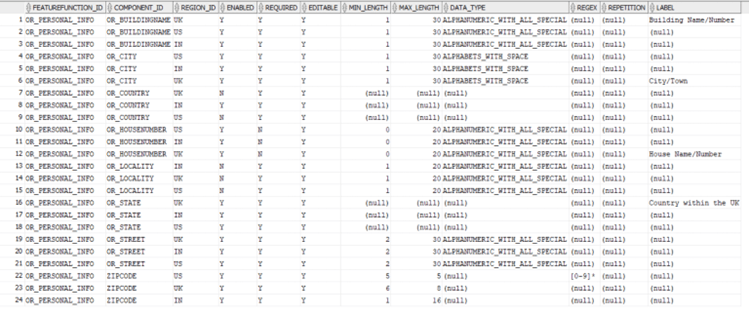
- For each component there are three entries in this table because each component needs to have configuration for each of the three regions.
- Each component entry will have following configuration parameters in the table.
This configuration corresponds to the UI fields for address capture.
- REGION_ID – specifies region for which config is done.
- ENABLED – specifies whether the field is to be displayed on UI.
- REQUIRED – specifies whether the field is optional/mandatory.
- EDITABLE – specifies whether the field is editable.
- MIN_LENGTH – Min length of the field.
- MAX_LENGTH – Max length of the field.
- DATA_TYPE – Specifies the data type for the field. This data type refers to one of the types in the table - DIGX_RG_DATATYPES.
- LABEL – region specific label for the field.
- For certain field like country and state – these are further defaulted or manipulated from UI code on the basis of region specific requirements.
- Certain fields may not have label specified in the
DIGX_RG_FEATUREFUNCTION_COMPONENT_MAPPING table. The generic labels for such
fields are maintained in DIGX_FW_RESOURCE_BUNDLE table. Query is given below.
select * from DIGX_FW_RESOURCE_BUNDLE where BUNDLE_NAME = 'Regionalization' and
RESOURCE_NAME IN ('ZIPCODE','OR_HOUSENUMBER','OR_BUILDINGNAME','OR_STREET','OR_LOCALITY','OR_COUNTRY','OR_CITY','OR_STATE');
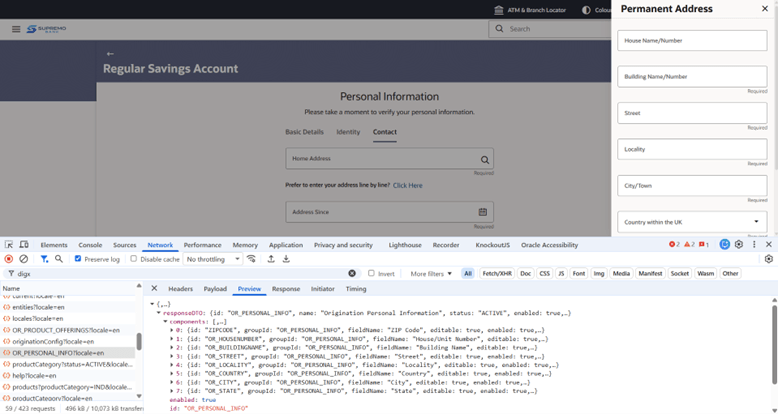
On UI, in the browser dev tools, under network tab the feature function call can be seen to check the address fields configuration received. Below screenshot depicts it.
Origination Product Offerings – Labels and Description managed through Regionalization
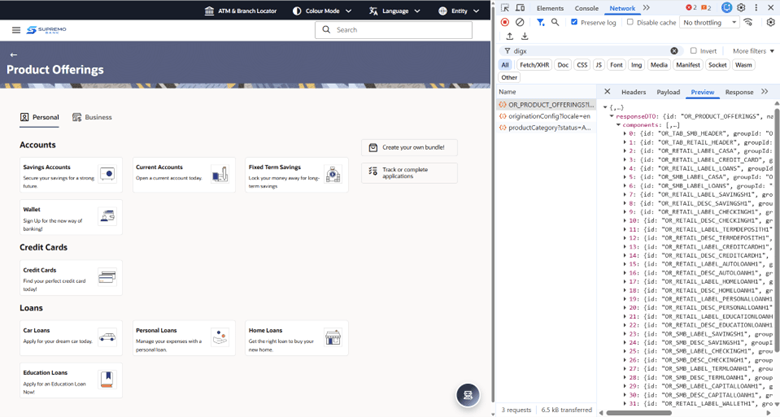
On the OBDX Product Offerings page, the action cards have title and description.
The title and description are now saved as region wise configuration in Regionalization tables.
Here in, these are simply labels and not input fields.
Below are the queries to view the configuration:
select * from DIGX_RG_FEATURE_FUNCTION where ID = 'OR_PRODUCT_OFFERINGS';
select * from DIGX_RG_COMPONENT where GROUP_ID = 'OR_PRODUCT_OFFERINGS';
select * from DIGX_RG_FEATUREFUNCTION_COMPONENT_MAPPING where  FEATUREFUNCTION_ID = 'OR_PRODUCT_OFFERINGS';
The label value is maintained in DIGX_FW_RESOURCE_BUNDLE for each component ID. Below is the query:
select * from DIGX_FW_RESOURCE_BUNDLE where BUNDLE_NAME = 'Regionalization' and RESOURCE_NAME like '%<COMPONENT_ID> %';Note:
The feature function call in this case is made through origination module component and not through UI framework component obdx-region.