1.1.9 Fungibility Rule Maintenance
This topic provides systematic instructions about fungibility rule maintenance.
- Under Maintenances, select Fungibility. Under
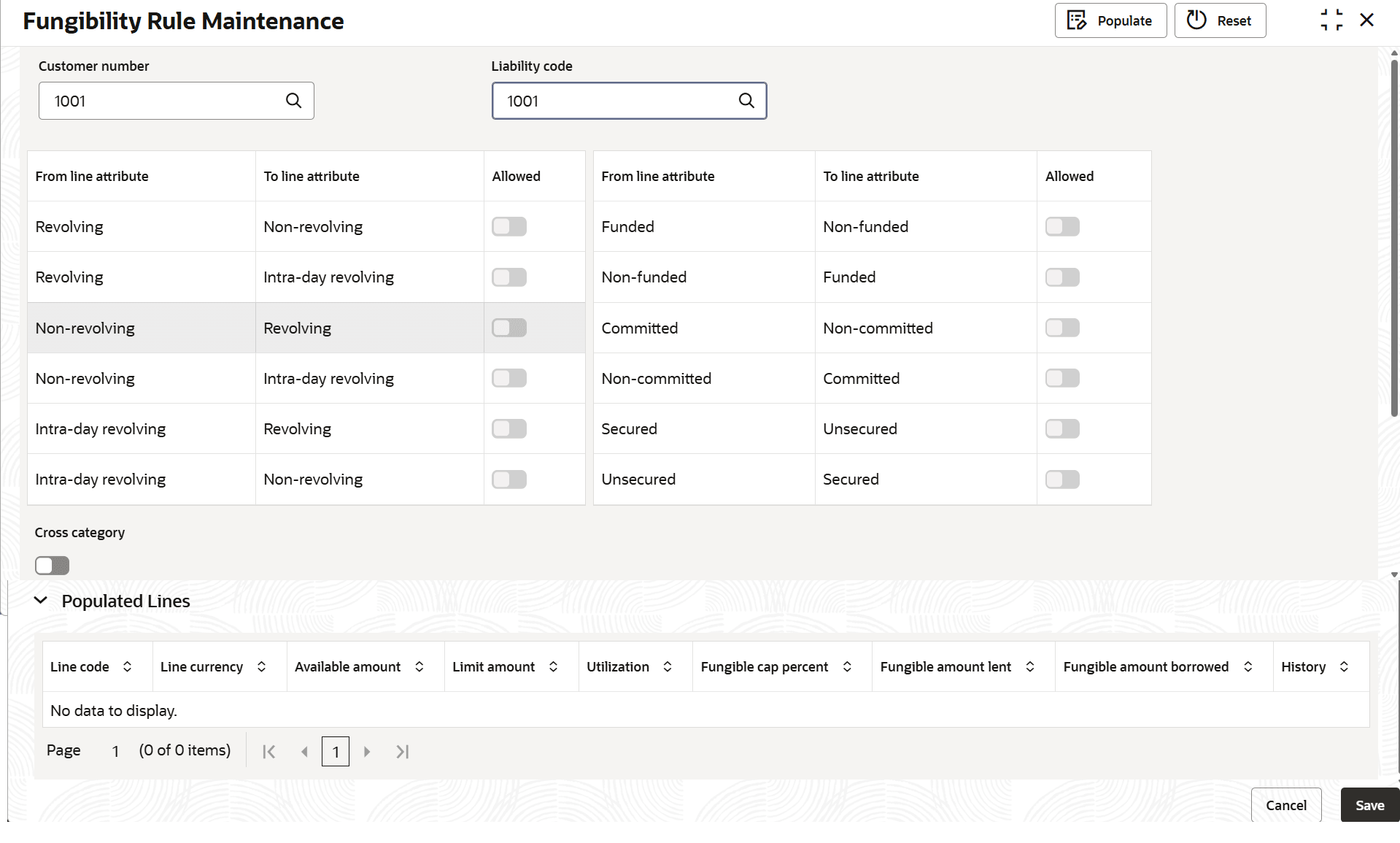
Fungibility, select Fungiblity Rule Maintenance.The Fungiblity Rule Maintenance screen displays.Creating Fungibility Rules for a Customer: Define fungibility rules for a customer and liability combination with the following parameters:
- From and To Line Attribute: The From and To Line Attribute displays the characteristics of both the originating (From) and receiving (To) lines within a liability and customer combination, for defining fungibility rules.
- Allowed flag – Toggle the switch to enable the selected criteria.
- Populated Lines – The available lines for fungibility gets listed based on the criteria selection.
Table 1-65 Attributes explained with example:
From Line Attribute/To Line Attribute Description Allowed/Disallowed (Example Value) Between facility types Enables fungibility across different facility types such as revolving, non-revolving, and non-revolving secured (NRS). Allowed Between funded and non-funded lines Allows fungibility between funded (e.g., loans) and non-funded (e.g., guarantees) facilities. Allowed Between committed and non-committed lines Permits fungibility between committed (firm commitment) and non-committed (uncommitted) facilities. Allowed Between secured and unsecured lines Permits fungibility between facilities backed by collateral (secured) and those that are not (unsecured). Disallowed Between different facility categories Allows fungibility across various facility categories. Allowed Note:
For more information, refer to 1.2.8 Limits Fungibility section.
- View Fungibility Rule
This topic describes the systematic instructions to view the Fungibility Rule.
Parent topic: Maintenances