1.3.2.3 Create Rule Group
This topic describes the systematic instructions to configure rule group.
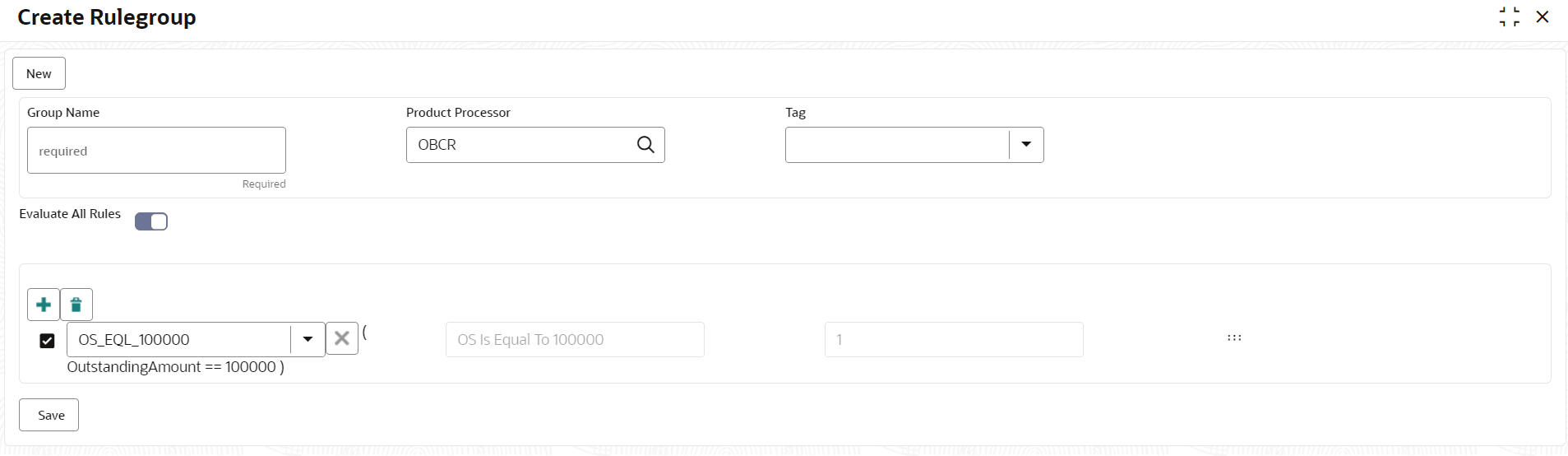
- Under Rule, click Rule, and then click Create Rule Group.The Create Rule Group screen displays.
- Specify the fields on the Create Rule Group screen.For more information on fields, refer to the field description table.
Note:
The fields marked as Required are mandatory.Table 1-30 Create Rule Group– Field Description
Field Description Group Name Specify the unique group name for the selected rules. Product Processor Click Search and select the product processor. Tag Specify the tag for rule group. Evaluate All Rules Switch to  to evaluate the expression in sequence.
Note: If the toggle is disabled, the evaluation of the expression stops when the condition of expression is evaluated to True.
Parent topic: Rule