2.1.1.1 Main Tab
This topic explains the Main tab of the NEFT Outgoing Payment Transaction Input Detailed screen.
- Click the Main tab in the main screen.The Main details are displayed.
Figure 2-2 NEFT Inbound Transaction Input - Main Tab
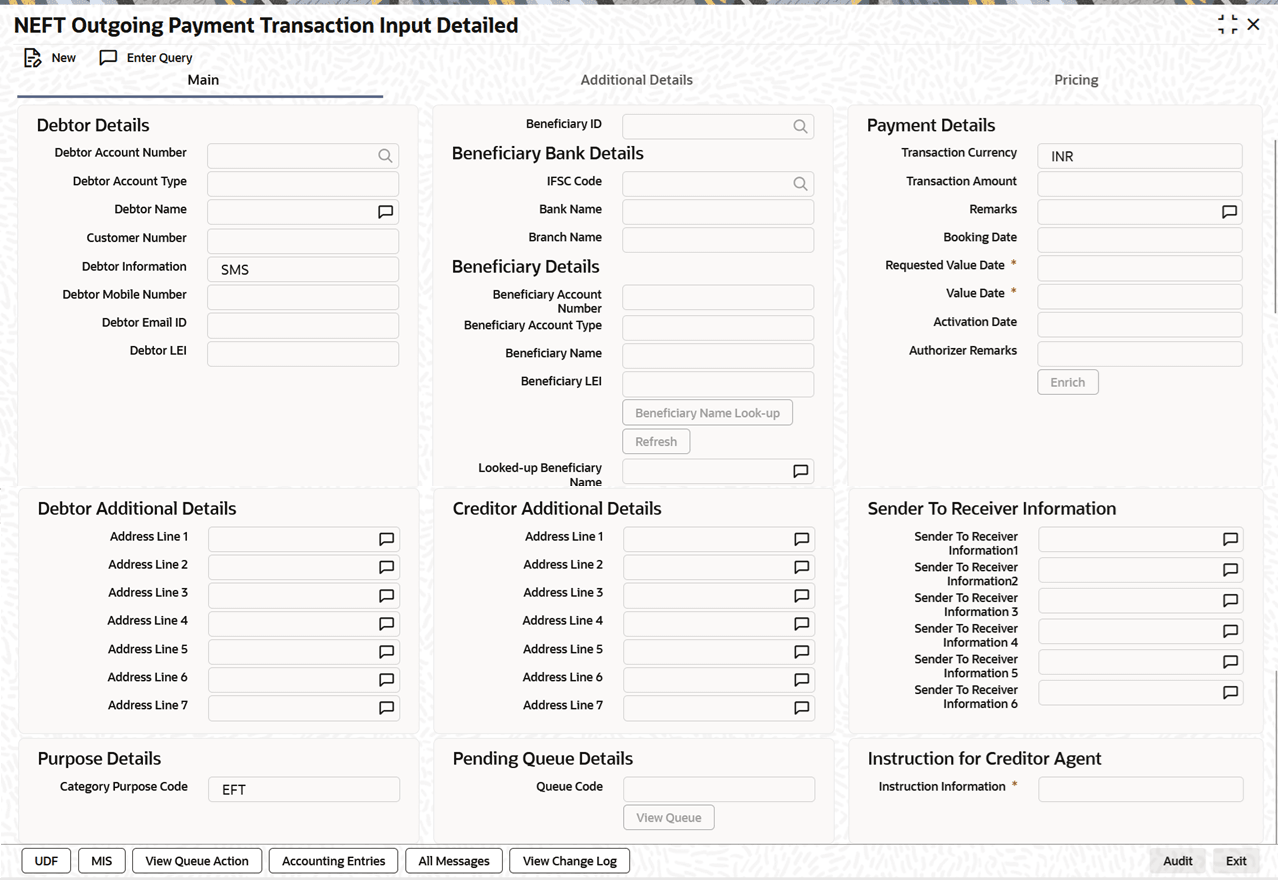
Description of "Figure 2-2 NEFT Inbound Transaction Input - Main Tab" - On Main tab, specify the fields.
Table 2-3 NEFT Inbound Transaction Input_Main Tab - Field Description
Field Description Debtor Details This section displays the Debtor Details.
Debtor Account Number Specify the debtor/ remitter account number. Alternatively, you can select the debtor account number from the option list. The list displays all open and authorized accounts as available in External Account Maintenance. Debtor Account Type Select the Debtor Account type from the following:- Savings Bank (10)
- Current Account (11)
- Cash Credit (13)
- Loan Account (14)
- Overdraft (12)
- NRE (40)
- Cash (50)
- Indo Nepal (51)
- Credit Card (52)
This field displays the text value for the account type. The corresponding number values appears in the NEFT payment messages generated.
Note: Once you select the ‘Indo Nepal Remittance’ checkbox, Debtor Account Type defaults to ‘51’ irrespective of Debtor Account is a customer Account or GL.
Debtor Name System displays the Debtor Name for selected Debtor Account Number. Customer Number Specify the Customer Number. Debtor Information Select the Debtor Information from the following:- SMS (Default)
- EML
Debtor Mobile Number Specify Debtor Mobile Number. If Debtor Information value is selected as SMS, then Mobile Number is mandatory. Debtor Email ID Specify the Debtor Email ID. If Debtor Information value is selected as EML, then Email ID is mandatory. Debtor LEI System displays the Debtor LEI. Beneficiary ID If Beneficiary registration has been done already for the debtor’s account at PMDBENRN. The Beneficiary ID can be picked up from the LOV here. All the other details such as beneficiary account number, account type, beneficiary name, beneficiary bank details such as IFSC code, Bank name, Branch Name are defaulted based on the beneficiary registration maintenance.
If beneficiary ID is not maintained, Beneficiary Details viz., IFSC Code, Bank Name, Branch Name can be entered in the fields provided in this screen.
Beneficiary Bank Details This section displays the Beneficiary Bank Details. IFSC Code Select the IFSC Code from the list of values. All the valid IFSC codes are listed. Bank Name Specify the Bank Name. Branch Name Specify the Branch Name. Beneficiary Details This section displays the Beneficiary Details. Beneficiary Account Number Specify the Beneficiary Account Number. You can select the Beneficiary Account Number from the list of values. The list of values lists Loan Account numbers along other customer account. Beneficiary Account Type Select the beneficiary/creditor account type from the drop-down values listed.- Savings Bank (10)
- Current Account (11)
- Cash Credit (13)
- Loan Account (14)
- Overdraft (12)
- NRE (40)
- Credit Card (52)
This field displays the text value for the account type. The corresponding number values appears in the NEFT payment messages generated.
Beneficiary Name Specify the Beneficiary/Credit Account Name for the account details specified. Beneficiary LEI Specify the Beneficiary LEI. Beneficiary Name Look-up Button It is mandatory to provide the following field details, before calling Beneficiary Name Look-up:- Beneficiary Account Number
- Beneficiary Bank IFSC code
Clicking the Beneficiary Name Look-up button triggers the system to call the ReqBeneDetails API of NPCI. Upon request receipt, NPCI sends an acknowledgment.
Refresh Click the Refresh button to view the received Beneficiary Name, which is populated in the Looked-up Beneficiary Name field. Looked-up Beneficiary Name After Refresh button is clicked, Looked-up Beneficiary Name is auto-populated. Payments Details This section displays the Payments Details. Booking Date The system defaults the booking date as application server date. Requested Value Date You can select the Requested Value Date. Value Date The system defaults the current system date as value date. However you can select a future date as Value Date. Currency & Network holiday checks are applicable for Value Date. Activation Date Activation date is derived as Instruction Date – Debit Float days as maintained in Process cutoff maintenance. Holiday check is done for Activation date based on Branch holidays maintained if ‘Branch Holiday’ check is applicable for the Network maintained in the Payments Preferences screen (PMDNFTPF). Transaction Currency System defaults the Transaction Currency as ‘INR’ for NEFT payments. Transaction Amount You can enter the Transaction Amount. Transaction amount specified is validated with the daily and transaction limits maintained in the Payments Preferences screen (PMDNFTPF).
Remarks Specify the Remarks. Authorizer Remarks System displays Authorizer Remarks. Debtor Additional Details This section displays the Debtor Additional Details. Address Line 1 to Address Line 7 Specify the address. Creditor Additional Details This section displays the Creditor Additional Details. Address Line 1 to Address Line 7 Specify the address. Sender To Receiver Information System populates the static text automatically on clicking Enrich button in the Sender to Receiver Information fields, if the Debtor Account Type is NRE. Sender to Receiver Information 1-6 Specify the Sender to Receiver Information. Purpose Details This section displays the Purpose Details. Category Purpose Code Select the Category Purpose Code from the following: - EFT (Default)
- FCRA
- INDNPL
Pending Queue Details This section displays the Pending Queue Details. Queue Details System displays Queue details. View Queue Button Click this button to view Queue action details. Instruction for Creditor Agent This section displays the Instruction for Creditor Agent. Instruction Information Specify the Instruction Information. Enrich Following validations are done, on clicking the Enrich button:- System validates if the Debtor Account Type is NRE/NRO for the outbound transactions.
- The specified instruction date is validated for network holiday. if yes, same is moved to the next working date.
- If the Debtor Account Type is NRE or NRO, the Sender to Receiver Information field (from Line 1) is automatically populated with static text as Sender is NRE. Please ensure compliance to RBI/FEMA regulation before applying funds.
- If you select Beneficiary Account Type 'NRE' (40), then you must select Debtor Account Type also 'NRE' (40). Else system rejects the transaction.
- If you select Debtor Account Type 'NRE' (40), then you can select Beneficiary Account Type as any account from drop-down lists, such as Savings Bank (10), Current Account (11), Cash Credit (13), Loan Account (14), Overdraft (12), NRE (40), and Credit Card (52).
- System computes the Charges, and Tax on Charges if applicable, based on the maintenance for Pricing Code specified in India Payment Common Preferences (PMDNFTPF).
Parent topic: NEFT Outgoing Payment Transaction Input Detailed