2.2.14.1 Process Main Tab
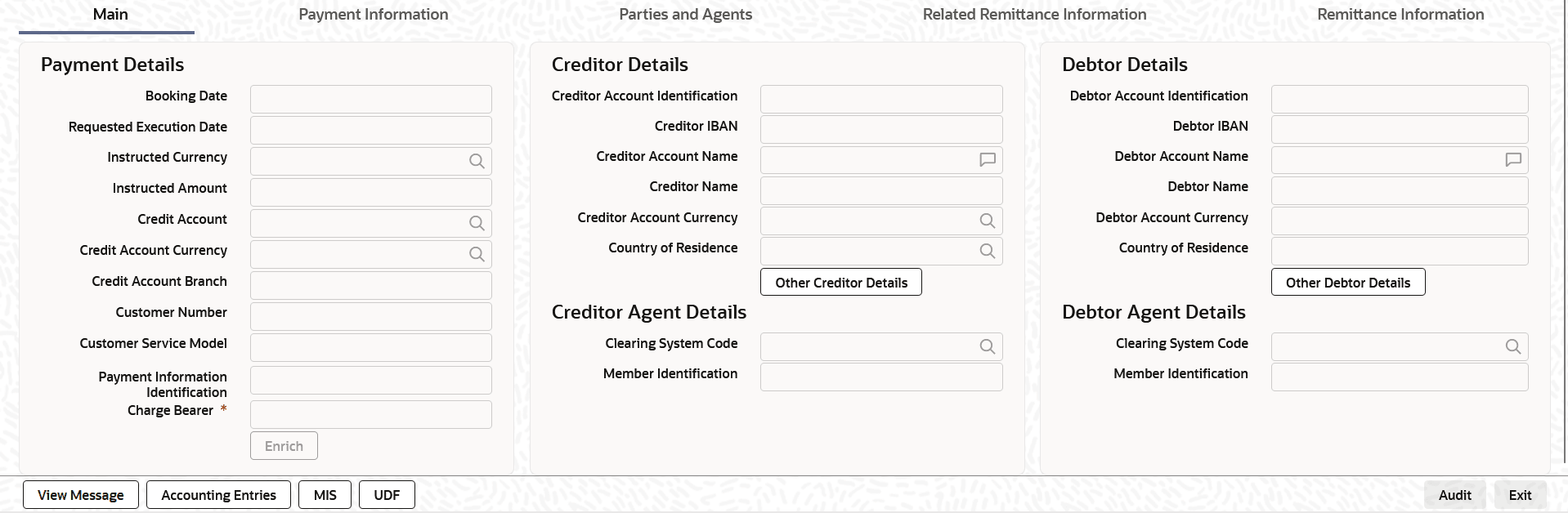
This topic explains the Main tab of the Fedwire ISO Outbound Drawdown Request Detailed screen.
- From the main screen, select the Main Tab.The Main details are displayed.
Figure 3-28 Fedwire ISO Outbound Drawdown Request Detailed_Main Tab
- On Main Tab, specify the fields.For more information about the fields, refer to field description table.
Table 3-23 Fedwire ISO Outbound Drawdown Request Detailed_Main Tab - Field Description
Field Description Payment Details This section displays the Payment Details.
System defaults the following fields to current branch date:- Booking Date
- Requested Execution Date
Instructed Currency Select from the list of values for instructed currency. Instructed Amount Specify the Requested Debit Amount. Credit Account Specify the credit account of the currency correspondent.
Note: If you do not specify the credit account, on click of Enrich button system populates the credit account with derived Nostro/Vostro (mirror) account.
Credit Account Currency System populates this field with the account currency based on the credit account chosen. Credit Account Branch System populates this field with the account branch based on the credit account chosen. Customer Number System defaults the resolved customer number. Customer Service Model System defaults the customer service model of the resolved customer number. Charge Bearer Select the charge bearer from following values:- CRED
- DEBT
- SHAR
- SLEV
Payment Information Identification Specify the Payment Information Identification. Creditor Details This section displays the Creditor Details. Creditor Account Identification Creditor Account is auto populated based on the Credit Account selected. You can modify the account number. Creditor IBAN Creditor IBAN is auto populated based on the Credit Account selected. You can modify the account number. Creditor Account Name Creditor Account Name is auto populated based on the Credit Account selected.
Creditor Name Name of the Customer is auto populated based on the Credit Account selected. Creditor Account Currency Select from the list of values for Credit Account Currency. Country of Residence Select from the list of values for Country of Residence.This field lists the 2-Char ISO Country code list from the factory-shipped table.
Note: Select Country of Residence (where the party physically lives) only if it is different from Postal Address/Country.
Other Creditor Details Button Click the Other Creditor Details button on Main tab under Creditor Details header to open the sub-screen. This screen shows the Creditor Details.
Refer to the Section Main Tab - Other Details Button for details of fields and sub screen of the Creditor Details button.
Creditor Agent Details This section displays the following fields. Clearing System Code Select the Clearing System Code from the list of values.
Note: Specify either BICFI or Clearing System Code/Member Identification.
Member Identification Specify the clearing ID code. Creditor Agent Details Button Click Creditor Agent Details button on Main tab under Creditor Agent Details header to the sub screen. This screen shows the creditor agent details.
Refer to the Section Main Tab - Agent Details Button for details of fields and sub screen of the Creditor Agent Details button.
Debtor Details This section displays the Debtor Details. Debtor Account Identification System defaults this field based on the selected debit account. The user can modify the account number. Debtor IBAN System defaults this field based on the selected debit account. The user can modify the account number. Debtor Account Name Specify the debited account name. Debtor Name Specify the debited customer name. Debtor Account Currency Specify the currency of the selected debit account. Country of Residence Specify the country of residence.
Note: Specify Country of Residence (where the party physically lives) only if it is different from Postal Address/Country.
Other Debtor Details Button Click the Other Debtor Details button on Main tab under Debtor Details header to open the sub-screen. This screen displays the Debtor Details.
Refer to the topic Main Tab - Other Details Button for details of fields and sub screen of the Other Debtor Details button.
Debtor Agent Details This section displays the following fields. Clearing System Code Select the Clearing System Code from the list of values. Member Identification Specify the member identification code.
Parent topic: Fedwire ISO Outbound Drawdown Request Detailed