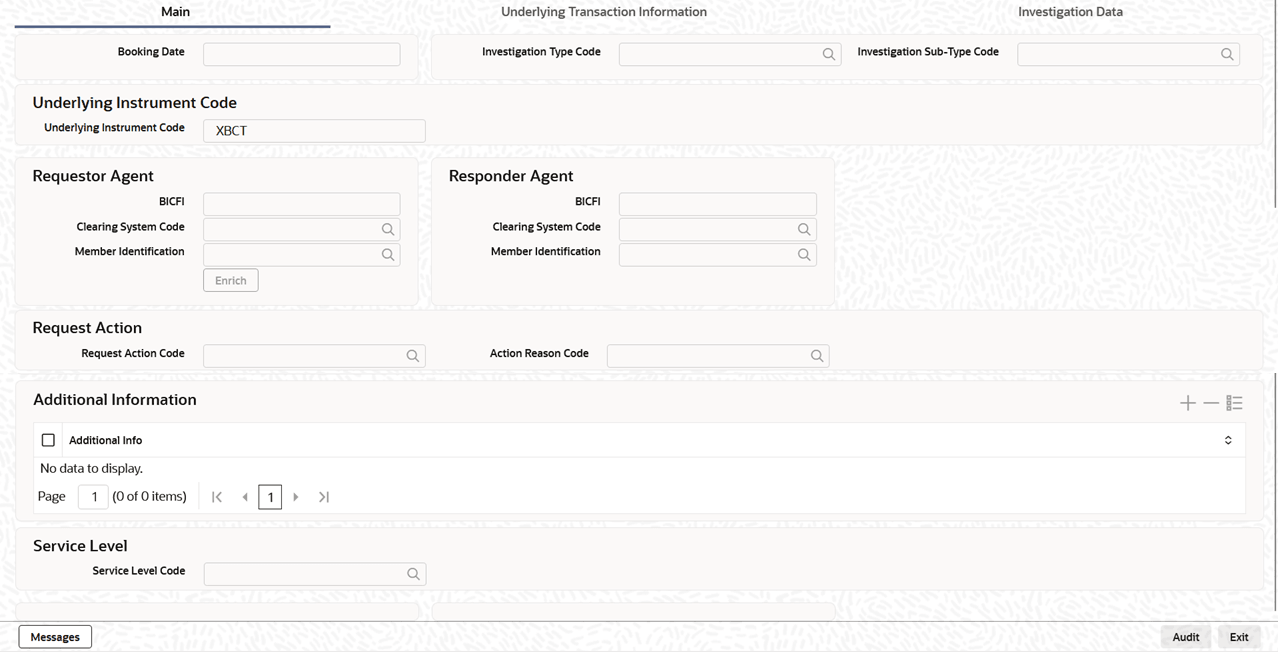
| Booking Date |
System defaults the booking date to current
branch date on clicking New
button.
|
| Investigation Type
Code |
Specify the Investigation Type Code from the
list of values. |
| Investigation Sub-Type
Code |
Specify the Investigation Sub-Type Code from
the list of values.
|
| Underlying Instrument
Code |
This section displays the
Underlying Instrument Code
details.
|
| Underlying Instrument
Code |
System displays the Underlying Instrument
Code, with XBCT set as the default
value.
|
| Requestor
Agent |
This section displays the
Requestor Agent details.
|
| BICFI |
Specify the BICFI from the list of
values. |
| Clearing System
Code |
Select from the list of values for clearing
system code.
|
| Responder
Identification |
Specify the clearing ID code. |
| Requestor
Agent |
This section displays the
Requestor Agent details.
|
| BICFI |
Specify the BICFI from the list of
values. |
| Clearing System
Code |
Select from the list of values for clearing
system code.
|
| Responder
Identification |
Specify the clearing ID code. |
| Request Action |
This section displays the Request
Action details.
|
| Request Action
Code |
Specify Request Action Code from the list of
values. |
| Action Reason
Code |
Specify Action Reason Code from the list of
values. |
| Additional
Information |
This section displays the
Additional Information
details.
|
| Additional
Information |
Specify the Additional Information
pertaining to action. |
| Service Level |
This section displays the Service
Level details.
|
| Service Level
Code |
Specify Service Level code for the
Investigation from the list of values. |