2.9.1.2 Main Tab
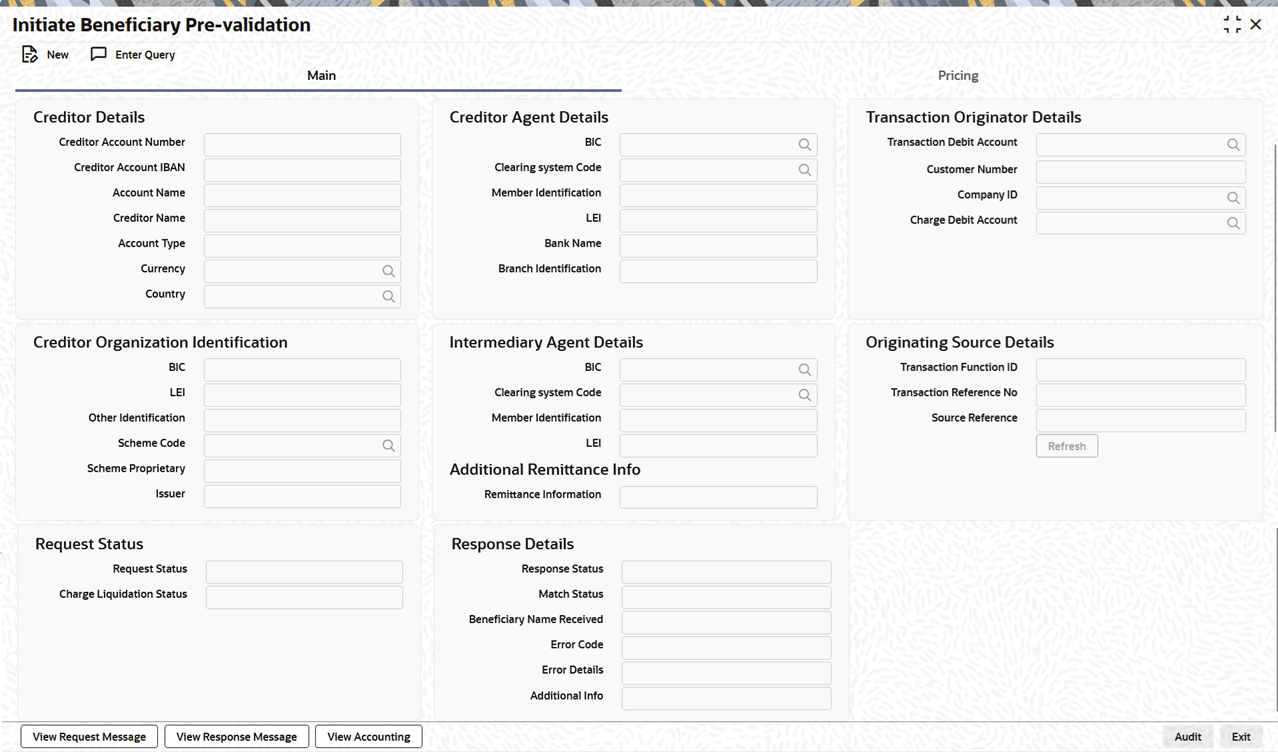
This topic explains the Main tab of the Initiate Beneficiary Pre-validation screen.
- Click the Main tab in the main screen.The Main details are displayed.
Figure 2-72 Initiate Beneficiary Pre-validation_Main Tab
- On Main tab, specify the fields.
Table 2-29 Initiate Beneficiary Pre-validation_Main Tab - Field Description
Field Description Creditor Details This section displays the Creditor Details. Creditor Account Number Select the Creditor Account Number. Creditor Account IBAN Specify the Creditor IBAN Number. Account Name Specify the Name of the Creditor Account. Creditor Name Specify the Name of the Creditor. Account Type Select the Account Type of the creditor from the drop-down list. The options include:- Personal
- Business
The default is blank (no selection).
Currency Select the currency from the list of values. Lists all valid currency codes. Country Select the country from the list of values. Lists all valid country codes. Creditor Agents Details This section displays the Creditor Agents Details. BIC Specify the BICFI from the list of values. Lists all valid (Open/Authorized) BIC codes. Clearing System Code Select the Clearing System Code from the list of values. Lists all ISO Clearing System codes. Member Identification Specify the Clearing Id code. LEI Specify the LEI. Bank Name Bank Name is defaulted based on BIC or Member ID from the respective directory table. Branch Identification Specify the Branch Identification. Transaction Originator Details This section displays the Transaction Originator Details. Transaction Debit Account Specify Transaction Debit Account from the list of values. Customer Number System defaults the customer number to the Customer Number linked in External Account Maintenance (PMDCRACC). Company ID Select the Company ID from the list of values. The list displays all valid Company IDs. Charge Debit Account Select the Charge Debit Account from the list of values. The list displays all valid charge debit account values. Creditor Organization Identification This section displays the Creditor Organization Identification. BIC Specify the BIC. All valid Bank BICs are listed. LEI Specify the LEI. Other Identification Specify the Other Identification. Scheme Code Specify the Identification Scheme Code from the list of values. Scheme Proprietary Specify the Identification Scheme Proprietary. Issuer Specify the Identification Issuer. Additional Remittance Info This section displays the Additional Remittance Information details. Remittance Information Specify the Remittance Information. Intermediary Agent Details This section displays the Intermediary Agent Details. BIC Specify the BIC of the intermediary agent from the list of values.. All valid Bank BICs are listed. Clearing system Code Select the Clearing System Code of the intermediary agent from the list of values. Lists all ISO Clearing System codes. Member Identification Specify the Member Identification of the intermediary agent. LEI Specify the LEI of the intermediary agent. Originating Source Details This section displays the Originating Source Details. Transaction Function ID Specify the Transaction Function ID. Transaction Reference No Specify the Transaction Reference Number. Source Reference Specify the Source Reference Number. Request Status This section displays the Request Status details. Request Status Select Request Status from the following:- Initiated
- Processed
Charge Liquidation Status Select Charge Liquidation Status from the following:- P-Pending
- I-initiated
- E-exception
- S-Liquidated
Response Details This section displays the Response details. Response Status Specify the Response Status. Match Status Specify the Match Status. Beneficiary Name Received Specify the Beneficiary Name Received. Error Code Specify the Error Code. Error Details Specify the Error Details. Additional Info Displays additional information received in the response from the external pre-validation system.
Parent topic: Outward Pre-validation Request Processing