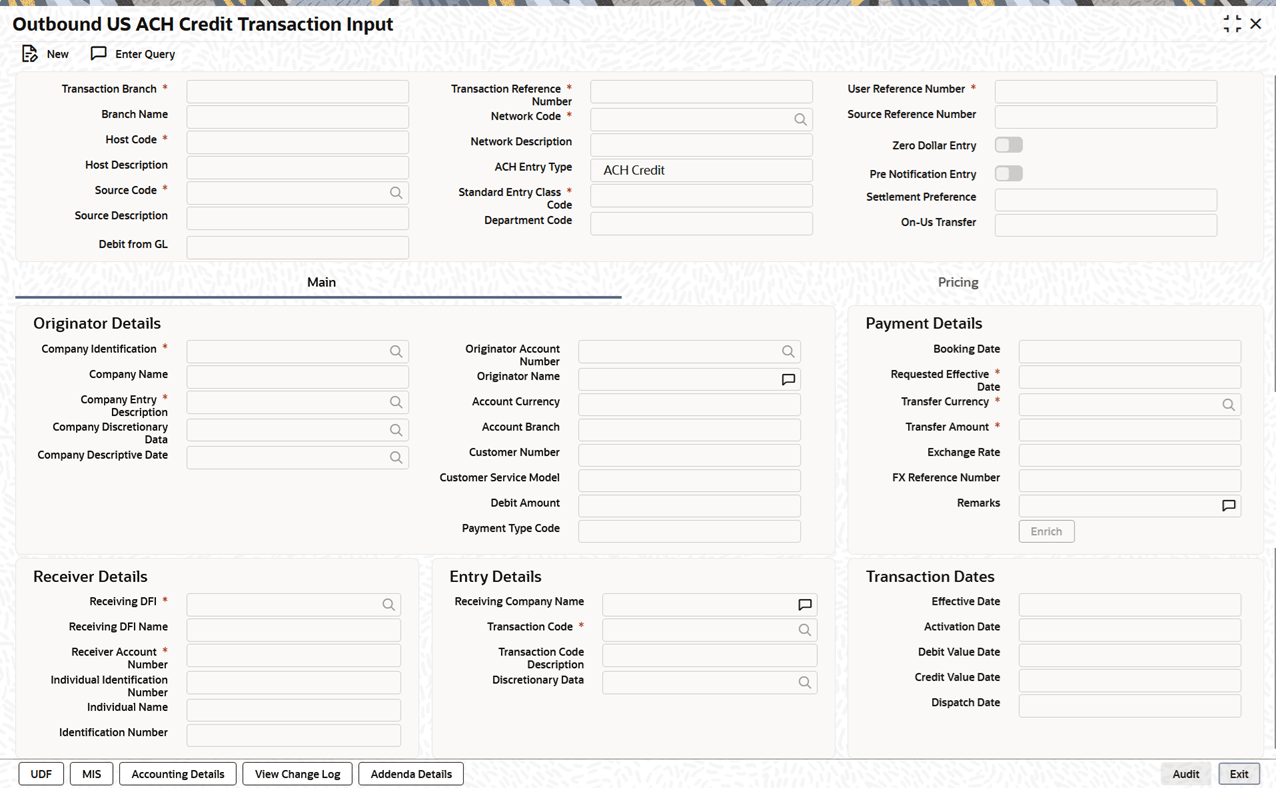
| Transaction Branch
Code |
System defaults the branch code of
transaction when the user clicks the
New button.
|
| Branch Name |
System defaults the Branch
Name based on the selected
Transaction Branch Code.
|
| Host Code |
System defaults the Host
Code of transaction branch when the user
clicks the New button.
|
| Host Code
Description |
System defaults the description of the
Host Code.
|
| Source Code |
This field defaults to
MANL, but you can also manually
input transactions. For transactions received through a
channel, the relevant source code from the source
maintenance is defaulted.
|
| Source Code
Description |
System defaults the description of the
source code. |
| Transaction Reference
Number |
Unique Reference Number for the payment
generated by the system. |
| Network Code |
Select the Network
Code from the list of values. If only one US
ACH network is maintained (which will generally be the case)
then the same will be defaulted.
|
| Network Code
Description |
System defaults the description of the
network code. |
| ACH Entry
Type |
This field is defaulted to ACH
Credit, indicating that the transaction is a
US ACH Credit transfer.
|
| Standard Entry Class
Code |
Select the required SEC codes from the
drop-down list. The available options are:
|
| User Reference
Number |
System defaults the user reference number
same as the transaction reference number. You can edit this
value to provide own reference number. |
| Source Reference
Number |
System displays the Source
Reference Number provided by the channel or
any other source for the transaction.
|
| Zero Dollar
Entry |
Enable the Zero Dollar
Entry toggle if the outbound transaction is
a Zero Dollar transaction.
|
| Pre Notification
Entry |
Enable the Pre Notification
Entry toggle if the outbound transaction is
a Pre Notification transaction.
|
| Settlement
Preference |
Select the required Settlement
Preference from the drop-down list. The
available options are:
|
| Department
Code |
System displays the Department
Code based on the Department
Code linked to the User
ID.
|
| On-Us
Transfer |
System defaults this field based on the
On-Us Transfer check at the
time of transaction save. The value is displayed as
either Yes or
No.
Note: An outbound ACH Credit/Debit
transaction is identified as an on-us transfer if:
- RDFI Routing Number Check:
The RDFI routing number matches the routing number
of any valid branch under the same host as the
transaction branch maintained in US ACH
ABA Number (Function ID:
PMDABANR), and
- Preference Configuration:
Dispatch is not applicable for on-us transfers, as
configured in US ACH
Preferences (Function ID:
PNDNWPRF).
|
| Debit from GL |
Enable the Debit from
GL toggle if the outbound transaction
needs to be debited from the General Ledger.
If the debit account in an ACH credit
transaction is recognized as a valid General Ledger
account, the system will default Debit from
GL as Yes to
ensure proper handling as an internal accounting
transaction.
|