2.2.1 Create Definition
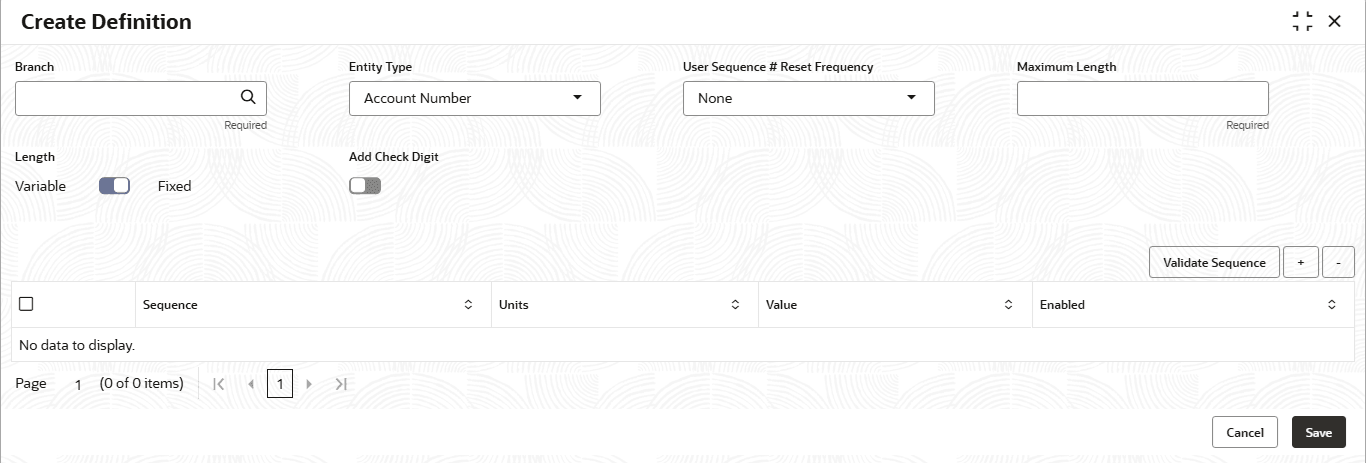
This topic describes the systematic instructions to configure Auto Number Generation by inputting various details.
- Under Maintenance, click Auto Number
Generation, then click Create Definition.The Create Definition screen is displayed.
- Specify the fields on Create Definition screen.For more information on fields, refer to the field description table.
Note:
The fields marked as Required are mandatory.Table 2-3 Create Definition - Field Description
Field Description Branch Click  icon and select the branch from the list. The value *.* represents Auto
Number maintenance, which can be commonly referred by all the branches.
icon and select the branch from the list. The value *.* represents Auto
Number maintenance, which can be commonly referred by all the branches.
The maintenance can be performed for a specific branch with branch Code value also other than *.* (Common maintenance for all branches ).
Entity Type Specify the type from the drop-down list. The available options are:- Account Number
- Quote ID
User Sequence # Reset Frequency This field refers to the frequency at which system will reset the User Sequence, if it is part of auto number generation logic. Select the frequency from the drop-down list. The available options are:.- None
- Daily
- Weekly
- Monthly
- Quarterly
- Semi-Annual
- Annual
Note:
When the User sequence is reset, it can form duplicates and sequences again re-start from 1, to avoid this the Julian date is included when User sequence in included in Unit and reset frequency is configured.Maximum Length This field indicates the maximum length of the entity number that system should generate. Specify the maximum length. For entity type account number maximum length allowed is 36. Length This field refers to whether the length of sequence number generated will be variable or fixed length. The available options are:For both the above options, the length of entity reference number can be maximum upto Maximum Length. If it is fixed and total length of reference number is less than the maximum length, then zeroes are prefixed to system sequence number. If it is variable, then zeroes are not prefixed to system sequence number.- Variable
- Fixed
Add Check Digit Switch
 to add the check digit. Refer to whether the system should add a
check digit to the end of the reference number.
to add the check digit. Refer to whether the system should add a
check digit to the end of the reference number.
Switch
 to avoid adding the check digit.
Modulus 11 algorithm is used for the check digit derivation.
Validate Sequence Click on Validate Sequence button to view the sample reference number that will get generated as per the format configuration done Sequence Specify the sequence in which the fields of reference number will be ordered while generating the same. For example, lets say first field in the sequence is a constant, say LN and the second field is branch code, followed by third field product code, then generated reference number will be always having LN+ branch code value+Product code value in that order. Units This refers to type or nature of reference fields like constant or viariable or julian date that forms the components of reference number generation logic. The available options are:- Constant - Constant value mentioned will be used as it is in number generation logic.
- Record Creation Year/Month(YYYYMM) - This refers to the year and month of reference number genration. The parameter's length is 6 (eg) 201401 for Jan 2014.
- Record Creation Year(YYYY) - This refers to the year of reference number generation. The parameter's length is 4. eg. 2014.
- Record Creation Year(YY) - -This refers to the year of reference number generation. The parameter's length is 2. eg. 14.
- Record Creation Month(MM) - This refers to the month of reference number generation.The parameter's length is 2. Eg. 01/02/03 etc.
- Record Creation Date(DD) - This refers to the date of reference number generation.The parameter's length is 2. Eg. 15 for 15th day of the month.
- User Sequence Number Length - The allowed value is integer. The length will be aligned with the user input value. The system should always start the sequence number with 1 and pad it with zeros based on the length specified.
- Random Number Length - The allowed value is interger. The length will be aligned with the user input value. The system should generate a random number of this length..
- System Sequence Number Length - The allowed value is integer. The length will be aligned with the user input value.
- System Sequence Alphanumeric Length - The system should produce the sequence number by this alphanumeric base 62 generated value is padded with zero when Fixed length definition is defined and Length generated is less than length specific in the Unit value against it. The Alphanumeric base 62 is an encoding scheme that represents numerical data as a string of 62 characters, including the digits 0-9, lowercase letters a-z, and uppercase letters A-Z .
- Julian Date - The parameter's length is always 5, where the first two digits are the year's final figures, while the last three digits represent the day of the year.
- Variable Code - When
Units is selected as a variable, the
Value field will have a drop-down. The available
options are:
- Product Segment Code - The system will return the value of the product segment code, the length of which is always 4.
- Branch Code -The system will return the value of the branch code. The length of which is always 3.
- Product Code - The system will return the value of the product code. The values allowed between greater than 0 and less than or equal to 30.
- Hours, minutes, and seconds - The code is HHMMSS, the length of which is always 6. This field cannot be modified and cannot be used standalone. It can be used only in case of Julian Date is selected for Account Number Mask.
Value Specify the value based on the Units selected. Enabled Click on toggle status to enable the parameter to be used in the number generation.
Parent topic: Auto Number Generation