2.13.1 Create Lending Events and Validation Rules

This section describes the steps for creating Lending Events and Validation Rules.

  1. From Home screen, click Retail Lending. Under Retail Lending, click Maintenance.
  2. Under Maintenance, click Lending Events and Validation Rules, then click Create Lending Events and Validation Rules
    The Create Lending Events and Validation Rules screen is displayed.

    Figure 2-78 Create Lending Events and Validation Rules
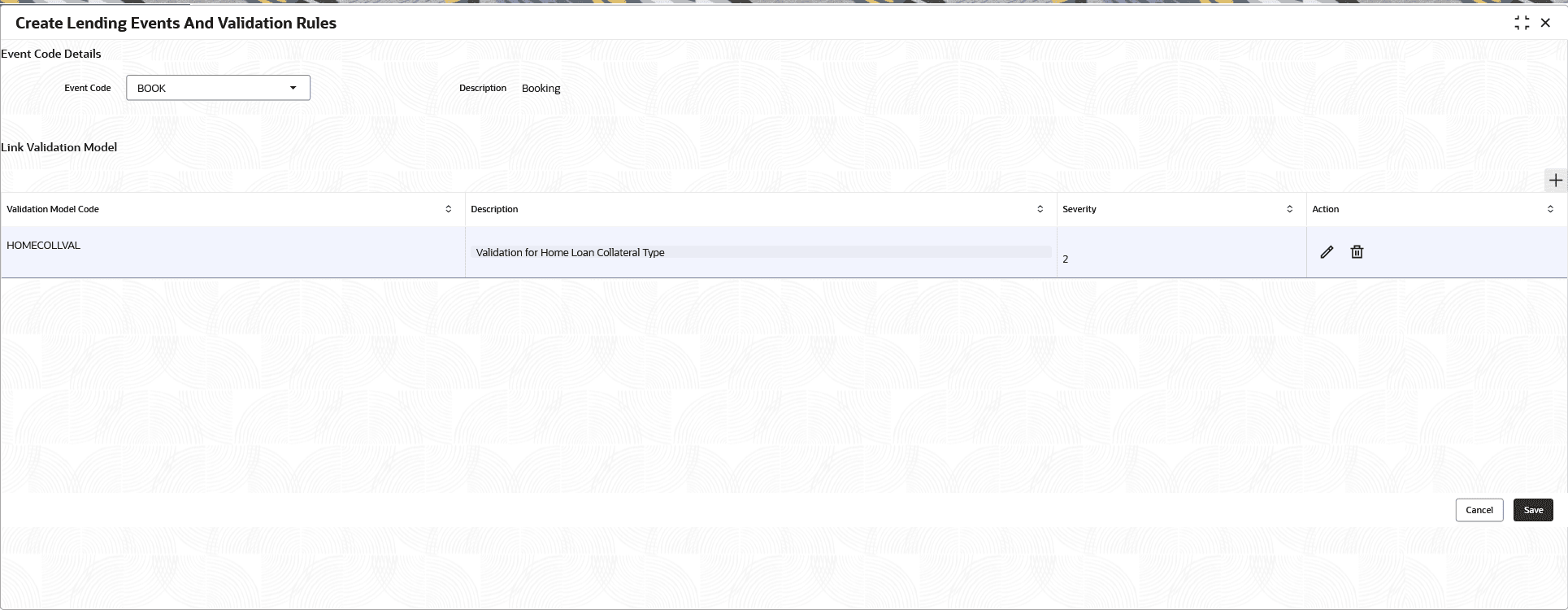


  3. Specify the fields on Create Lending Events and Validation Rules screen.

    Note:

    The fields marked as Required are mandatory.
    For more information on fields, refer to the field description table.

    Table 2-75 Create Lending Events and Validation Rules - Field Description

    Field Description
    Event Code Details This sections allows selecting the events to be associated with validation rules.
    Event Code Specify the event code to be associated with the validation rules.
    Description Displays the short description assigned to the event.
    Link Validation Model This section allows selecting validation models to be associated with events.
    Validation Model Code Specify the validation model code to be associated with an event.
    Description Displays the description of the valdiation model.
    Severity Specify the order of execution of validation models. Multiple validation models can be attached to same event.
    Action Displays the action that can be performed for the selected validation model.

    The user can edit or delete the record.

  4. Click Save to save the details.
    The Lending Events and Validation Rules is successfully created and can be viewed using the View Lending Events and Validation Rules screen.