3.5.18.2.2 Modify Collateral
This topic explains the systematic instructions for modifying the collateral details.
To modify the collateral details:
Note:
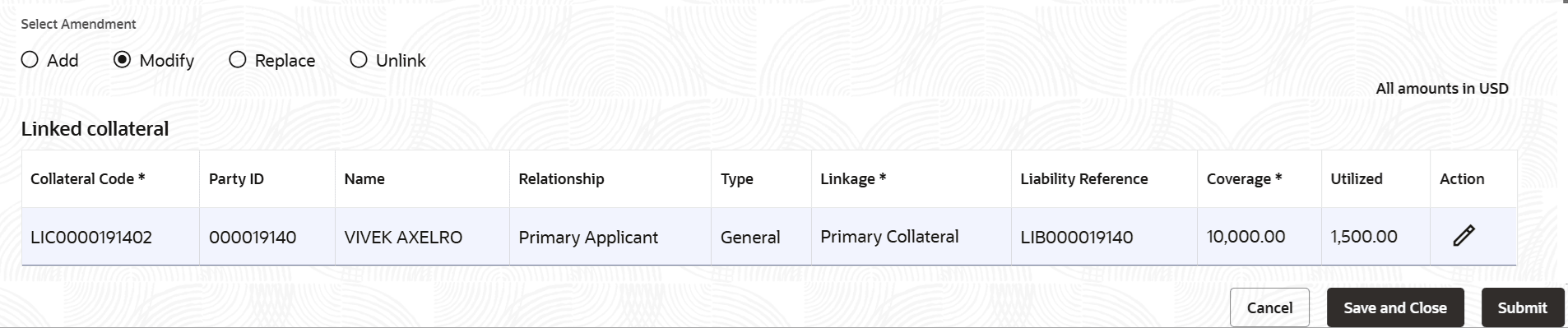
The fields marked as Required are mandatory.- From the Select Amendment field, select Modify.In the Linked collateral section, the row is enabled for editing.
- In the Linked collateral section, modify the details. For more information on fields, refer to field description table below:
Table 3-58 Modify Collateral – Field Description
Field Description Linked collateral This section displays the linked collateral details. Collateral Code Displays the collateral code to linked to the account. Party ID Displays the party ID linked to the collateral. Name Displays the party name. Relationship Displays the relationship of the party. Type Displays the collateral type. Linkage Displays the linkage type for the collateral. The possible options are: - Primary Collateral
- Secondary Collateral
Liability Reference Displays the reference number for the liability. Coverage Specify the coverage amount. Utilized Displays the utilized amount. Action Displays the following icons:  : Click to save the details added or modified. This icon is displayed only after the required mandatory details are specified.
 : Click to close the row added. This icon is displayed only after the required mandatory details are specified.
 : Click to edit the limit ID and expiry date of the limit. Once all the required mandatory details are specified, this icon is not displayed.
 : Click to delete the entry.
Parent topic: Manage Loan Securities - Collateral