2.6.1.3 Preferences
This section describes adding transaction level preferences for the product segment.
Preferences is about associating supported currencies to the segment along with defining a range for the loan amount to be disbursed and its term. Additional aspects like exchange rates for foreign currency products and miscellaneous features can also be defined, as applicable
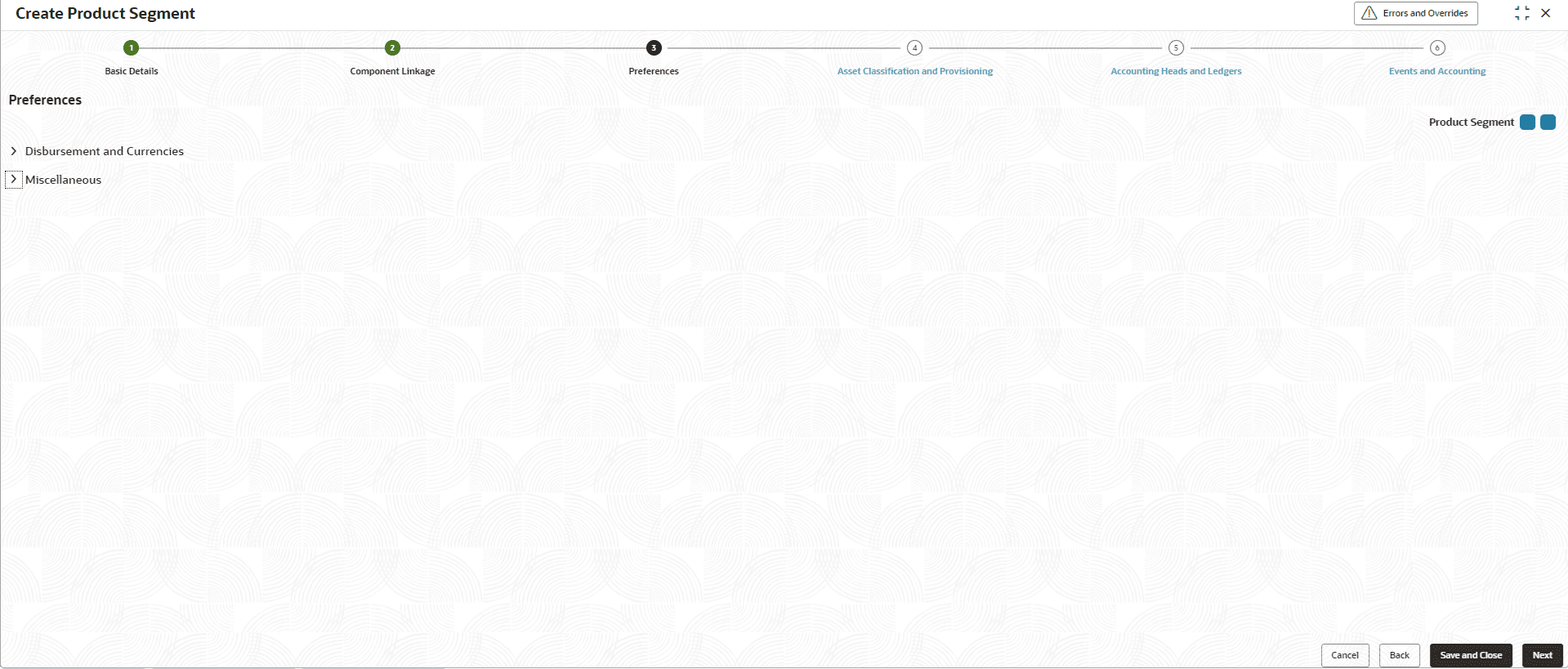
- Click Next in the Component Linkage
screen to add the Preferences.The Preferences screen displays.
- Specify the fields on Preferences screen.For more information on fields, refer to the field description table.
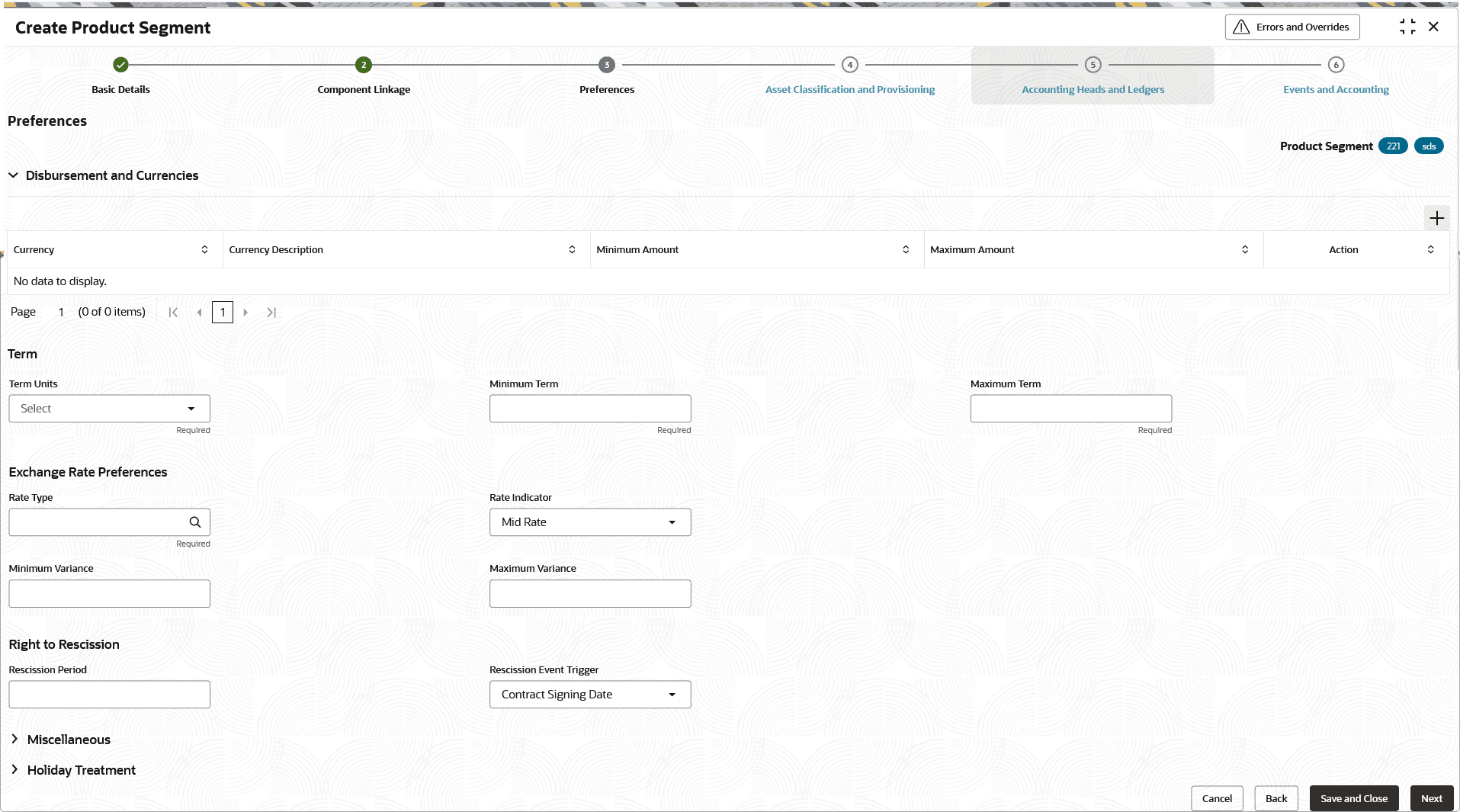
Figure 2-23 Disbursement and Currencies
This section is about permissible currencies for disbursement along with a range for amount and tenor combinations. The range as defined in this section will be validated during account opening and related life cycle events.
Table 2-24 Disbursement and Currencies - Field Description
Field Description Currency Click  icon and select the currency from the list.
Note: One Currency to be selected from the list. The currency linked in the component and in disbursement ought to be same.
Currency Description Displays the description of the currency selected. Minimum Amount Specify the minimum amount for loan account / Line of Credit opened under the product segment in the specified currency. Note: For Line of Credit products, this is a mandatory, non-editable field with default value set to 1.
Maximum Amount Specify the maximum amount for the loan account opened under the product segment in the specified currency. Note: This field is not supported for Line of Credit products.
Term Units Select the term units as either of Months, YEARS, or SCHEDULE from the drop-down list. The term of the loan account will be specified in this term unit for the accounts opened under this product segment. Note: This field is not supported for Line of Credit products.
Minimum Term Specify the minimum term for the loan account opened under the product segment. Note: This field is not supported for Line of Credit products.
Maximum Term Specify the maximum term for the loan account opened under the product segment. Note: This field is not supported for Line of Credit products.
Rate Type The rate type is referred for currency conversion when account currency is different from local currency. Click icon and select the type from the list.
The rate types maintained are displayed in the list. This section is for products that supports the lending life-cycle for currencies in addition to or other than the local currency. The rate types as defined in the common core will be available for the user to choose.
Note:- Currently, Loan accounts can be opened only in local currency.
- This field is not supported for Line of Credit products.
Rate Indicator The rate indicator refers to the value of rate to be considered while currency conversion in case of loan account currency being different from local currency. The available options are:
- Mid Rate
- Buy Rate
- Sell Rate
Note: This field is not supported for Line of Credit products.
Minimum Variance Specify the minimum variance for the loan account. This field determines the minimum deviation in absolute terms that the user can opt for, as compared to the actual exchange rate, during account disbursement.
Note: This field is not supported for Line of Credit products.
Maximum Variance Specify the maximum variance for the loan account. This field determines the maximum deviation in absolute terms that the user can opt for, as compared to the actual exchange rate, during account disbursement.
Note: This field is not supported for Line of Credit products.
Rescission Period Specify the number of days during which the borrower has the right to rescind the loan, if applicable. Rescission Event Trigger Select the trigger event from which rescission period begins for this product segment. The available options are:
- Contract Signing Date
- Account Onboarding Date
- Account Open Date
- Account Disbursement Date
The allowed values are defined by the lookup type RESCISSION_TRIGGER_EVENT.
Note:
The system calculates the rescission window using the configured trigger event, rescission period, and day-count basis. If a request is received within the allowed period, the system initiates rescission, updates the account with the relevant rescission status, restricts incompatible servicing events, and processes applicable disbursement and fee reversals.For more information on fields, refer to the field description table.Figure 2-24 Miscellaneous
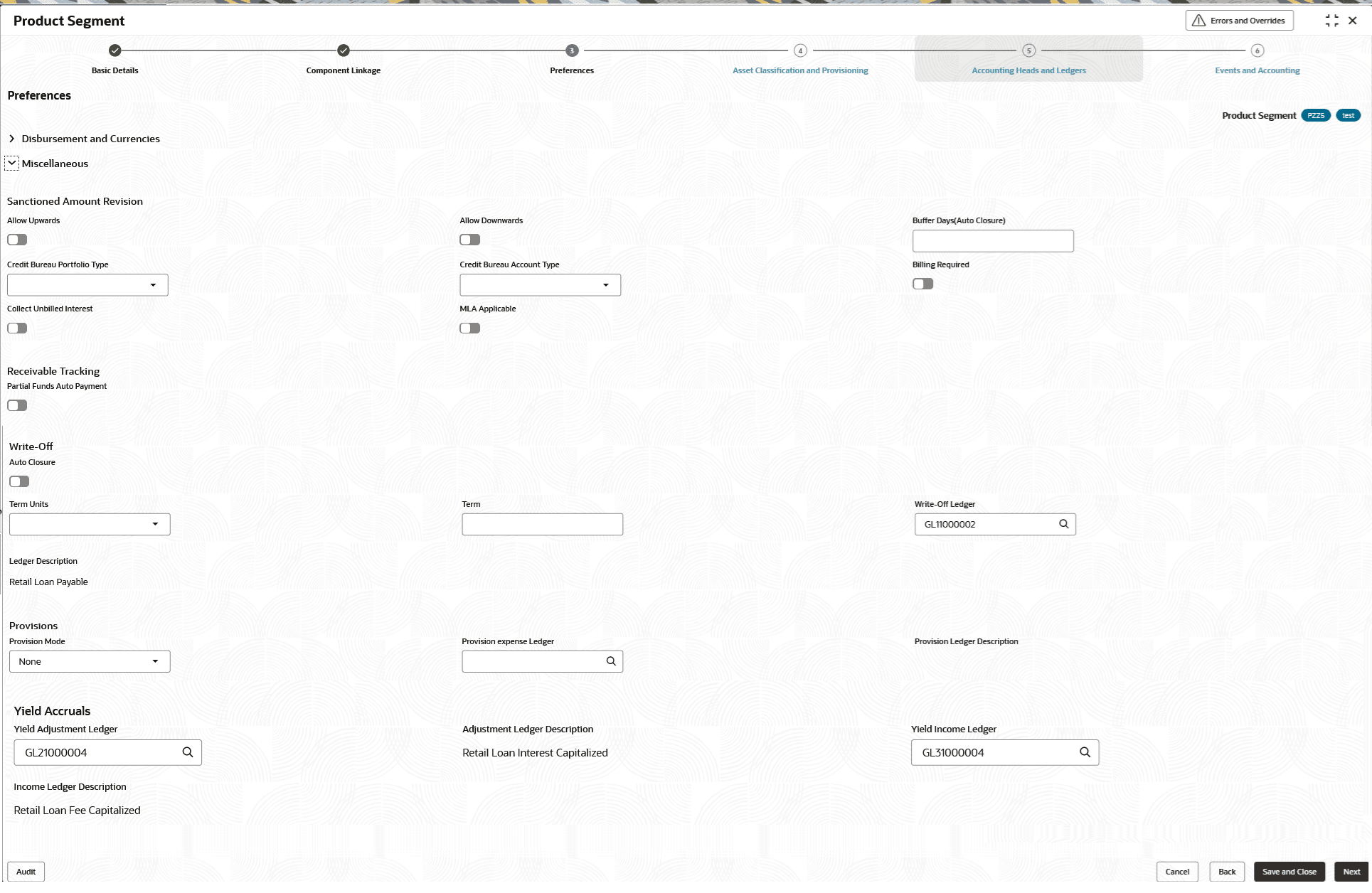
The section on miscellaneous is about certain aspects that are related to the servicing of the loan accounts.
This feature allows defining whether revision of sanctioned amount upwards/downwards is allowed.
Table 2-25 Miscellaneous - Field Description
Field Description Sanctioned Amount Revision Lending Institution can allow revision of sanction amount upwards/downwards based on borrower credentials like age, salary, occupation, credit score and repayment capacity. Specify the fields under this section . Note:- This is applicable only for non-billing accounts.
- This field is not supported for Line of Credit products.
Allow Upwards Click the toggle status to enable, to allow sanction amount increase. Note:- The Multi disbursement should be enabled to allow sanction revision upwards.
- This is applicable only for non-billing accounts.
-
This field is not supported for Line of Credit products.
Allow Downwards Click the toggle status to enable, to allow sanction amount decrease. Note:- This is applicable only for non-billing accounts.
- This field is not supported for Line of Credit products.
Buffer Days(Auto Closure) This field refers to the period required to complete the formalities related to loan account closure post the full repayment of loan by the borrower. Specify the number of days after which loan account will be marked as closed, following the full repayment of loan.
Note: This field is not supported for Line of Credit products.
Credit Bureau Portfolio Type Select the portfolio type from the drop-down list. This field is currently disabled and is for future use.
Credit Bureau Account Type Select the account type from the drop-down list. This field is currently disabled and is for future use.
Billing Required Click the toggle status to enable, if billing advices /notices to be generated for the product. Note:- Billing advice includes due details of business components with Include in Installment enabled.
- This field is mandatory for the Line of Credit products.
Collect Unbilled Interest Click the toggle status to enable, to consider unbilled interest along with installment due for payment during manual and auto payments. Note: On manual payment, flag on UI will be defaulted as per this field and will be allowed to modify.
This field is only applicable if Billing Required is selected.
Receivable Tracking Specify the fields under this section. Partial Funds Auto Payment Click the toggle status to enable this feature. Enable this feature if the lender intends to collect partial funds from the borrower’s savings account during auto-payment in event of the account not having adequate funds to collect the entire dues
Note: This field is not supported for Line of Credit products.
Write-Off Specify the fields under this section. The account can be written off if the lender does not expect the borrower to repay his obligations. Where the account has been fully written-off, the lender can choose to wait for a pre-configured term before it can be marked as closed.
Note: This field is not supported for Line of Credit products.
Term Units Select the term after write-off after which the account can be closed from the drop-down list. The available options are:- Months
- Years
Note: This field is not supported for Line of Credit products.
Term Specify the term. Note: This field is not supported for Line of Credit products.
Write-Off Ledger Click icon and define a expense ledger for write-off processing.
Note: This field is not supported for Line of Credit products.
Ledger Description Displays the description of the ledger selected. Note: This field is not supported for Line of Credit products.
Provisions The lender can define component and status-wise provisions for a loan account. Note: This field is not supported for Line of Credit products.
Provision expense Ledger Click icon and define a expense ledger for provisions processing.
Note: This field is not supported for Line of Credit products.
Provision Ledger Description Displays the description of the expense ledger selected. Note: This field is not supported for Line of Credit products.
Yield Accruals In this section user can define the Yield accounting ledgers. Yield Adjustment Ledger Select an asset type of ledger from the drop-down list. Adjustment Ledger Description Displays the ledger description. Yield Income Ledger Select an income type of ledger from the drop-down list. Income Ledger Description Displays the ledger description. For more information on fields, refer to the field description table.Figure 2-25 Holiday Treatment
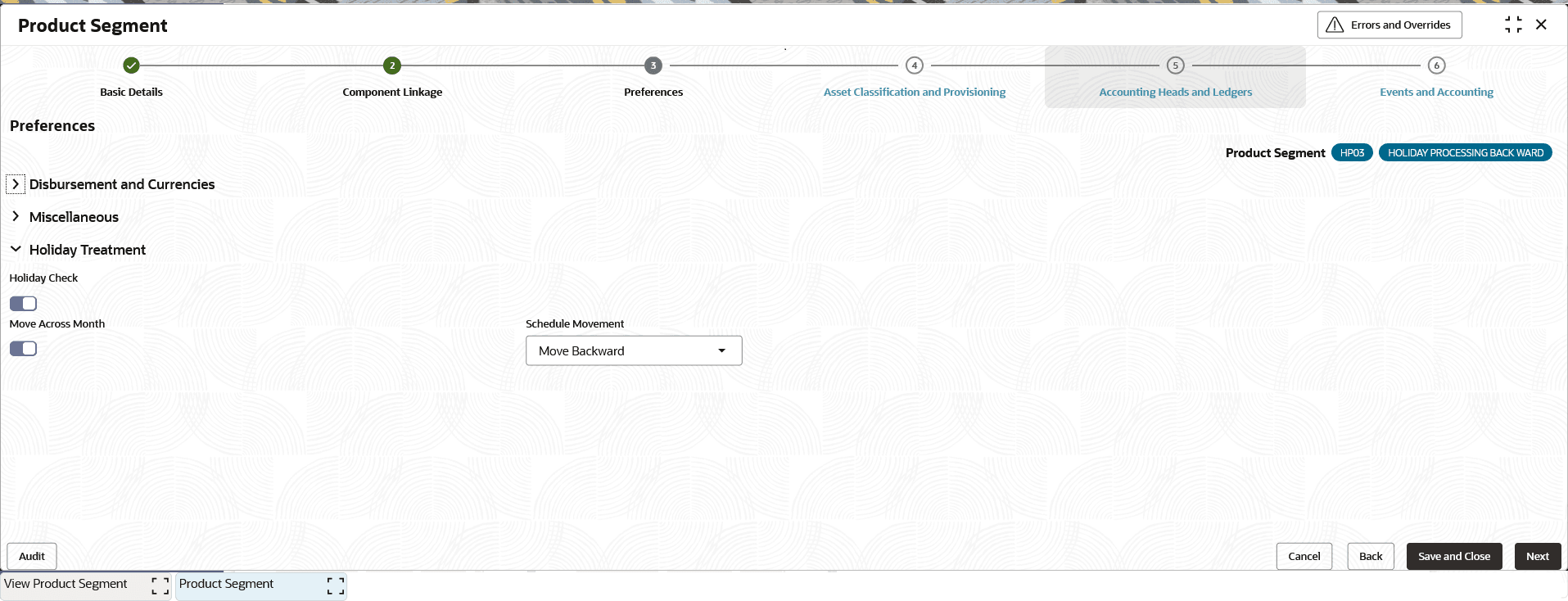
The section on holiday treatment is about certain aspects that are related to the servicing of the loan accounts / Line of Credit.
This feature automatically aligns all installments and the maturity date with the local holiday calendar during the initial schedule setup and across all services that generate a repayment schedule. It applies to phased disbursements, prepayments, and amendments—including changes to rate, tenor, installments, due dates, and rate revisions.
Table 2-26 Holiday Treatment - Field Description
Field Description Holiday Check Toggle to enable shifting repayment dates if an installment falls on a holiday. Note: The holiday treatment feature is applicable only for Non billing Account.
Move Across Month If the Holiday Treatment parameter is enabled, the lender will have an option to enable the said flag. This flag will act as a check to ensure that an entire month is not skipped as a result of holiday related schedule movements. The lender will enable the flag if the date movements as a result of the holidays are not expected to skip an entire month from an installment perspective. This field is disabled by default.
Schedule Movement Select the preferred Holiday Treatment to determine whether to shift the due date to the previous or next working day when an installment coincides with a holiday from the drop-down list. The available options are:- Move Forward - This indicates that if the instalment day in question is a holiday, it will be postponed to the next immediate working day
- Move Backward - This indicates that if the instalment day in question is a holiday, it will be preponed to the previous immediate working day
Parent topic: Create Product Segment