2.7.1.5 Stage Definition
This topic describes about configuring the repayment schedule of the loan accounts opened under this product and/or adhoc codes.
This topic describes the instructions to configure various stages of loan product. Each stage can be any of the below installment payment types - Interest only Installment (IOI), Moratorium(MOR), Equated Periodic Installment (EPI), Post Maturity Installment (PMI) etc. Single or multiple of these stages can be defined for the product. Loan repayment schedule is drawn using the above stage definition. For example, we can configure a student education loan to have MOR stage followed EPI stage.
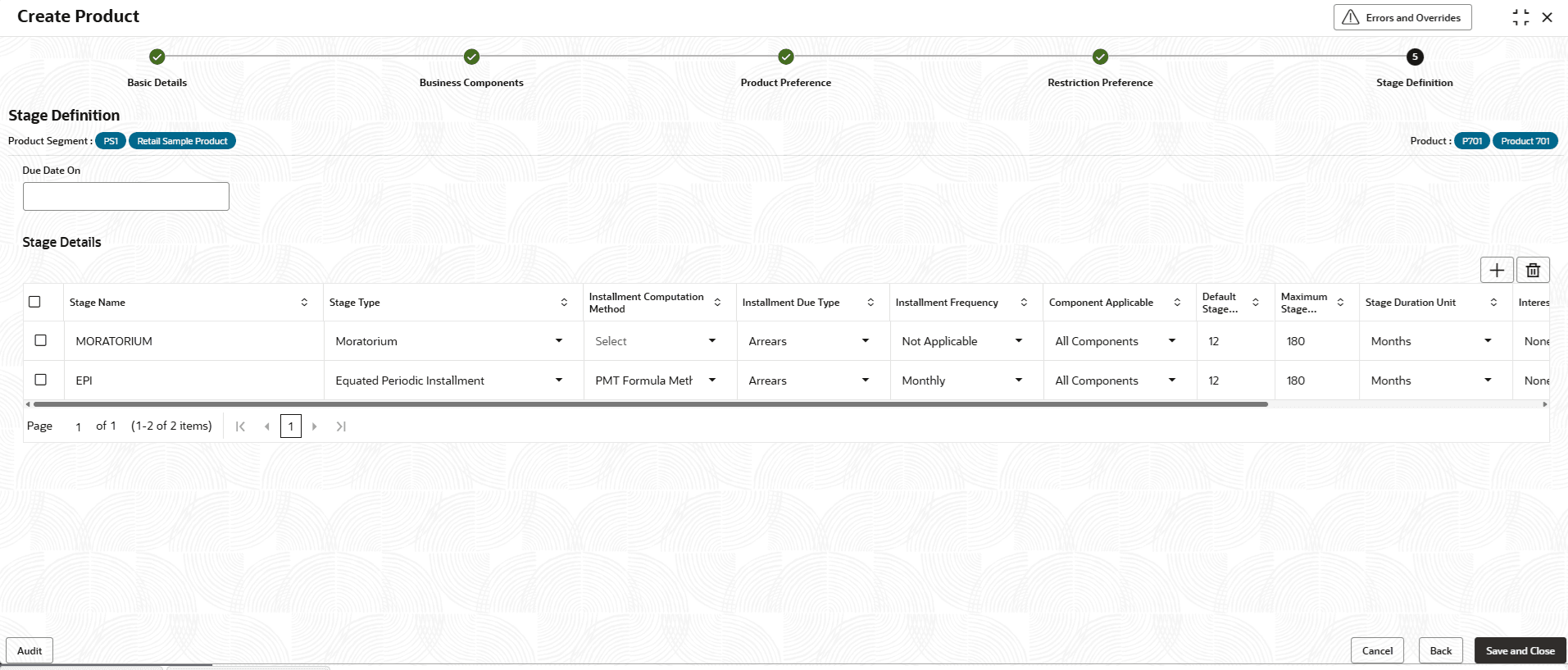
- Click Next in the Restriction Preference screen to define the stage.The Stage Definition screen is displayed.
- Specify the fields on Stage Definition screen.
Table 2-62 Stage Definition - Field Description
Field Description + button Click to add a row. - button Click to delete a row that is already selected. Due Date On Specify the due date when all the schedule due dates need to fall for the account. It is an optional field. The allowed values are 1 to 31. If the value is entered as 31, then due dates will fall on month ends. Stage Name Specify the name for each stage as per bank's naming convention. Note: The Line of Credit product supports the Draw Stage.
Stage Type Select the stage type from the drop-down list. The available options are:- Equated Periodic Installment
- Interest Only Installment
- Moratorium
- User Defined Schedule
- Interest Principal Installment
- Draw
The allowed values are defined by the lookup type STAGE_TYPE.
Note: The Line of Credit product supports the Draw Stage.
Installment Computation Method Select the method as PMT Formula Method from the drop-down list. The available options are:- PMT Formula Method
- Annuity Method
- PMT Recursive Formula Method
This field indicates the formula for the computation of installment amount for the stage.
The allowed values are defined by the lookup type COMP_METHOD.
Note: This field is not supported for the Line of Credit products.
Installment Due Type This field indicates whether the installments will become due at the beginning of the installment period or at the end. Select the due type as Arrears from the drop- down list. In this type of method, the installment is due at the end of the installment cycle. The allowed values are defined by the lookup type INST_TYPE.
Note: This field is not supported for the Line of Credit products.
Installment Frequency This field indicates the frequency when the installment amount will become due for payment for the configured stage. Different stages can be configured to have different payment frequency. Select the frequency from the drop- down list. The allowed values are defined by the lookup type INST_FREQ. Note: This field is not supported for the Line of Credit products.
Component Applicable Select the component as All Components from the drop-down list. This field indicates different definitions for each component type at the stage level.
The allowed values are defined by the lookup type COMP_APPLICABLE.
Note: This field is not supported for the Line of Credit products.
Default Stage Duration Specify the default stage duration which percolates or defaulted down to the account. The allowed values are defined by the lookup type STAGE_UNIT.
Note: The Line of Credit product supports Draw Stage, with the Default Stage Duration configured as Indefinite.
Maximum Stage Duration Specify the maximum stage duration (cumulative) allowed for the stage type at the account level. Note: This field is not supported for Line of credit as Revolving Line of Credits are flexible and Draw stage is intended to remain active until the customer requests to convert the Line to Repayment stage.
Stage Duration Unit Select the duration as Months from the drop-down list. This field is unit value of duration for the values entered in Default Stage Duration and Maximum Stage Duration.
For example, maximum stage definition and stage duration unit can be expressed as 36 months, which means maximum duration of the configured stage in loan account can be only upto 36 months.
Note: This field is not supported for Line of credit products.
Interest Compounding Frequency This field is defaulted to None. Note: This field is for future use.
Excess Interest Behavior This field specifies the treatment for the excess interest amount (i.e. when the interest amount computed for the schedule period is more than the installment amount). Select the interest behaviour from the drop-down list. The available options are:- Capitalize
- Charge
- Carry Forward to Subsequent Installments
The allowed values are defined by the lookup type EXCESS_INT_TREATMENT.
Note: This field is not supported for Line of credit products.
End of period behavior This field specifies the treatment for accrued components (i.e Interest) at the end of the stage term. The available options are:- No Treatment Required
- Carry Forward to First Installments
- Capitalize Interest
- Spread across loan term equally
- Carry Forward with Notional Capitalization
The allowed values are defined by the lookup type END_PERIOD_BEHAVIOUR.
Note: This field is not supported for the Line of Credit products.
- Click Back to go back to previous tab.
- Click Cancel to close the details without saving.
- Click Save and Close to save the details.The Contract Template is successfully created and can be viewed using the View Product screen.
Parent topic: Create Product