4.2.2.1 Commission
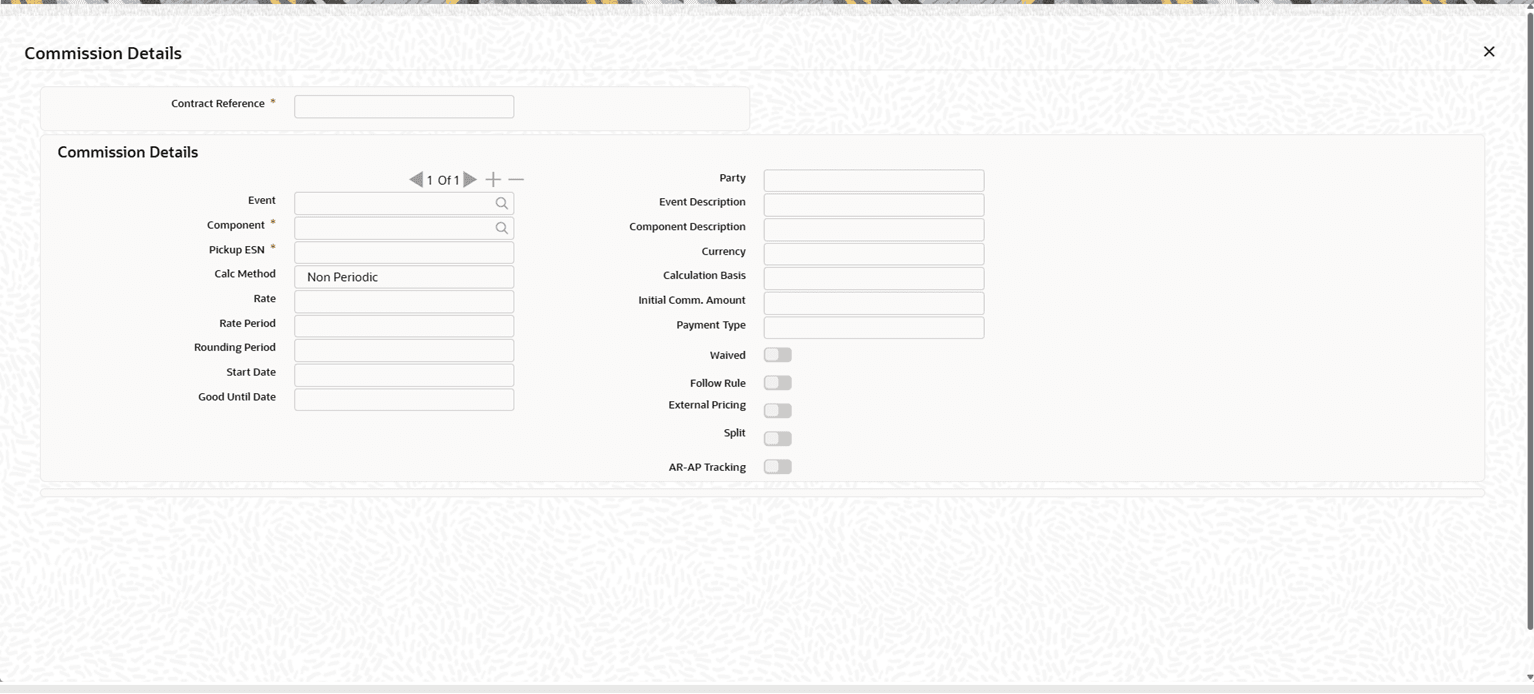
This topic provides the systematic instructions to capture the commission details.
Navigate to Bills and Collections Contract Definition screen.
- On Bills and Collections Contract Definition screen,
click Commission.Commission Details screen is displayed.
Note:
The Commission subsystem is available only when the contract is in Final stage.
Commission applies only to Import Bills. For Export Bills and Transfer Bills, the system disables the Commission subsystem.
- On the Commission Details screen, specify the details as
per the requirement.
Table 4-13 Commission Details - Field Description
Field Description Contract Reference System displays the Contract Reference Number. This field is display only.
Party System displays the counterparty of the contract. This field is display only.
Event System displays the event for which commission is collected.
This field is display only.
Event Description System displays the description of the selected Event. This field is display only.
Component System displays the commission Component associated with the event as defined in the product.
This field is display only.
Component Description System displays the description of the selected Component. This field is display only.
Pickup ESN System displays the Event Sequence Number (ESN) of the event for which the commission applies. This field is display only.
Currency System displays the commission currency used for commission calculation as defined in the commission rule. This field is display only.
Calc Method System displays the commission calculation method based on product preferences.
Available values:
- Flat
- Non Periodic
Commission is calculated according to the selected method.
Calculation Basis System displays the Calculation Basis defined for the product for the contract currency.
If no value is available in the product, the system displays the interest calculation basis defined for the currency.
Rate System displays the commission rate defined in the commission rule.
Modify the rate at the contract level if required. The system recalculates the commission when the rate changes.
Recalculation does not apply when the calculation method is Flat.
Rate Period System displays the Rate Period defined in the commission rule.
If the rounding period is 0, the applicable rate period is 12 and cannot be modified. In this case, the field is display-only.
Rounding Period System displays the Rounding Period defined in the commission rule.
For Bills commission, the rounding period cannot be greater than 0.
Start Date System displays the commission start date.
For Acceptance Commission linked to INIT and BCAP events, the system defaults the start date according to the product date preference.
For Co-Acceptance Commission linked to the BCAC event, the system defaults the Transaction Date.
Modify the date if required. If the calculation method is Non Periodic, the system recalculates the commission after modification.
Good Until Date System displays the Bill Maturity Date.
Commission is calculated up to this date.
This value cannot be modified.
Initial Comm. Amount System displays the calculated commission amount.
If commission parameters are modified at the contract level, the system recalculates the amount.
Specify the commission amount manually when the calculation method is Flat.
Payment Type System displays the commission collection method defined for the contract.
The system collects the commission based on this value.
Waived System defaults the value to No.
Change the value to Yes to waive the commission.
Waived commission is not collected.
Follow Rule System defaults the value to No.
If set to Yes, the system applies the rate defined in the commission rule.
External Pricing System displays the External Pricing value defined in the commission rule. Set the value to Yes to split the commission component.
AR-AP Tracking System displays the AR-AP Tracking flag based on the commission rule.
If Yes is selected, the system debits the commission from the GL account defined for deferred commission collection.
Parent topic: Main Tab