1.1.4 Credit Rating Maintenance

This topic provides systematic instructions to credit rating maintenance.

This screen allows user to configure the rating scales for various credit rating agencies and define the obligations (debt instruments) that fall under different grades, such as investment-grade, non-investment-grade, or speculative-grade. This setup helps in aligning user internal systems with the grading structure used by agencies like S&P, Moody’s, Fitch, and others.

  1. On the Home screen, type TRDCRERT in the text box, and click Next.
    The Credit Rating Maintenance screen displays.
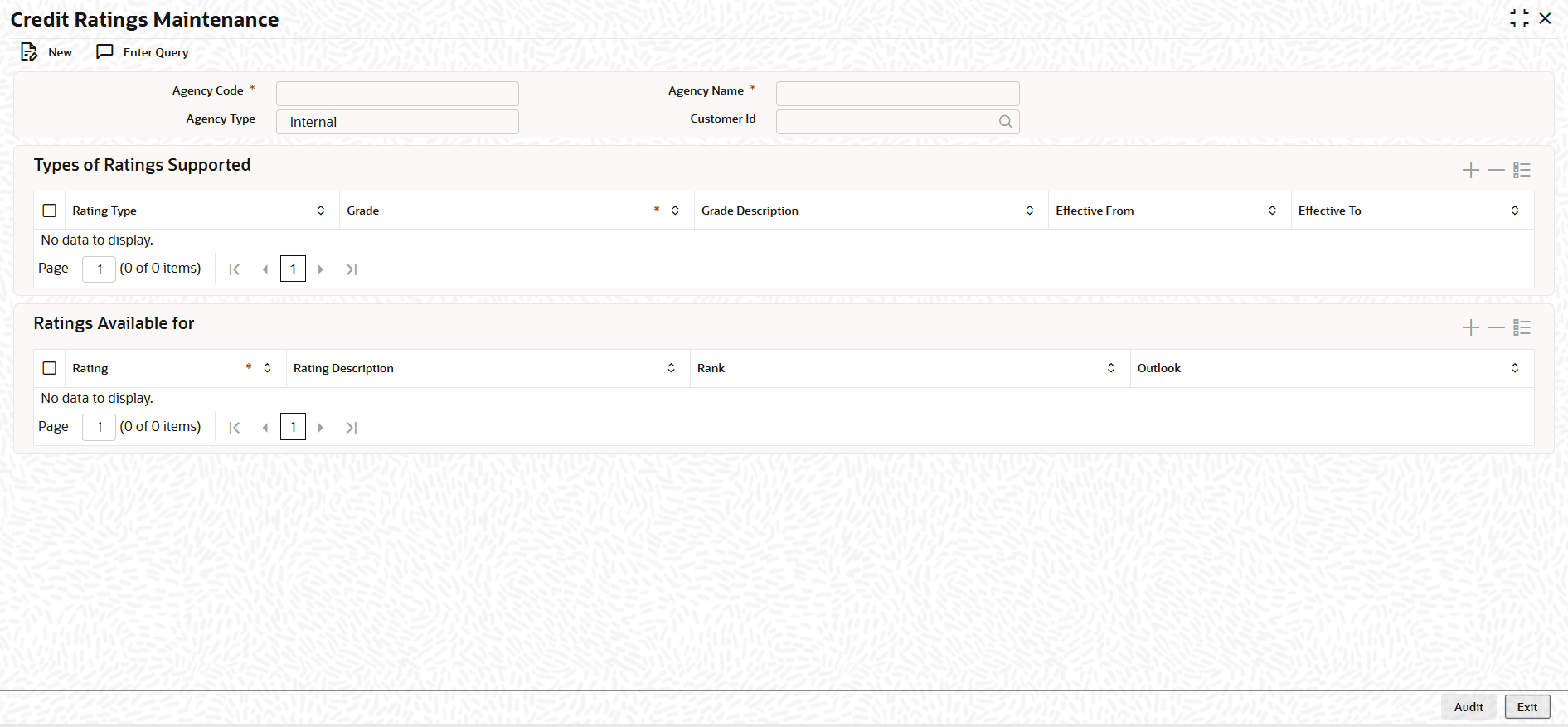
    Figure 1-10 Credit Rating Maintenance


  2. On the Credit Rating Maintenance screen, Click New.
  3. On the Credit Rating Maintenance, Specify the details as required.

    Table 1-10 Credit Rating Maintenance - Field Description

    Field Description
    Agency Code Specify the agency code.
    Agency Name Specify the credit rating agency who gives the rating for a instrument.
    Agency Type Specify the agency type, whether it can be Internal or External.
    Customer ID Specify the Agency CIF ID.
    Grade Displays the grade for rating scale or category for rating scale.
    Grade Description Displays the grade description.
    Effective From Displays the start of the date.
    Effective To Displays the end of the date.
    Rating Displays the rating scale for each grade for a agency.
    Rating Description Displays the description for the rating scale.