1.1.1 Instrument Product Definition
This topic provides systematic instructions to instrument product definition.
In this screen user will be able to create instrument product for inflation
linked bond with preference classification segregated properly for bonds, equity and so
on.
- On the Home screen, type
TIDINPRD in the text box, and click
Next.The Instrument Product Definition screen displays.
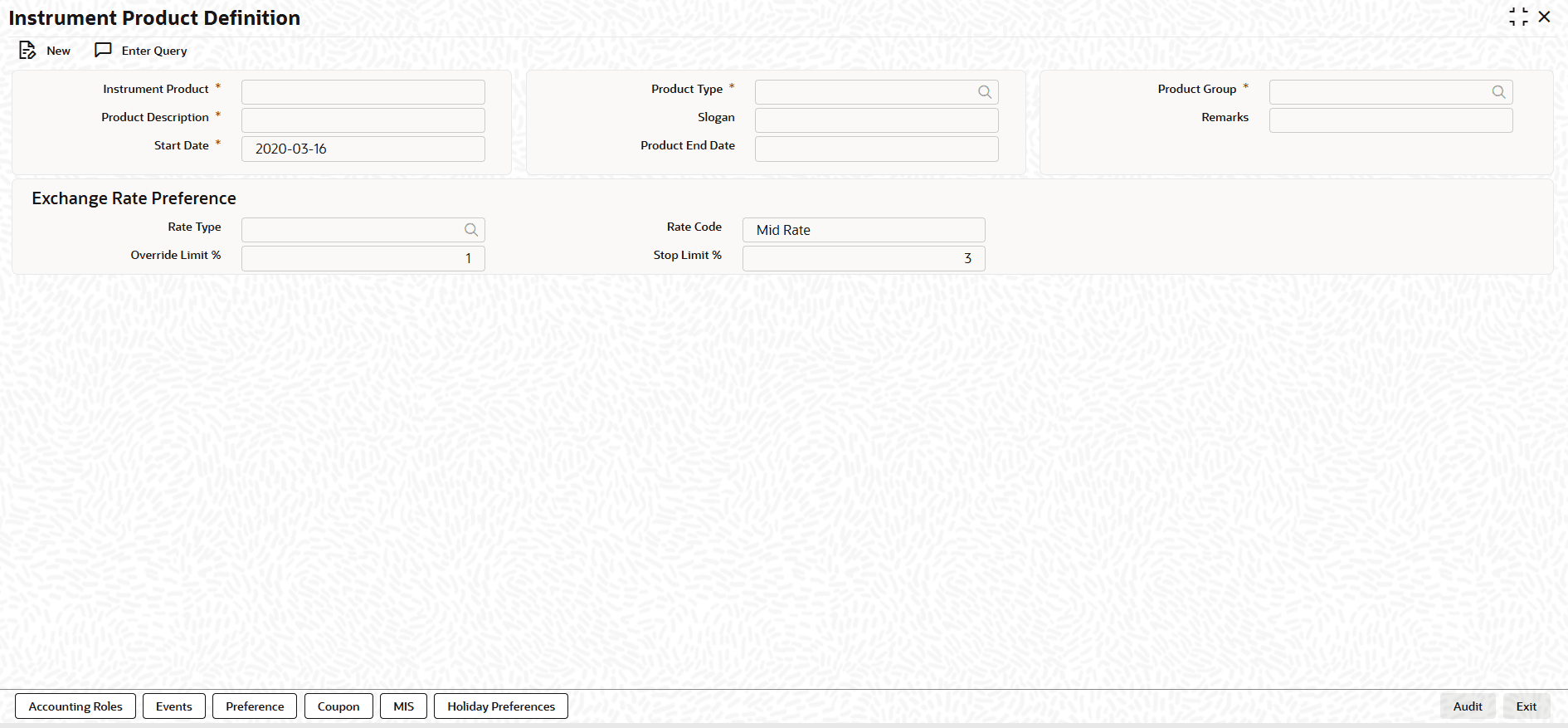
- On the Instrument Product Definition screen, Click New.
- On the Instrument Conversion Maintenance screen, Specify
the details as required.
Table 1-1 Instrument Product Definition - Field Description
Field Description Instrument Product Enter the product code of the settlement product to be created. Product Description Enter the description of the product code of the instrument to be created. Product Type Enter the specific type to which the product belongs. Slogan Enter the short marketing/internal sentence for the product. Start Date Enter the date from which the product can be used. Product End Date Enter the date up to which the product can be used. Product Group Enter the details of the group to which the product is associated with. Remarks Enter information about the product intended for bank’s internal reference. Rate Type Enter the exchange rate type for getting the exchange rate to be used for market price variance for the instrument product. Rate Code Select the exchange rate code for getting the exchange rate to be used for market price variance. Override Limit % Enter the normal variance (as %) allowed for the exchange rate used for the instrument. Stop Limit % Enter the maximum variance (as %) allowed for the exchange rate used for the Instrument.
Parent topic: Introduction of Inflation Linked Bonds
