1.1.2 Instrument Master
This topic provides systematic instructions to instrument master.
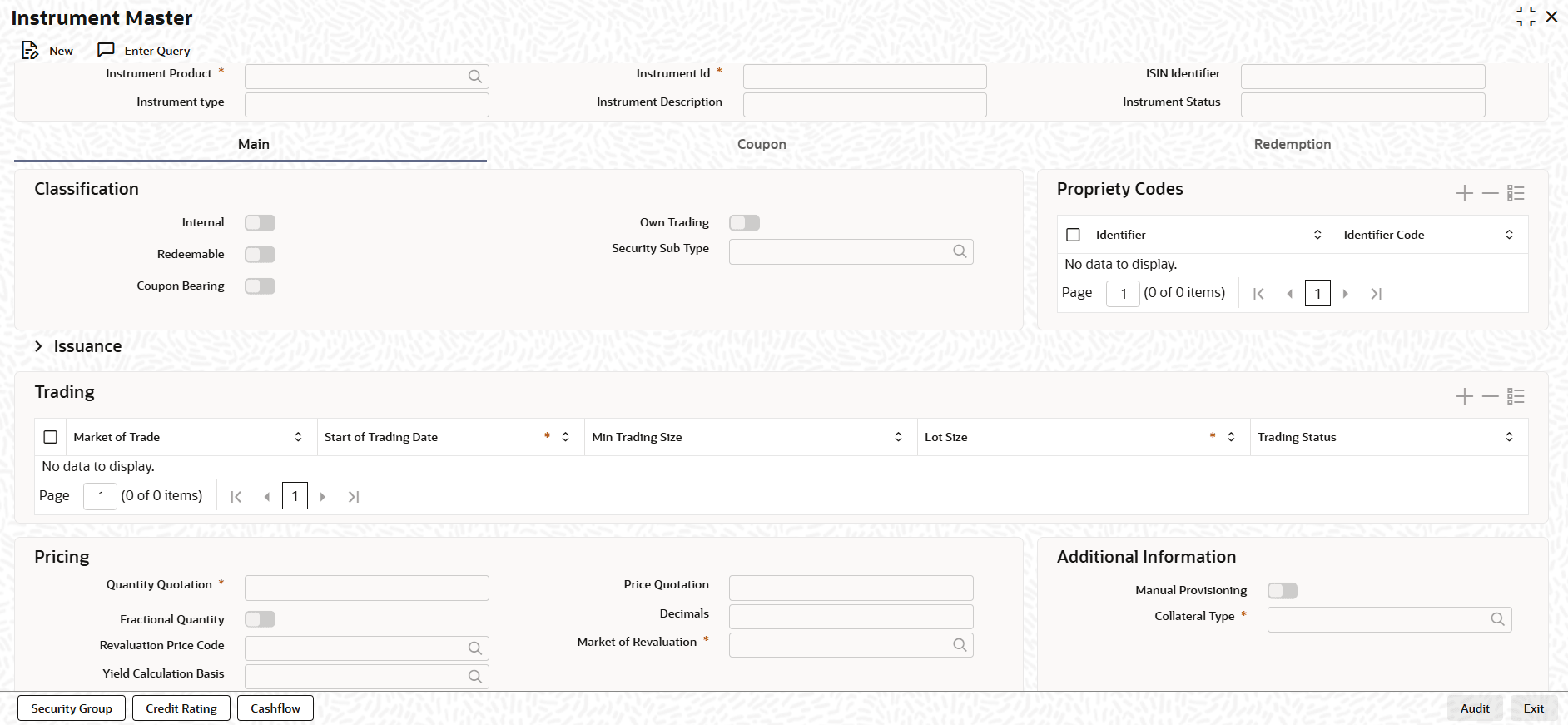
- On the Home screen, type TIDINSDF
in the text box, and click Next.The Instrument Master screen displays.
- On the Instrument Master screen, Click New.
- On the Instrument Master screen, Specify the details as
required.
Table 1-2 Instrument Master - Field Description
Field Description Instrument Product Select the Instrument product from the List. Instrument ID Enter the instrument ID. ISIN Identifier Enter the International Securities Identification Number (ISIN) number allotted for the instrument. Instrument Type Displays Instrument Product Type. Instrument Description Enter the instrument description. Instrument Status Enter the status to know states whether the security is of Primary type (new issue) or Secondary type. Internal Select the flag if instruments flagged for internal purpose. Own Trading Select the flag if its used for banks own trading. Redeemable Select the flag if instrument is redeemable . Security Sub Type Enter the security sub type. Coupon Bearing Select the flag if its bond is a coupon bearing bond. Identifiers Displays the unique identifiers for the instrument. Identifier Code Displays the input proper uniquealhanumeric identifier code. Market of Trade Select valid market of issue from the list. This is the market where instrument is issued. Issuer Code Select Issuer CIF ID from why has issued the instrument. Registered/Bearer The Holder of Instrument can be either Registered or Bearer.
The Registered security is issued in the name of a specific owner, whose details are recorded on the books of the issuer.
The Bearer security is owned by whoever physically holds it (the "bearer"). No registration of ownership is maintained.
Form Type Select the form type from the drop-down list. The available options are: - Scrip Based - Issued in a paper format.
- Immobilized - Securities in lieu of which proxies are traded.
- Dematerialized - Issued in a electronic format.
- Combination - Issued in one or more of the above formats.
- SGL
Issue Date Select the date originally issued in the primary market. Redemption Date Select the date when issuer repays the principal amount to the investors. Issue Price An issuer can offer a security at a premium or at a discount with respect to the par value, on the Issue Date. You can capture the offer price (the purchase price), or the Issue Price for a security that you are maintaining. Redemption Price Enter the price at which an issuer redeems a security is referred to as the redemption price. Initial Face Value Enter the actual unit face value of the security you are maintaining, as of the issue date. This price is also referred to as the par value of the security. Current Face Value Enter the system-generated value, giving the current face value of the security. Issue Size Enter the size it represents the total amount the issuer intends to raise at the time of issuance. Outstanding Issue Size Enter the outstanding issue size refers to the number or value of securities that are currently in the hands of investors and actively trading in the market. Instrument Currency Enter the currency in which instrument is issued. Payment Currency Enter the currency in which instrument pays corporate actions. Issuer Agent Code Displays the issuer agent code. Issue Price Displays the issue price. Market of Trade Displays the market in which security is traded. Start of Trading Date Displays the date on which security is started to be available for trading. Min Trading Size Displays the minimum quantity in which a security should be traded. Lot Size Displays the lot size is the standardized quantity of shares, contracts, or units bought or sold in a single transaction, acting as the minimum order size. Trading Status Displays whether the trade is Active, Closed (Suspended) or Redeemed. Quantity Quotation This field indicates how the securities is quoted. Price Quotation The method in which price is quoted, is a feature of the market where a security is traded. Each market may use a particular price quotation method. Fractional Quantity Indicates security quantity can be quoted in fraction for units. Decimals Enter decimal points of a fractional unit of a security. Revaluation Price Code Enter the price code assigned to each security is used to identify the particular market price of the security for revaluation. Market of Revaluation Enter the market, which will determine the number of spot days to be used for arriving at the revaluation date while revaluing the security using the effective interest method. Yield Calculation Basis Enter yield calculation basis for a bond. Manual Provisioning Select this check box to allow the manual provision during the instrument-life-cycle. Collateral Type Select the appropriate collateral type for the instrument. - On the Instrument Master screen, click
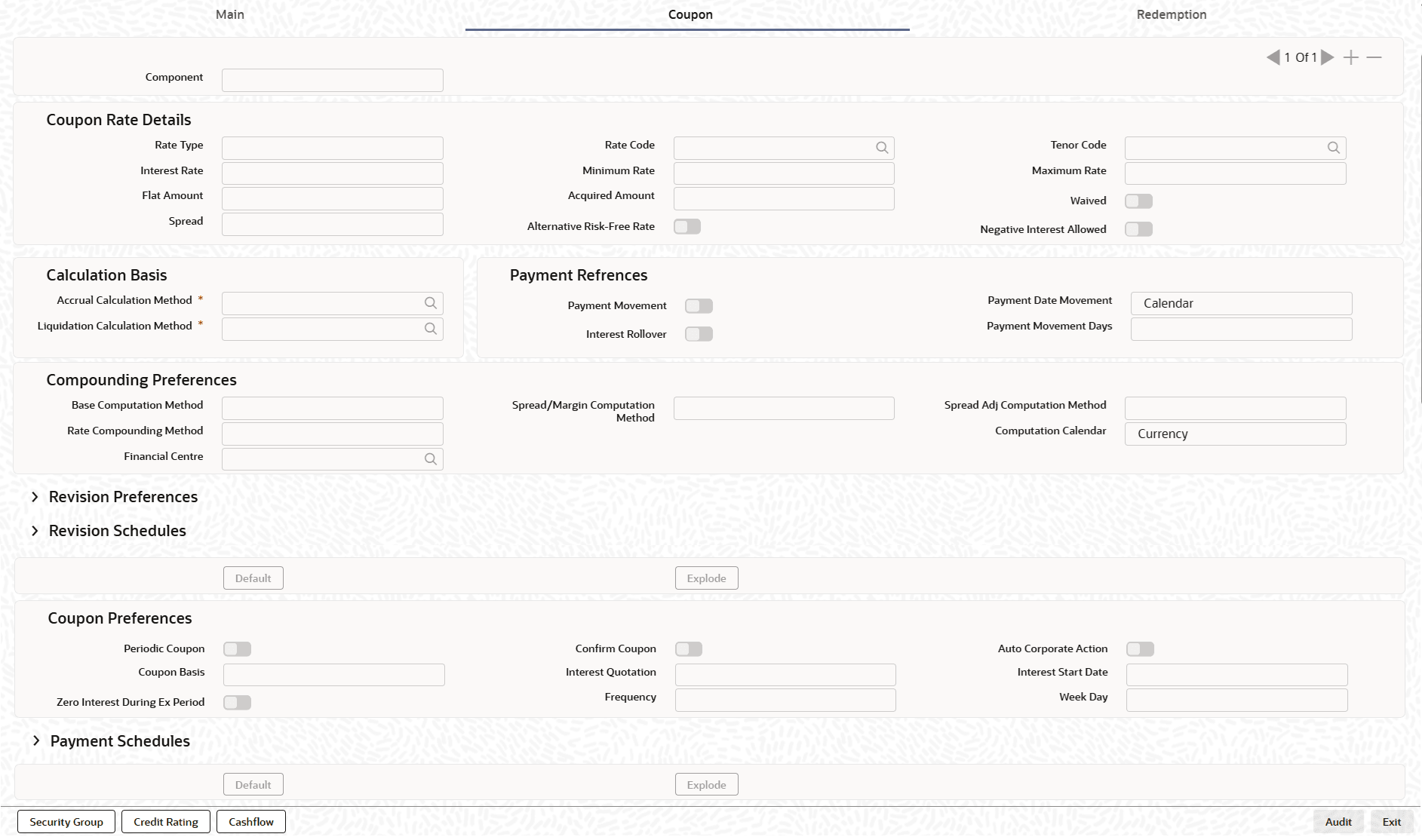
Coupon.The Coupon tab displays.
- On the Coupon tab, specify the fields.
Table 1-3 Coupon - Field Description
Field Description Component Enter the component for the coupon. Rate Type Enter the rate type for the coupon. Rate Code Enter the rate code for a floating rate type coupon. Tenor Code Enter the tenor code for a floating rate type. Interest Rate Enter the rate of the interest for the coupon. Minimum Rate Enter minimum interest rate allowed for the instrument. Maximum Rate Enter maximum interest rate allowed for the instrument. Flat Amount Specify the flat amount. Acquired Amount Specify the acquired amount. Waived Select the waived flag if user does not want to collect coupon for the component. Spread Enter the spread for the coupon. Alternative Rist-Free Rate Select the alternative risk-free rate, if the interest class is enabled for RFR. Negative Interest allowed Select the negative interest allowed flag for coupon with negative interest. Accrual Calculation Master Enter calculation basis for coupon accrual. Liquidation Calculation Master Enter calculation basis for liquidation. Payment Movement Select this flag, if Interest payments are delayed by a certain number of days and are due a few days after the end of an interest period. Interest Rollover Interest Rollover method can be used as a combined method along with one each of In-arrears & In-advance methods Payments are set in advance and any missed interest relative to in arrears is rolled over into the next payment period
This option combines a first payment (installment payment) known at the beginning of the interest period with an adjustment payment known at the end. The adjustment payment can be made a few days later or at the end of the next accrual period.
Payment Date Movement Select the payment movement calendar. If the option Calendar is selected, then the system skips the Holiday Preferences selected at the contract level.
If the option Business is selected, it considers holiday treatment specified for schedule as per the Holiday Preferences selected at the contract level.
Payment Movement Days This field will only be relevant if 'Rate Method' is 'In-Arrears' or bearing and RFR method is Payment delay. Number of days by which the interest (or installment) payments are delayed by a certain number of days and are thus due a few days after the end of an interest period. Base Computation Master Enter the base computation method for coupon calculation. Spread/Margin Computation Master Enter the Spread/Margin computation method, it can be either Simple or Compound. Spread Adj Computation Master Enter the Spread Adj Computation Master, it can be either Simple or Compound. Rate Compounding Method Enter the rate compounding method, it can be either CCR or NCCR.
This rate compounding method produces a rate for a period by applying the RFR compounding formula to the RFR rate and applying the compounded rate to the principal to calculate the interest due.
Computation Calender Select the computation calendar from the drop-down list for interest calculation when RFR method is selected. It can be either Currency or Financial Center. Financial Center Enter the financial center name.
This field is mandatory if the Financial Center is selected as a computation calendar.
Periodic Revision Enter the rate revision, it indicates as periodic and it has predefined schedule. Confirm Revision Enter the confirm revision, it indicates as confirmed for corporate action. Revision Frequency Select the revision frequency for rate revision from drop-down list. The available options are: - Daily
- Weekly
- Monthly
- Quarterly
- Half-yearly
- Yearly
Last Reset Check this check box to indicate that the last reset method is allowed. This field is relevant only if rate method is In-Advance. In this option, the system determines the interest payments on the basis of the averaged RFR of the previous period. Lookback The user can select Lookback as RFR preference if the rate method is In-Arrears. The observation period for the interest rate calculation starts and ends a certain number of days prior to the Interest period. As a result, you can choose the interest payment to be calculated prior to the end of the interest period. Lookback Days Specify the lookback days. Last Recent last recent uses a shorter, more recent observation period than the full interest period. Lockout Lockout means that the RFR is frozen for a certain number of days prior to the end of an interest period (lockout period). Lockout Days Specify the lockout days. Index Value The RFR Index measures the cumulative impact of compounding RFR on a unit of investment over time. Index Value supports below RFR preferences. - Arrear Method
- Lookback
- Lockout
- Payment Delay
- Plain
- Advance Method
- Last Reset
- Last Recent
Plain This field will only be relevant if rate method is In-Arrears or bearing and RFR method is Plain. System will use averaged SOFR over current interest period, paid on first day of next interest period. Rate Compounding Select if rate compounding should be applied for the instrument for calculation. Observation Shift The observation shift mechanism provides the rate to be calculated and weighted by reference to the observation period rather than the relevant interest period.
Observation shift currently supports below RFR methods and combination.- Lookback
- Lockout
- Lookback and Lockout combination
Weighted Average Select this check box to use weighted average calculation (WAC) as the RFR calculation method. Spread Adjustment Specify the rate code spread adjustment. Rate Fixing Days Specify the rate fixing days.
For every cash flow settlement period of the floating rate leg, you have to fix the floating rate. The rate fixing days defined may differ from trade to trade basis. The floating rate fixed in advance or at the end of the period according to the rate fixing days and movement set for the trade.
Fixing Date Movement Specify the fixing date movement.
Rate fixing date movement indicates how a rate fixing schedule to be moved during fixing. The rate fixing schedules is build based on the rate revision dates, rate fixing days and fixing date movement.
Base Start Date Specify the start of coupon schedule. Discrete/Continuous If user choose the continuous option, the system calculates all intermediate coupon due dates, based on the frequency specified. For the Discrete / Irregular coupon schedule definition, you will have to set the coupon dates. Base End date Specify the end of coupon schedule. Base Frequency Select the frequency for a coupon that will determine the repayment schedule. Unit Specify the unit of frequency to set the frequency the component. Adhere to Month End If the schedule frequency is in terms of a month, you choose to indicate that the schedule days must adhere to Month - Ends. - On the Instrument Master screen, click
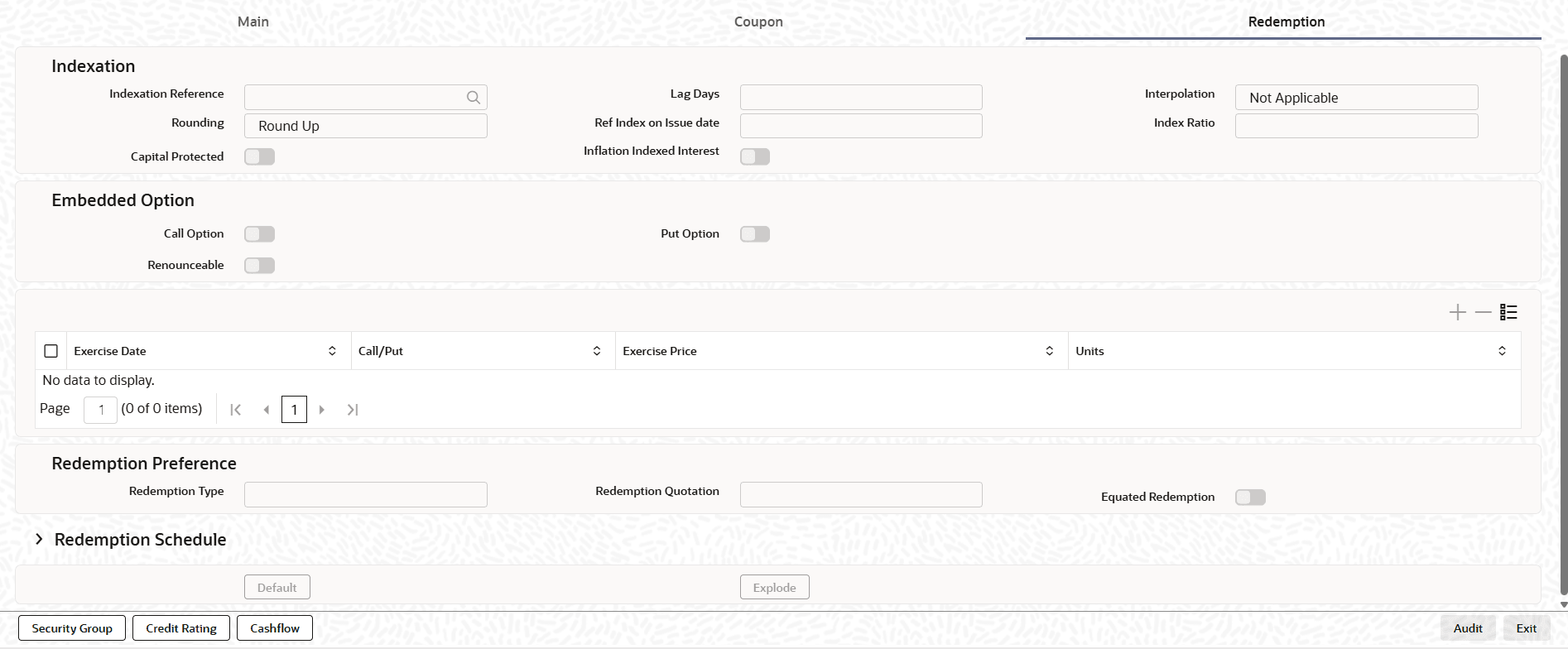
Redemption.The Redemption tab displays.
- On the Redemption tab, specify the fields.
Table 1-4 Redemption - Field Description
Field Description Redemption Type Specify the redemption type.
This field indicates mode of redemption that an issuer can redeem. While defining redeemable securities you can specify the method in which the security is to be redeemed. You can indicate whether the redemption type is to be Bullet (On Maturity) or Quantity (% of the Nominal on different schedule).
Redemption Quotation Specify the Quotation type of redemption. Equated Redemption Select this check box to indicate instrument can be redeem on equal installments over period of time. Indexation Reference Specify the indexation reference. Lag Days Enter number of lag days used for index reference rate pick up. Interpolation Specify the interpolation method. Rounding Select the rounding method used for interpolation from the drop-down list. The available options are: - Up
- Down
- Truncate
- Round Near
Ref Index on Issue Date Displays ref index value for issue date of an instrument. Index Ratio Displays ref index ration on issue date. Capital Protected Select if bond's principal is indexed. Inflation Indexed Interest Select if coupon is indexed. Call Option A bond call option is a contractual right for the issuer to redeem a bond before its maturity date, allowing them to pay back the principal early. Put Option A put option in a bond, known as a callable bond, gives the bondholder the right to sell the bond back to the issuer at a specific price and on certain dates before the maturity date. Renounceable Indicates that an existing shareholders have the option to sell or transfer their right to purchase new shares to another investor, rather than exercising the right themselves. Exercise Date Displays the date of redemption. Call/Put Displays call or put option. Exercise Price Displays the redemption price. Units Displays the units which are redeemed. Event Date Specify the redemption date. Redemption Factor/Cashflow/Percentage Enter the %/amount/factor for redemption. Redemption Price Enter the redemption price. Disposition of Fractions Enter the rounding of decimals. Call Indicator Enable this flag if issuer calls the repayment of the bond. Current Face Value Displays the current face value. Redemption Details This section follows the below fields. Rating Agency Select the agency which is used for credit rating. Rating Type Select the rating type, whether it is Entity or Instrument. Rating Select the rating for the issuer or issue. Rating Date Select the rating date. Rating Outlook Select rating outlook which gives the direction of the credit rating from the drop-down. - Positive
- Negative
- Stable
- Developing
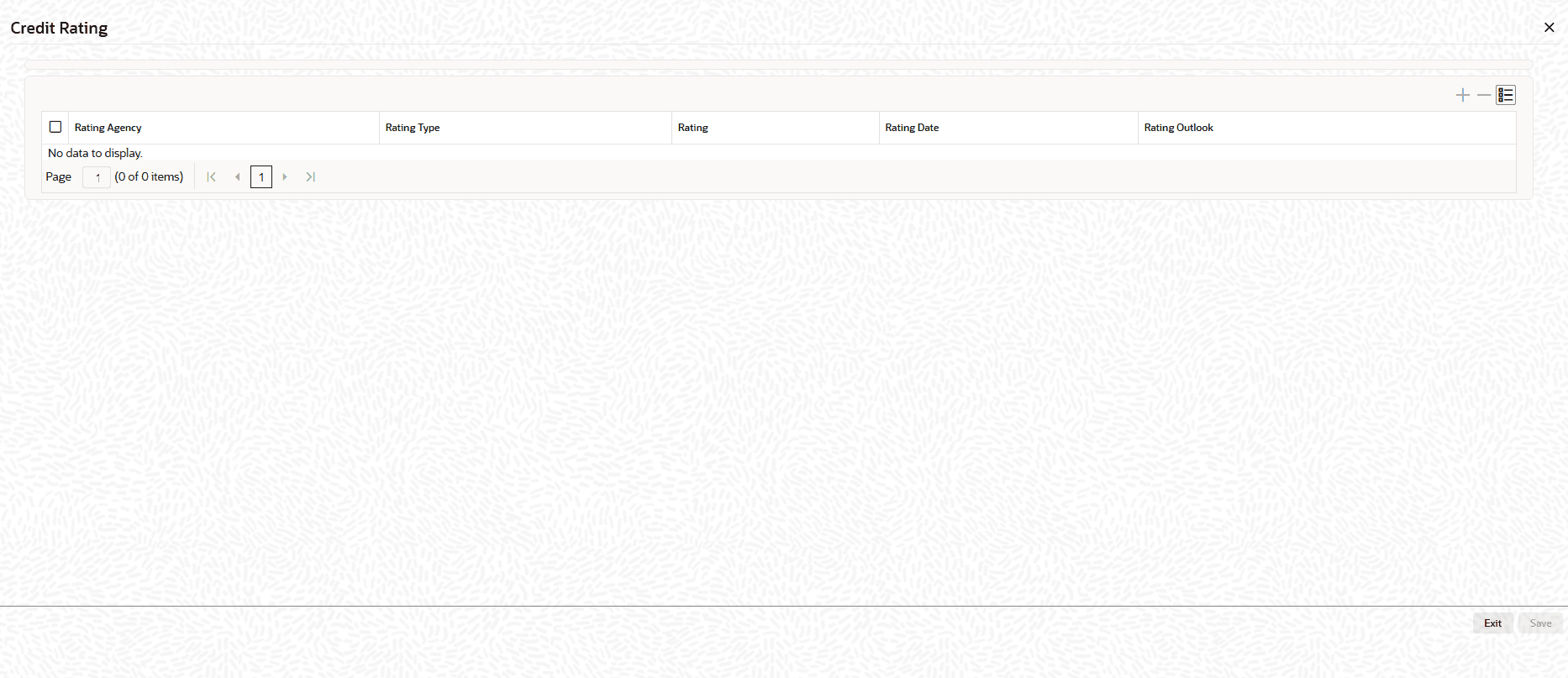
- On Instrument Monitor screen, click Credit
Rating.The Credit Rating screen displays.
- On the Credit Rating tab, specify the fields.
Table 1-5 Credit Rating - Field Description
Field Description Rating Agency Displays the organization that issued the credit rating. Rating Type Displays category/scale of rating being recorded. Rating Displays actual credit rating value assigned by the agency under the selected rating type. Rating Date Displays the effective date of the rating. Rating Outlook Displays the agency’s forward-looking view associated with the rating. - On Instrument Monitor screen, click Cash Flow
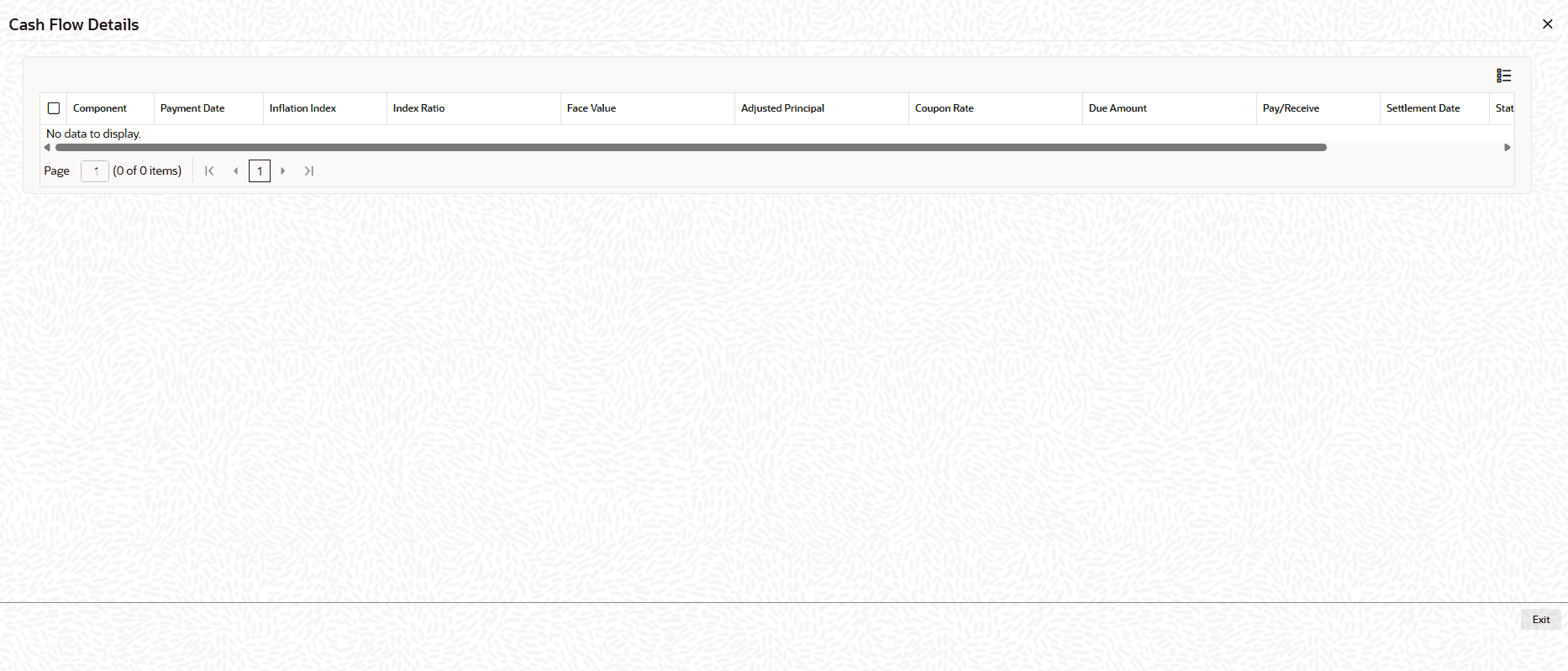
Details.The Cash Flow Details screen displays.
- On the Cash Flow Details tab, specify the fields.
Table 1-6 Cash Flow Details - Field Description
Field Description Component Displays the cash flow component/type for the line item. Payment Date Displays the scheduled date the cash flow is due per the instrument/contract schedule. Inflation Index Displays the reference inflation index used for indexed instruments . Index Ratio Displays the multiplier derived from the inflation index (typically current index ÷ base index) used to adjust principal/cash flows. Face Value Displays the original nominal/principal amount on which cash flows are based. Adjusted Principal Displays the principal amount after applying the index ratio used for calculating payments on indexed instruments. Coupon Rate Displays the interest rate applied to the principal for the period, per terms of the instrument. Due Amount Displays the amount scheduled to be paid/received for this cash flow line before settlement processing. Pay/Receive Indicates the direction of the cash flow for the entity: Pay (outflow) or Receive (inflow). Settlement Date Displays the actual or expected date the cash flow is settled. Status Displays the processing state of the cash flow line.
Parent topic: Introduction of Inflation Linked Bonds