E.2.2.4 Generate Lease Sale and Usage Tax Report
This topic provides information about generating the lease sales and usage tax report, which displays details of sales and usage taxes associated with lease transactions.
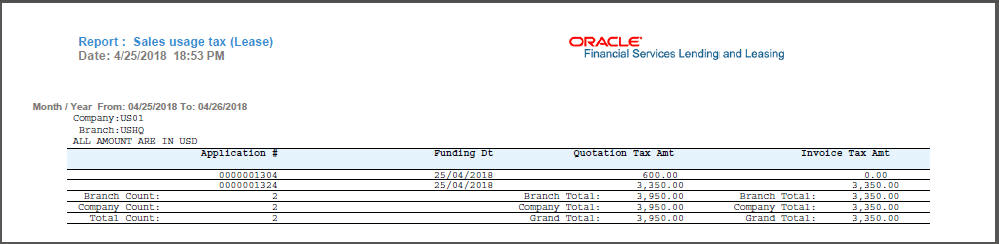
After the sales tax details are calculated, user can retrieve the information to view the sales tax amount recorded during calculation and actual tax collected after funding, by generating Sales usage tax (Lease) report. This report can be generated for all applications with Sales Tax Mode and Tax Method UPFRONT/ PURCHASE_PRICE.
In the report, the tax recorded before funding is referred as Quotation Tax Amt and actual tax recorded for the application is referred as Invoice Tax Amt. Since this is a system generated report, any difference in these amount are to be manually updated into the account.
- On the Origination, click Origination. Under Origination, click Reports.
- In the Reports section, filter report with description SALES USAGE TAX - LEASE.
- In the Report Parameters section, select/specify the required parameters and click Run Report.
Figure E-6 Reports - Origination - Sales Tax
Parent topic: Sales Tax Calculation at Origination