E.2.1.4 Range
This topic provides information on the range.
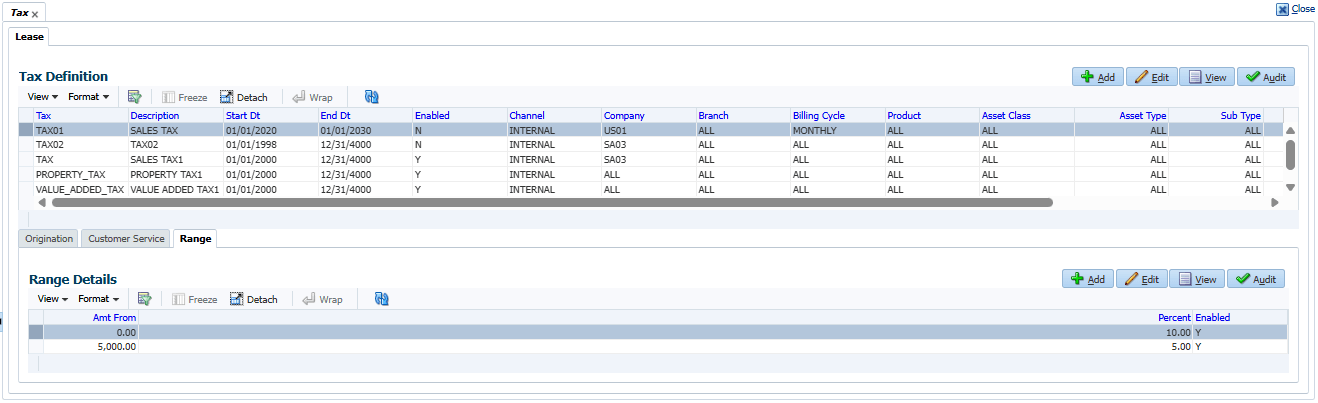
The Range tab of Tax screen facilitates to define range (gradual increase in tax rate) for tax calculation based on different charges levied for Product/Service.
For example if the cost of the vehicle is less than or equal to $20,000 then Sales and Usage Tax slab is 20% and if the cost is greater than $20,000 then slab is 30%. To facilitate this, below configuration should be maintained in the system.
Table E-8 Origination
| Calculation Method | Itemization | Sign | Value | Enabled |
|---|---|---|---|---|
| PERCENTAGE OF ITEMIZATION AMOUNT | ITM CASH SALES | + | 100 | Y |
Table E-9 Range
| Amount From | Percentage | Enabled |
|---|---|---|
| 20000 | 20 | Y |
| 20001 | 30 | Y |
To define Range for tax calculation
- On the Setup, click Administration. Under Administration, click System.
- Under System, click
Tax. Under Tax, click
Lease. Under Lease, click
Range.
The Range screen displays.
- In the Range Details section, click
Add. User can also perform any of the Basic Operations mentioned in Preface.
A brief description of the fields are given below:
Table E-10 Range Details
Field Description Amt From Specify the minimum amount from which tax has to be determined. Percent Specify the percentage of tax to be calculated based on amount. Enabled Check this box to enable the range. - Perform any of the Basic Actions mentioned in Preface.
Parent topic: Sales Tax Setup