E.2.1.3 Customer Service
This topic provides information on the customer service.
- On the Setup, click Administration. Under Administration, click System.
- Under System, click
Tax. Under Tax, click
Lease. Under Lease, click
Customer
Service.
The Customer Service screen displays.
- In the Formula Details section, click
Add. User can also perform any of the Basic Operations mentioned in Navigation chapter. A brief description of the
fields are given below:
Table E-6 Formula Details
Field Description Calculation Method Select the lease tax calculation method as one of the following from the drop-down list. The list is populated based on SALES_TAX_INT_AMT_CD lookup code for Internal calculation method and SALES_TAX_EXT_AMT_CD lookup code for Vertex.- Flat Transaction Amount - fixed tax amount charged for configured transactions.
- Percentage of Transaction Amount - fixed tax percentage charged for configured transactions.
** Refer to the illustrated example for information on calculation methods.
Txn Code Select the transaction code from the drop-down list. The list is populated with the following values based on SALES_TAX_TXNS_CD lookup code.- Bill/Due date
- Late Charge
- Payoff Quote lease
Refer to example Illustration - Stream Tax Calculation below for information on how tax is calculated based on combination of calculation method and transaction code.
Sign Select +ve option (default) if the calculated tax amount is to be added to the lease account or -ve option if a tax rebate is given on the lease account.
Note: This field is displayed only for Internal tax calculation method.
Value Based on the calculation method selected, specify either amount or percentage of tax to be calculated.
Note: This field is displayed only for Internal tax calculation method.
Tax Exemption Check this box to indicate if the tax formula can be exempted from tax calculation for lease accounts having valid exemption details. Else, tax is assessed for lease account using this tax formula.
Note: This check box is displayed only for Internal tax calculation method.
Enabled Check this box to enable the tax formula. - Perform any of the Basic Actions mentioned in Preface.
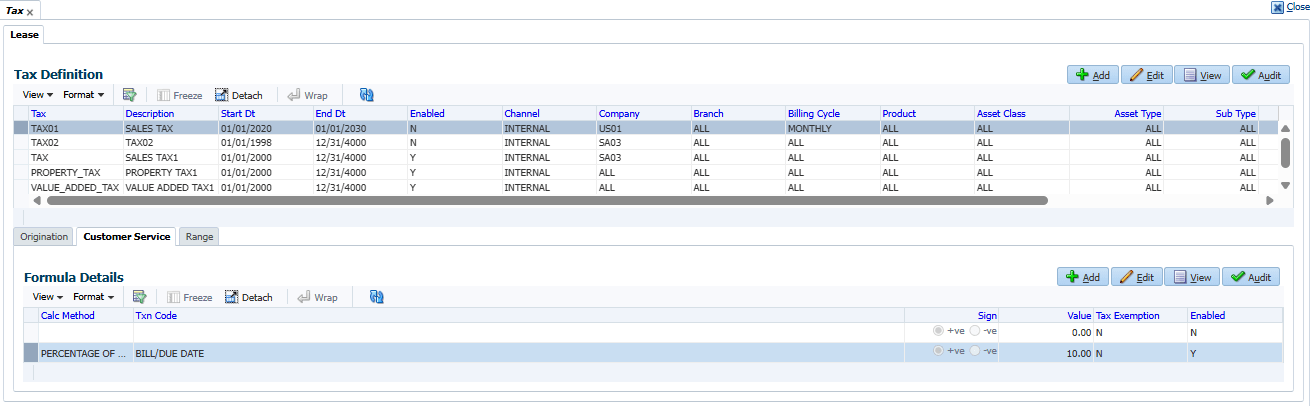
Illustration - Stream Tax Calculation
Table E-7 Stream tax calculation
| Txn Code | Calc Method | Tax % | Tax Amt | Txn Amt | Total Txn Amt |
|---|---|---|---|---|---|
| BILL/DUE DATE | Percentage of Transaction Amt | 5% | - | $558.17 | $586.08 |
| BILL/DUE DATE | Flat Transaction Amt | - | $100 | $558.17 | $658.17 |
| LATE CHARGE | Percentage of Transaction Amt | 5% | - | $20 | $21 |
| LATE CHARGE | Flat Transaction Amt | - | $5 | $20 | $25 |
Parent topic: Sales Tax Setup