8.19 Escrow Analysis Tab
This topic provides information on the Escrow Analysis section, which records and manages the annual review of escrow accounts.
If escrow is allowed for the selected instrument, the Escrow Analysis link is available on the Contract drop-down link. This screen enables user to view and perform the initial escrow analysis. When user are satisfied with the analysis, complete the Approval Dt field in the Approval section and save your entry.
The escrow payment for the Loan account starts on the 1st date of the Loan payment month. The disbursement happens on the 10th of the month (as per the disbursement rules). The escrow analysis lasts for a year (12 months) irrespective of the Loan term.
User can perform multiple analysis; however, the Escrow Analysis screen only records the last analysis performed. No record of any earlier analysis is currently available.
- On the Origination, click Origination. Under Origination, click Funding.
- Under Funding, click Funding tab.
Under Funding tab, click Escrow
Analysis.
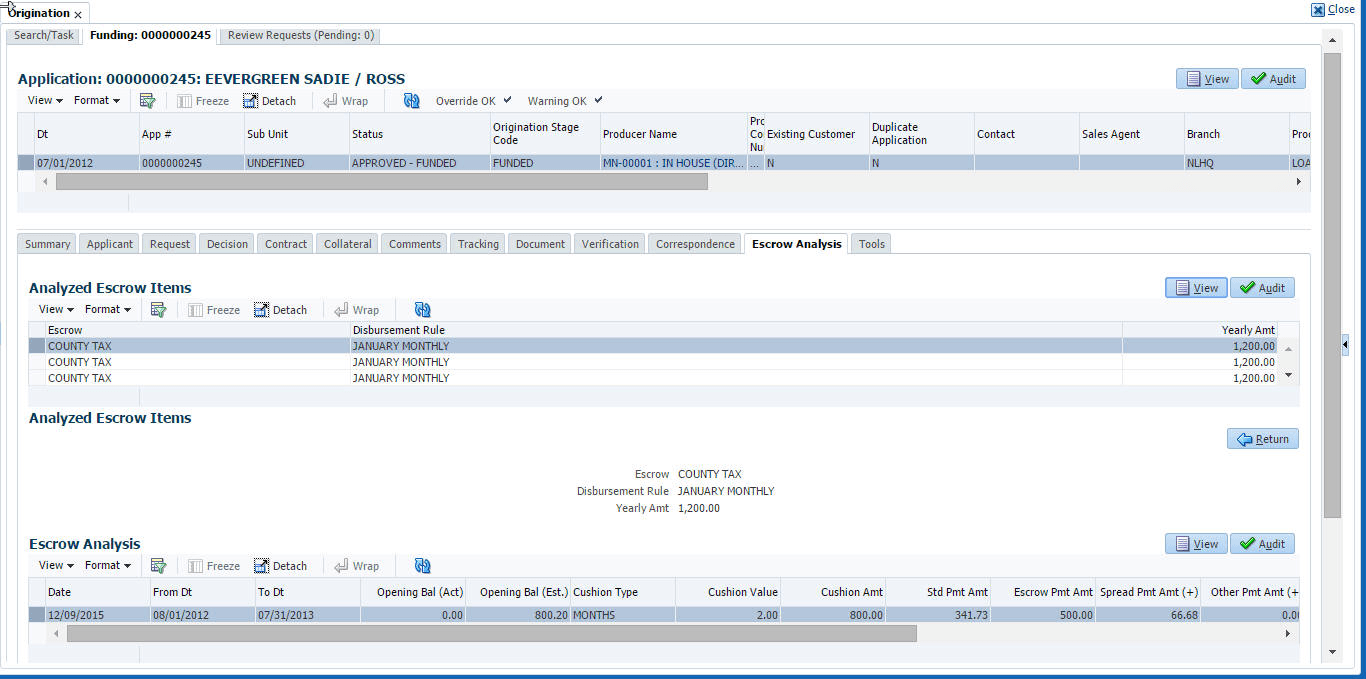
The Escrow Analysis screen displays.
- In the Escrow Analysis section, view or enter the following
information:
Table 8-26 Escrow Analysis section
Field Description Escrow Displays the escrow item. Disbursement Rule Displays the escrow disbursement rule. Yearly Amt Displays the escrow disbursement yearly amount. - Click Analyze.
- Information on the Analysis Details screen is based on expected cash flow from contract and escrow disbursement setup. Payments received appear before escrow disbursement in any given month. Click View in Escrow Analysis section.
- In the following section, enter, view, or edit the following information:
Table 8-27 Escrow Analysis
Field Description Parameters Displays the parameters section. Date Displays the date. From Dt Displays the FROM date for the escrow activity. To Dt Displays the To date for the escrow activity. Opening Bal (Act) Displays the opening balance actual amount. Opening Bal (Est) Displays the opening balance estimated amount. Calculation: cushion amount + low required balance
Cushion Type Displays the cushion type. Cushion Value Displays the cushion value. Cushion Amt Displays the cushion amount. Calculation: as per the shortage /cushion Rule maintenance
Results Displays the Results section. Std Pmt Amt Displays the standard payment amount. Escrow Pmt Amt (+) Displays the escrow payment amount. Calculation: Yearly Amount/12.
Spread Pmt Amt (+) Displays the spread payment amount. Calculation: Surplus amount / 12
Other Pmt Amt (+) Displays the other payment amount. New Pmt Amt = Displays the new payment amount. Calculation: standard payment amount + escrow payment amount + spread payment amount + other payment amount
Surplus Displays the surplus section. Surplus /<Shortage Amt> Displays the surplus shortage amount. Calculation: escrow account balance - opening balance
Refund Amt Displays the refund amount. - Click View in the Analysis Details section.
- On the Analysis Details sub screen, view the following information:
Table 8-28 Analysis Details
Field Description Txn Dt Displays the transaction date. Transaction Displays the escrow transaction. Vendor Displays the vendor name. Txn Amt Displays the amount of the transaction. Balance Amt (Est) Displays the estimated amount of balance. Balance Amt (Act) Displays the actual amount of balance. Information on the Analysis Details sub screen is based on expected cash flow from contract and escrow disbursement setup. Payments received appear before escrow disbursement in any given month.
- If user want to re-analyze the escrow analysis, change the escrow information on the
Contract link’s screen and sub screens.
If user want to approve the escrow analysis, complete the following information fields on the Approval section:
Table 8-29 Approval
Field Description Approval Displays the approval section. Approval Dt Displays the approval date. Approved By Displays the person who approved the Loan. - Click Save on the Funding screen.
Parent topic: Funding