16.2.2 Vendor Assignment Allocation
This topic describes the process of distributing and assigning vendors to tasks, accounts, or cases based on defined allocation rules within the system.
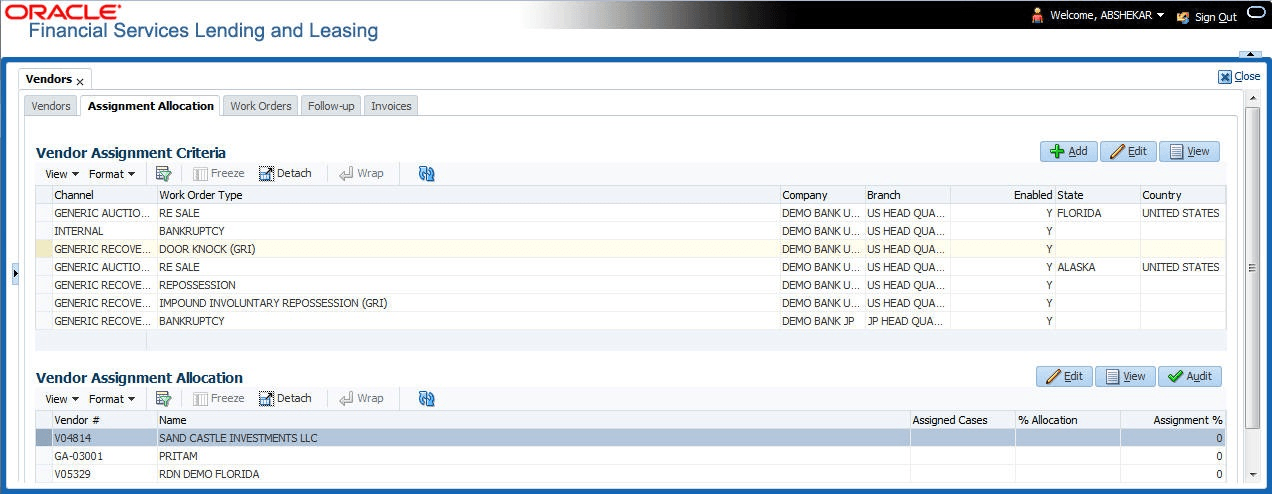
In the Vendor Assignment Allocation section, system fetches the list of vendors qualifying the combination of channel, work order, company and branch selected and allows user to define the weightage for each vendor in percentage.
By default, the allocated assignment percentage for each vendor is 0. During subsequent update, the total of assignment percentage allocation for all vendors should be equal to 100. A vendor with the highest weightage is selected by default during work order creation.
- On the Origination, click
Origination. Under Origination, click
Vendors. Under Vendors, click
Assignment
Allocation.
The Assignment Allocation screen displays.
- Perform any of the Basic Operations mentioned in Preface.
A brief description of the fields is given below:
Table 16-7 Vendor Assignment Allocation
Field Description Vendor # View the Vendor number. The same is either specified manually or system generated in the Vendors tab. Name View the name of the vendor. Assigned Cases View the total number of cases assigned to the vendor. % Allocation View the percentage of total cases assigned to the vendor. Assignment % Specify the percentage allocation value (out of 100) for each vendor. However, ensure that the total of all assignment % is equal to 100. - Perform any of the Basic Actions mentioned in Preface.
Parent topic: Assignment Allocation