16.2.1 Vendor Assignment Criteria
This topic describes the parameters and conditions used to select and assign vendors to specific tasks, accounts, or processes within the system.
- On the Origination, click Origination. Under Origination, click
Vendors. Under Vendors, click
Assignment
Allocation.
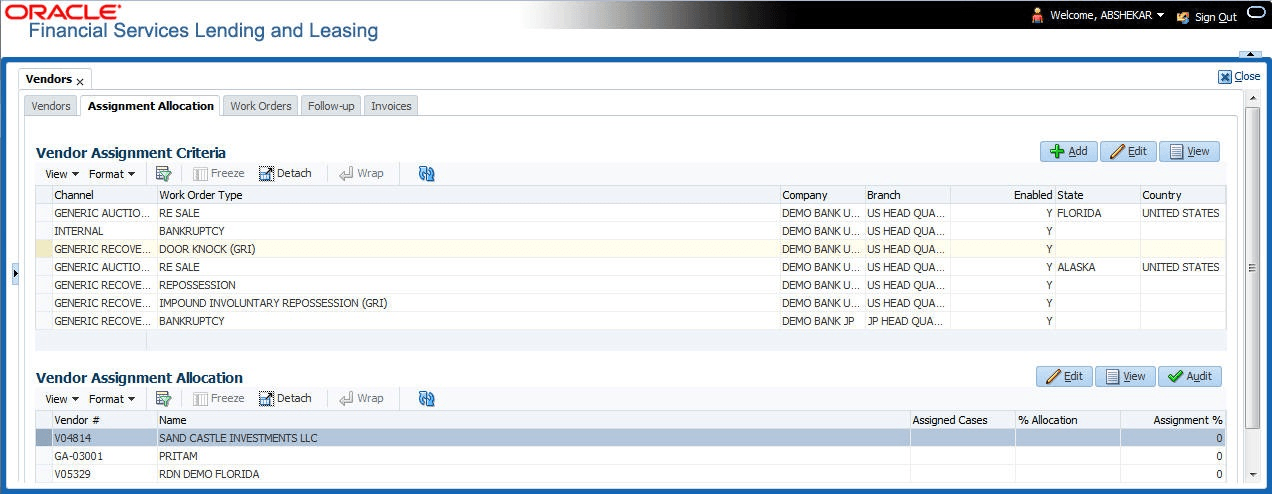
The Assignment Allocation screen displays.
- Perform any of the Basic Operations mentioned in Preface.
A brief description of the fields is given below:
Table 16-6 Vendor Assignment Criteria
Field Description Channel Select the OFSLL interfaced channel from the drop-down list.
If the channel is selected as GENERIC RECOVERY INTERFACE, the work order is processed through an external system. For more information, refer to Appendix chapter - Generic Recovery Interface (GRI).
Work Order Type Select the work order type from the drop-down list. Repo Storage Country This field is available only if the channel is selected as GENERIC AUCTION INTERFACE. Select the Country where the repossessed asset is currently stored from the drop-down list. Repo Storage State This field is available only if the channel is selected as GENERIC AUCTION INTERFACE. Select the State where the repossessed asset is currently stored from the drop-down list. Company Select the Company from the drop-down list. Branch Select the company’s Branch from the drop-down list. Enabled Check this box to enable the vendor assignment criteria. - Perform any of the Basic Actions mentioned in Preface.
Parent topic: Assignment Allocation